Localization
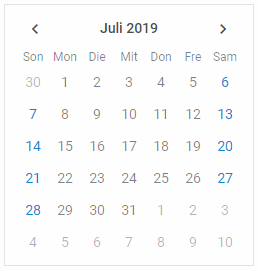
You can apply different languages to the Calendar interface. Translate the strings for Calendar labels and apply the locale to the component.
Default locale
The default locale for Calendar looks like this:
const en = {
    // short names of months
    monthsShort: ["Jan", "Feb", "Mar", "Apr", "May", "Jun",
                 "Jul", "Aug", "Sep", "Oct", "Nov", "Dec"],
    // full names of months
    months: ["January", "February", "March", "April", "May", "June",
            "July", "August", "September", "October", "November", "December"],
    // short names of days
    daysShort: ["Sun", "Mon", "Tue", "Wed", "Thu", "Fri", "Sat"],
    // full names of days
    days: ["Sunday", "Monday", "Tuesday", "Wednesday", "Thursday",
                "Friday", "Saturday"]
};
Custom locale
To use a different locale, you need to do the following:
- Define necessary language settings: provide full and short names of months, as well as full and short names of days of the week:
const de = {
    // short names of months
    monthsShort: ["Jan", "Feb", "Mär", "Apr", "Mai", "Jun",
                 "Jul", "Aug", "Sep", "Okt", "Nov", "Dez"],
    // full names of months
    months: ["Januar", "Februar", "März", "April", "Mai", "Juni",
            "Juli", "August", "September", "Oktober", "November", "Dezember"],
    // short names of days
    daysShort: ["Son", "Mon", "Die", "Mit", "Don", "Fre", "Sam"],
    // full names of days
    days: ["Sonntag", "Montag", "Dienstag", "Mittwoch", "Donnerstag",
                "Freitag", "Samstag"]
};
- Apply the language settings by calling the
dhx.i18n.setLocale()method before Calendar initialization:
dhx.i18n.setLocale("calendar", de);
const calendar = new dhx.Calendar("calendar_container");
Related sample: Calendar. Localization