buttons_right
Description
라이트박스의 오른쪽 아래 모서리에 위치한 버튼들의 모음을 저장합니다
buttons_right: string[]
Example
<style>
    .complete_button{
        margin-top: 2px;
        background-image:url("common/v_complete.png");
        width: 20px;
    }
</style>
<script>
    gantt.locale.labels["complete_button"] = "Complete";
    gantt.attachEvent("onGanttReady", function(){                               /*!*/
        gantt.config.buttons_right = ["gantt_delete_btn","complete_button"];   /*!*/
    });                                                                           /*!*/
    gantt.init("gantt_here");

    gantt.attachEvent("onLightboxButton", function(button_id, node, e){
        if(button_id == "complete_button"){
            var id = gantt.getState().lightbox;
            gantt.getTask(id).progress = 1;
            gantt.updateTask(id);
            gantt.hideLightbox();
        }
    });
</script>
Default value: ["gantt_delete_btn"]
Related samples
Details
노트
다음에 유의하십시오: Material skin을 사용할 경우 버튼 구성이 재정의될 수 있습니다. 이를 방지하려면 onGanttReady 이벤트 핸들러 내에서 버튼 구성을 지정해야 합니다.
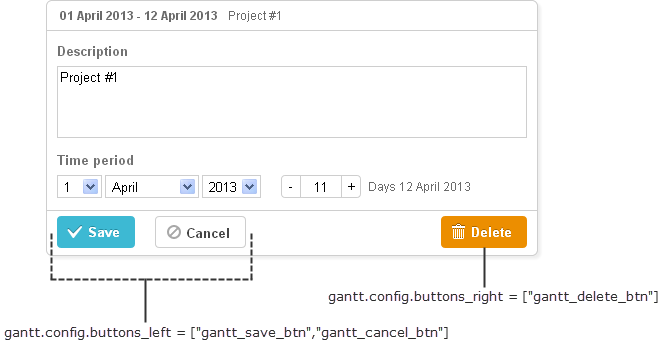
You can redefine labels of the right button by using the following syntax before initialization of Gantt:
gantt.locale.labels.icon_delete= "New Label";

gantt.init("gantt_here");
You can also change the label using another syntax after initialization of Gantt, as follows:
gantt.attachEvent("onGanttReady", function(){
  gantt.locale.labels.gantt_delete_btn = "New Label";
});
From version 7.0, the labels also can be changed by using the i18n object:
gantt.i18n.setLocale({
   labels: {
      gantt_delete_btn: "New Label"
   }
});
Related API
Related Guides
Need help?
Got a question about the documentation? Reach out to our technical support team for help and guidance. For custom component solutions, visit the Services page.