buttons_right
Description
Speichert eine Sammlung von Buttons, die sich in der rechten unteren Ecke des Lightbox-Fensters befinden
buttons_right: string[]
Example
<style>
    .complete_button{
        margin-top: 2px;
        background-image:url("common/v_complete.png");
        width: 20px;
    }
</style>
<script>
    gantt.locale.labels["complete_button"] = "Complete";
    gantt.attachEvent("onGanttReady", function(){                               /*!*/
        gantt.config.buttons_right = ["gantt_delete_btn","complete_button"];   /*!*/
    });                                                                           /*!*/
    gantt.init("gantt_here");

    gantt.attachEvent("onLightboxButton", function(button_id, node, e){
        if(button_id == "complete_button"){
            var id = gantt.getState().lightbox;
            gantt.getTask(id).progress = 1;
            gantt.updateTask(id);
            gantt.hideLightbox();
        }
    });
</script>
Default value: ["gantt_delete_btn"]
Related samples
Details
Hinweis
Bitte beachten Sie, dass bei Verwendung des Material skin die Buttons-Konfiguration neu definiert wird. Um dies zu verhindern, müssen Sie die Konfiguration der Buttons im Ereignishandler onGanttReady festlegen.
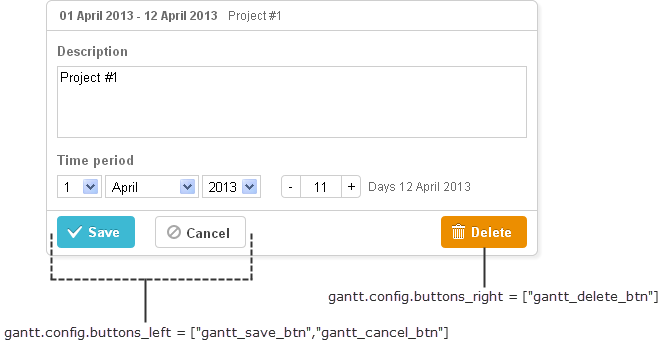
You can redefine labels of the right button by using the following syntax before initialization of Gantt:
gantt.locale.labels.icon_delete= "New Label";

gantt.init("gantt_here");
Sie können auch den Bezeichner nach der Initialisierung von Gantt mit einer anderen Syntax ändern, wie folgt:
gantt.attachEvent("onGanttReady", function(){
  gantt.locale.labels.gantt_delete_btn = "New Label";
});
From version 7.0, the labels also can be changed by using the i18n object:
gantt.i18n.setLocale({
   labels: {
      gantt_delete_btn: "New Label"
   }
});
Related API
Related Guides
Need help?
Got a question about the documentation? Reach out to our technical support team for help and guidance. For custom component solutions, visit the Services page.