Milestones
信息
此功能仅在 PRO 版本中可用
里程碑是持续时间为零的任务,用于标记项目中的重要日期、关键事件或目标。例如,可以用来突出显示评审会议日期或项目阶段的预期完成日期。
从编程角度来看,里程碑是预定义任务类型之一。但它的行为与常规任务一致,会触发相同的事件和模板。
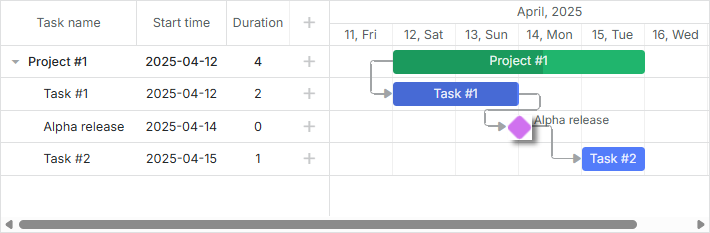
要启用在图表中添加里程碑,通常请按照以下步骤操作:
- 在 lightbox 中添加一个额外的部分 - Typeselect 컨트롤 - 以便用户可以更改任务类型并选择里程碑。
gantt.config.lightbox.sections = [
    {name: "description", height: 70, map_to: "text", type: "textarea"},
    {name: "type", type: "typeselect", map_to: "type"},
    {name: "time", height: 72, type: "duration", map_to: "auto"}
];
- 定义 rightside_text 或 leftside_text 模板,为里程碑设置文本标签。请注意,使用 task_text 模板设置的标签不会显示,因为里程碑的持续时间为零。
gantt.templates.rightside_text = function(start, end, task){
    if(task.type == gantt.config.types.milestone){
        return task.text;
    }
    return "";
};
- 启用 order_branch 属性以便用户操作更方便。此选项允许在父分支内拖动任务,用户可以在任意位置创建里程碑,然后再移动到正确位置。
gantt.config.order_branch = true;
完成这些步骤后,Gantt 图表即可完全支持里程碑的使用。
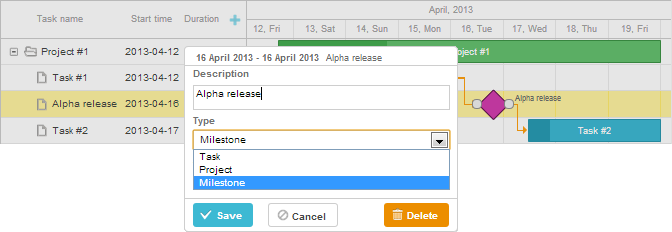
在数据集中指定里程碑
在初始数据中指定里程碑时,需要将项目的 type 属性设置为 'milestone'(具体值存储在 types 对象中):
var data = {
    tasks:[
        {id:1, text:"Project #1",    type:gantt.config.types.project,    open:true},
        {id:2, text:"Task #1",       start_date:"12-04-2020", duration:3, parent:1},
        {id:3, text:"Alpha release", type:gantt.config.types.milestone,   parent:1, /*!*/
            start_date:"14-04-2020"}],                                              /*!*/
    links:[]
};
汇总任务和里程碑
从 v7.1 开始,任务和里程碑可以显示在其父项目上。为此,只需将数据项的 rollup 属性设置为 true:
var data = {
    tasks:[
        {id:11, text:"Project #1", type:"project", progress: 0.6, open: true},
        {id:12, text:"Task #1", start_date:"03-04-2018", duration:"3",
            parent:"11", progress: 1, open: true},
        {id:13, text:"Task #2", start_date:"03-04-2018", type:"project",
            parent:"11", progress: 0.5, open: true},
        {id:16, text:"Final milestone", start_date:"08-04-2018", type:"milestone",  /*!*/
            rollup: true, parent:"11", progress: 0, open: true},  /*!*/
        {id:17, text:"Task #2.1", start_date:"03-04-2018", duration:"2",
            parent:"13", progress: 1, open: true},
        {id:18, text:"Task #2.2", start_date:"06-04-2018", duration:"1",
            parent:"13", progress: 0.8, open: true}],
    links:[]
};
效果如下:

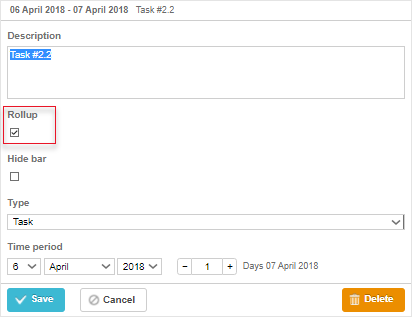
你也可以在 lightbox 中通过 Rollup 复选框切换汇总功能:
gantt.config.lightbox.milestone_sections = [
    {name: "description", height: 70, map_to: "text", type: "textarea", focus: true},
    {name: "rollup", type: "checkbox", map_to: "rollup"},/*!*/
    {name: "hide_bar", type: "checkbox", map_to: "hide_bar"},
    {name: "type", type: "typeselect", map_to: "type"},
    {name: "time", type: "duration", map_to: "auto"}
];
隐藏任务和里程碑
自 v7.1 起,可以通过在数据项中设置 hide_bar: true 属性来在时间线上隐藏任务条和里程碑:
var data = {
    tasks:[
        {id:11, text:"Project #1", type:"project", progress: 0.6, open: true},
        {id:12, text:"Task #1", start_date:"03-04-2018", duration:"3",
            parent:"11", progress: 1},
        {id:13, text:"Task #2", start_date:"03-04-2018", type:"project",
            parent:"11", progress: 0.5, open: true},
        {id:16, text:"Final milestone", start_date:"08-04-2018", type:"milestone",  /*!*/
            rollup: true, hide_bar: true, parent:"11", progress: 0},  /*!*/
        {id:17, text:"Task #2.1", start_date:"03-04-2018", duration:"2",
            parent:"13", progress: 1},
        {id:18, text:"Task #2.2", start_date:"06-04-2018", duration:"1",
            parent:"13", progress: 0.8}],
    links:[]
};
效果如下:
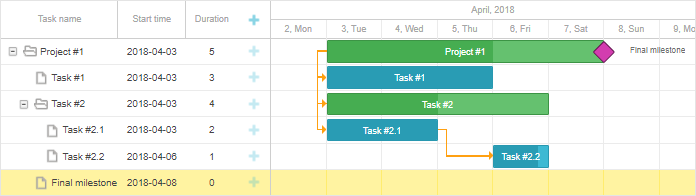
请注意,如果同时设置 hide_bar:true 和 rollup:true,该项将在时间线上隐藏,但仍会显示在父项目上。
注释
若要在父项目上隐藏所有汇总项,请在项目对象中设置 rollup:false(自 v8.0 起可用):
{ id:11, text:"Project #1", type:"project", rollup:false, open: true }
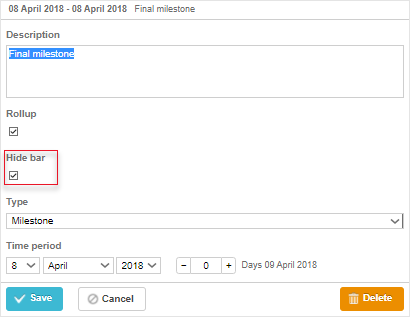
你也可以在 lightbox 中通过切换 Hide bar 复选框来在时间线上隐藏任务或里程碑:
gantt.config.lightbox.sections = [
    {name: "description", height: 70, map_to: "text", type: "textarea", focus: true},
    {name: "rollup", type: "checkbox", map_to: "rollup"},
    {name: "hide_bar", type: "checkbox", map_to: "hide_bar"},  /*!*/
    {name: "type", type: "typeselect", map_to: "type"},
    {name: "time", type: "duration", map_to: "auto"}
];

gantt.config.lightbox.milestone_sections = [
    {name: "description", height: 70, map_to: "text", type: "textarea", focus: true},
    {name: "rollup", type: "checkbox", map_to: "rollup"},
    {name: "hide_bar", type: "checkbox", map_to: "hide_bar"},  /*!*/
    {name: "type", type: "typeselect", map_to: "type"},
    {name: "time", type: "duration", map_to: "auto"}
];

gantt.config.lightbox.project_sections = [
    {name: "description", height: 70, map_to: "text", type: "textarea", focus: true},
    {name: "hide_bar", type: "checkbox", map_to: "hide_bar"},  /*!*/
    {name: "type", type: "typeselect", map_to: "type"},
    {name: "time", type: "duration", map_to: "auto"}
];
API 概览
有一个事件可以控制汇总任务在父项目上的可见性:
// 在汇总任务显示到父项目之前触发
gantt.attachEvent("onBeforeRollupTaskDisplay", function(taskId, task, parentId){
    // 可在此处添加自定义逻辑
    return false;
});
独立汇总项的样式设置
从 v8.0 起,汇总项包含 task.$rendered_at 属性,该属性保存了汇总项渲染所在行的 id。你可以通过 task_class 模板,根据显示行来为特定汇总项设置样式:
gantt.templates.task_class = function(start, end, task) {
    if(task.$rendered_at) {
        if(gantt.calculateTaskLevel(gantt.getTask(task.$rendered_at)) === 1) {
            return "phase-level-rollup";
        }
    }
    return "";
};
pro
Need help?
Got a question about the documentation? Reach out to our technical support team for help and guidance. For custom component solutions, visit the Services page.