任务类型
此功能仅在 PRO 版本中可用。
在甘特图中可以显示三种预定义的任务类型(你也可以添加自定义类型)you can also add a custom type:
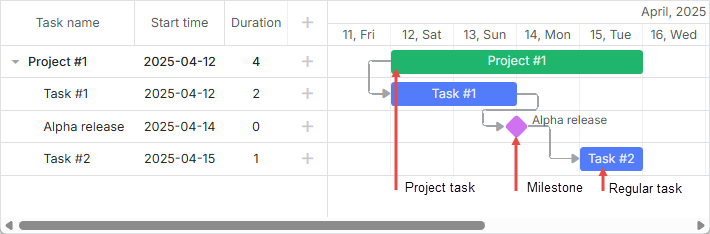
要设置任务的类型,请使用数据项的 type 属性(值存储在 types 对象中):
const data = {
    tasks: [
        { id: 1, text: "Project #1", type: "project", open: true },
        { id: 2, text: "Task #1", start_date: "12-04-2025", duration: 3, parent: 1 },
        { id: 3, text: "Alpha release", start_date: "16-04-2025", type: "milestone", parent: 1 },
        { id: 4, text: "Task #2", start_date: "17-04-2025", duration: 3, parent: 1 },
    ],
    links: [
        { id: 1, source: "1", target: "2", type: "1" },
        { id: 2, source: "2", target: "3", type: "0" },
        { id: 3, source: "3", target: "4", type: "0" },
    ],
};
相关示例: Projects and milestones
常规任务
默认情况下,dhtmlxGantt 提供创建常规任务(type="task" 的任务)。
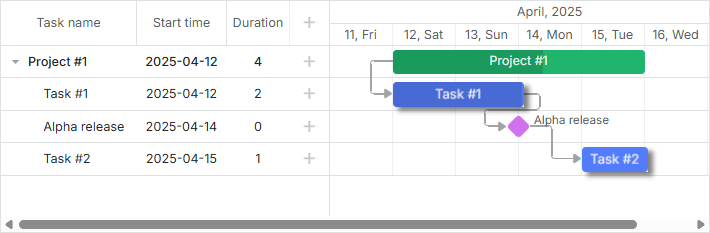
const data = {
    tasks: [
        { id: 2, text: "Task #1", start_date: "12-04-2025", duration: 3, parent: 1 },
    ],
    links: [],
};
//或
const data = {
    tasks: [
        { id: 2, text: "Task #1", start_date: "12-04-2025", duration: 3, parent: 1, type: "task" },
    ],
    links: [],
};
相关示例: Projects and milestones
具有 type="task" 的任务可具备如下特征:
- 可以有一个父任务和任意数量的子任务。
- 可以被拖拽和调整大小。
- 不依赖子任务,即如果用户拖动普通任务的某个子任务,该任务的持续时间或进度不会相应改变。
- 可以出现在父级项目中。详见 详细信息。
- 可以在时间线中隐藏。详见 详细信息。
项目任务
项目任务是在其最早子任务开始时开始、在其最后一个子任务结束时结束的任务。
项目任务与常规任务的区别在于,项目任务的持续时间取决于其子任务,并会相应地改变。
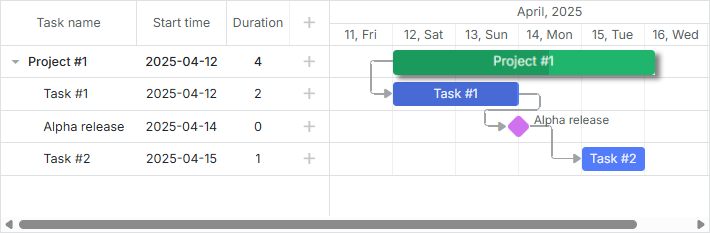
const data = {
    tasks: [
        { id: 1, text: "Project #1", type: "project", open: true },
        { id: 2, text: "Task #1", start_date: "12-04-2025", duration: 3, parent: 1 },
        { id: 3, text: "Alpha release", start_date: "16-04-2025", type: "milestone", parent: 1 },
        { id: 4, text: "Task #2", start_date: "17-04-2025", duration: 3, parent: 1 },
    ],
    links: [],
};
相关示例: Projects and milestones
具有 type="project" 的任务可具备如下特征:
- 可以有 1 个父任务和任意数量的子任务。
- 除非通过 drag_project 配置显式启用拖放,否则不能被拖拽和调整大小。
- 依赖子任务,即如果用户拖动一个项目任务的子任务,任务的持续时间会改变。
- 忽略 start_date、end_date、duration 属性。
- 如果没有子任务,则不能被拖拽。
- 项目的 progress 默认显式指定,与子任务无关。若你希望自动计算,需要自行编写代码实现。 查看示例。
如需提供添加项目任务的可能性,请参阅文章 Milestone。添加里程碑的可能性确保最终用户也可以添加项目任务。
Milestones
Milestone 是一个零持续时间的任务,用来标记项目的重要日期(更多详情请参阅](guides/milestones.md)。
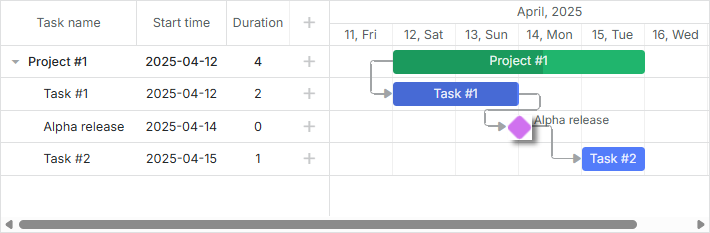
const data = {
    tasks: [
        { id: 3, text: "Alpha release", start_date: "16-04-2025", type: "milestone", parent: 1 },
    ],
    links: [],
};
相关示例: Projects and milestones
具有 type="milestone" 的任务可具备如下特征:
- 可以有 1 个父任务和任意数量的子任务。
- 不能被拖拽和调整大小。
- 持续时间为零,并始终保持为零。
- 忽略 end_date、duration、progress 属性。
- 可以出现在父级项目中。详见 details。
- 可以在时间线中隐藏。详见 details。
为了提供添加里程碑的可能性,请阅读文章 Milestone。
每种任务类型的专用灯箱
每种任务类型都有自己的一组特性。因此,可以为每种类型定义独立的详情表单(灯箱)的配置。 所有配置都存储在 lightbox 对象中。
它们是:
- gantt.config.lightbox.sections - 适用于常规任务。
- gantt.config.lightbox.project_sections - 适用于项目任务。
- gantt.config.lightbox.milestone_sections - 适用于里程碑。
默认配置如下:
gantt.config.lightbox.sections = [
    { name: "description", type: "textarea", map_to: "text", height: 70, focus: true },
    { name: "time", type: "duration", map_to: "auto" }
];

gantt.config.lightbox.project_sections = [
    { name: "description", type: "textarea", map_to: "text", height: 70, focus: true },
    { name: "type", type: "typeselect", map_to: "type" },
    { name: "time", type: "duration", map_to: "auto", readonly: true }
];

gantt.config.lightbox.milestone_sections = [
    { name: "description", type: "textarea", map_to: "text", height: 70, focus: true },
    { name: "type", type: "typeselect", map_to: "type" },
    { name: "time", type: "duration", map_to: "auto", single_date: true }
];
当用户在相关下拉框中更改任务类型时,相应的配置将应用于灯箱弹出窗口,并会动态更新。
您可以 add a custom type 并为其指定适当的灯箱结构。
要了解灯箱配置的详细信息,您可以阅读 Configuring Edit Form 章节。
创建自定义类型
所有任务的类型都在 types 对象中定义。
通常,要添加自定义任务类型,您需要:
- 在 types 对象中添加一个新的值。
- 为新类型定义单独的设置。
设想,您想新增一个任务类型 - meeting。 Meeting 将是一个普通任务,但会以不同的颜色显示并在灯箱中有不同的输入。
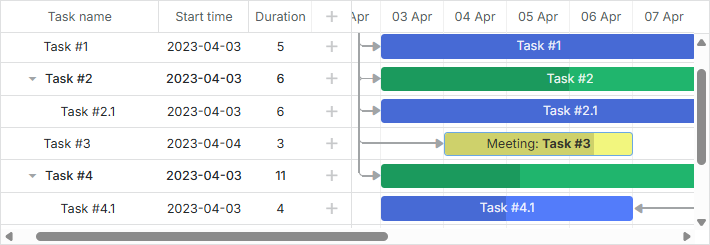
若要定义名称为 meeting 的新类型并为其指定独立的灯箱结构,请使用以下方式:
在 types 对象中添加一个新类型:
gantt.config.types.meeting = "type_id";
其中 "meeting" 是类型的程序化名称。它不影响任何内容。程序化类型名称的唯一用途是让处理类型的代码更具可读性。 "type_id" 是将存储在数据库中的类型标识符。该标识符在 types 对象内必须是唯一的。
在“typeselect”控件中为新类型设置标签:
gantt.locale.labels.type_meeting = "会议";
为新创建的类型指定灯箱的新结构:
gantt.config.lightbox.meeting_sections = [
    { name: "title", type: "textarea", map_to: "text", height: 20, focus: true },
    { name: "details", type: "textarea", map_to: "details", height: 70 },
    { name: "type", type: "typeselect", map_to: "type" },
    { name: "time", type: "time", map_to: "auto", height: 72 }
];

gantt.locale.labels.section_title = "主题";
gantt.locale.labels.section_details = "详情";
为新类型指定样式并通过 task_class 模板应用:
.meeting_task{
    border:2px solid #BFC518;
    color:#6ba8e3;
    background: #F2F67E;
}

.meeting_task .gantt_task_progress{
    background:#D9DF29;
}
gantt.templates.task_class = (start, end, task) => {
    return task.type === gantt.config.types.meeting
        ? "meeting_task"
        : "";
};
使用 task_text 模板设置 "meeting" 任务的文本模板:
gantt.templates.task_text = (start, end, task) =>
    task.type === gantt.config.types.meeting
        ? `会议: <b>${task.text}</b>`
        : task.text;
相关示例: Custom task type
自定义任务类型的显示效果
要自定义现有任务类型的外观,请使用 type_renderers 选项。该选项允许你重新定义在页面上显示不同任务类型时所调用的函数。
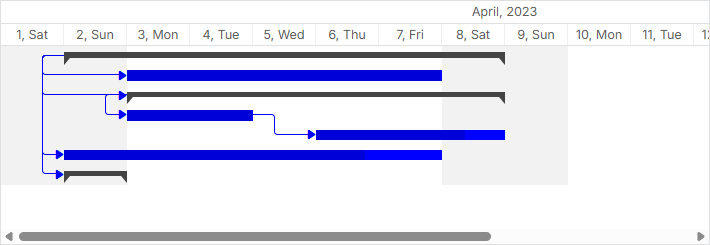
gantt.config.type_renderers["project"] = (task, defaultRender) => {
    const taskBar = document.createElement("div");
    taskBar.setAttribute(gantt.config.task_attribute, task.id);
    taskBar.className = "custom-project";

    const taskSize = gantt.getTaskPosition(task);
    taskBar.innerHTML = [
        "<div className='project-left'></div>",
        "<div className='project-right'></div>"
    ].join('');

    taskBar.style.left = `${taskSize.left}px`;
    taskBar.style.top = `${taskSize.top + 7}px`;
    taskBar.style.width = `${taskSize.width}px`;

    return taskBar;
};
相关示例: Classic Look