手动安排的摘要任务
可以手动为 projects(摘要任务)进行排程。
此功能旨在提高使用甘特图管理项目的灵活性与准确性。
默认情况下,摘要任务会基于其子任务中的最早开始日期和最晚结束日期自动计算日期。
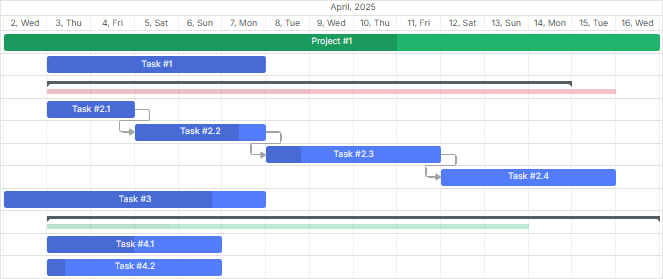
您也可以为摘要任务设置固定的开始和结束日期,与子任务互不影响。因此,甘特图将同时显示固定持续时间和从子任务派生的持续时间。
要为摘要任务激活此功能,请将 auto_scheduling 属性设置为 false。
固定日期存储在 task.start_date 和
task.end_date,而从子任务计算得到的日期则在 task.$auto_start_date 和 task.$auto_end_date 中可用。
gantt.parse({
  data: [
    {
      id: 1,
      text: "Project Phase 1",
      type: "project",
      start_date: "2025-05-01 00:00:00",
      duration: 15,
      auto_scheduling: false /* ! */
    },
    // ...
  ],
});
摘要任务的固定持续时间与其子任务计算出的实际持续时间都会在甘特图中显示。
如果子任务的日期范围超出摘要任务分配的日期,将对摘要任务进行高亮显示以指示排程冲突。这个视觉提示有助于最终用户快速识别并解决项目时间线中的差异。
Need help?
Got a question about the documentation? Reach out to our technical support team for help and guidance. For custom component solutions, visit the Services page.