关键路径
此功能仅在 PRO 版中可用
关键路径是一系列不能被推迟的任务。否则,整个项目将被推迟。
关键路径也决定了项目可以花费的最短时间。
如果一个任务没有缓冲时间(slack),并且任何延迟都会直接影响项目完成日期,则该任务被视为关键任务。关于关键路径计算逻辑的详细解释,请参阅 Critical path logic 部分。
缓冲时间是一个任务在不影响其他任务或项目完成日期的情况下可以延迟的时间。
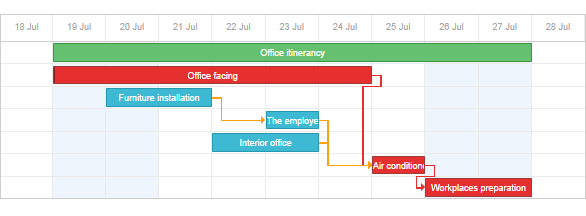
要开始使用此扩展,请通过 gantt.plugins 方法启用它。
要在甘特图中显示关键路径,请将 highlight_critical_path 属性设置为 'true':
(使甘特图显示关键路径)
<!DOCTYPE html>
<html>
<head>
   <script src="codebase/dhtmlxgantt.js"></script>
   <link href="codebase/dhtmlxgantt.css" rel="stylesheet">
</head>
<body>
    gantt.plugins({ /*!*/
        critical_path: true /*!*/
    }); /*!*/
    gantt.config.highlight_critical_path = true;
    //your code will be here
</body>
</html>
请注意,当该属性启用时,dhtmlxGantt 将自动检查任务状态并更新关键路径。 关键任务和链接将分别具有额外的 'critical_task' 和 'critical_link' CSS 类。
每当某个任务被修改,dhtmlxGantt 将完全重新绘制数据以重新计算关键路径。 有时这会带来性能问题。针对这种情况,组件提供了公共方法,允许您检查 某个特定任务或链接,并实现一个对性能更友好的显示关键路径的策略。
关键路径逻辑
Gantt 在以下情况下将任务视为关键任务:
- 该任务在整个图表中具有最新的结束日期。
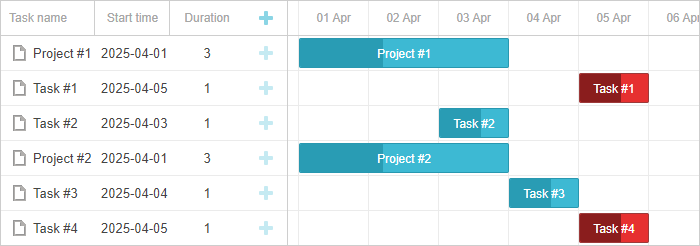
- 该任务连接到一个关键任务,且它们之间的滞后为 0。
滞后取决于 gantt.config.duration_unit 参数的值。当 duration_unit 被设置为 'day' 且任务之间的时长为数小时时,Gantt 按以下规则对时长进行四舍五入:
- 如果时长大于或等于 12 小时,则向下取整
- 如果时长少于 12 小时,则向上取整
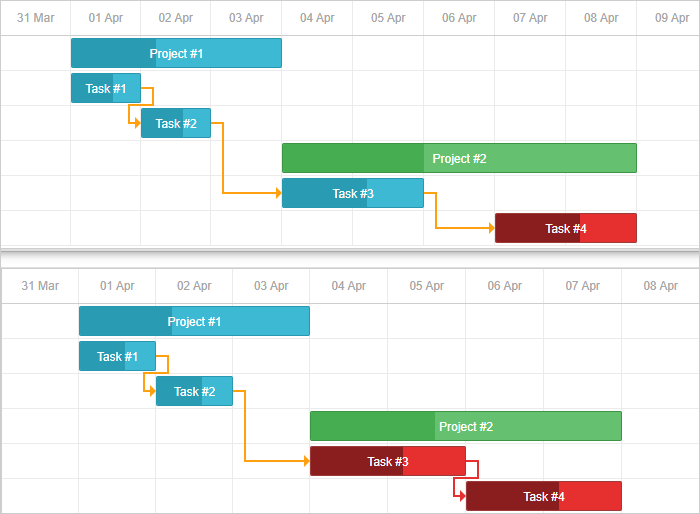
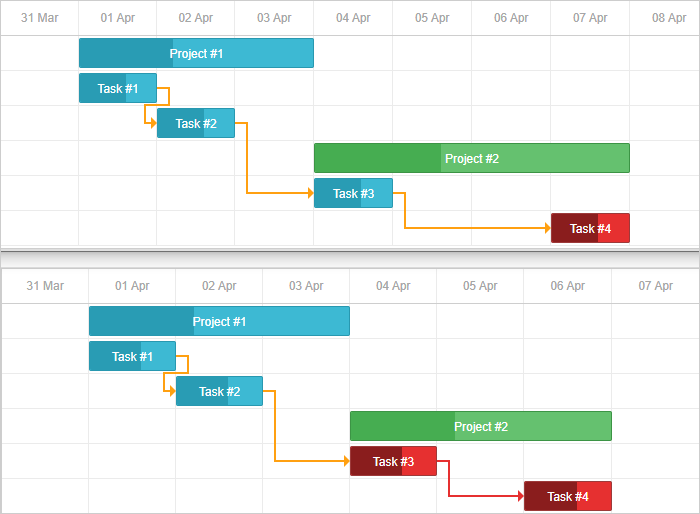
如果链接对象包含 lag 参数,则它允许改变任务之间的时长。例如,当 lag 设置为 1 时,任务在任务之间时长为 1 时变为关键路径。
下面是不同 link.lag 值的一些示例:
- link.lag 为 0
const tasks = {
    "data": [
        ...
    ],
    "links": [
        ...
        { "id": 3, "source": 3, "target": 4, "lag": 0, "type": "0" },

    ]
}
- link.lag 为 1
const tasks = {
    "data": [
        ...
    ],
    "links": [
        ...
        { "id": 3, "source": 3, "target": 4, "lag": 1, "type": "0" },

    ]
}
- link.lag 为 -1
const tasks = {
    "data": [
        ...
    ],
    "links": [
        ...
        { "id": 3, "source": 3, "target": 4, "lag": -1, "type": "0" },

    ]
}
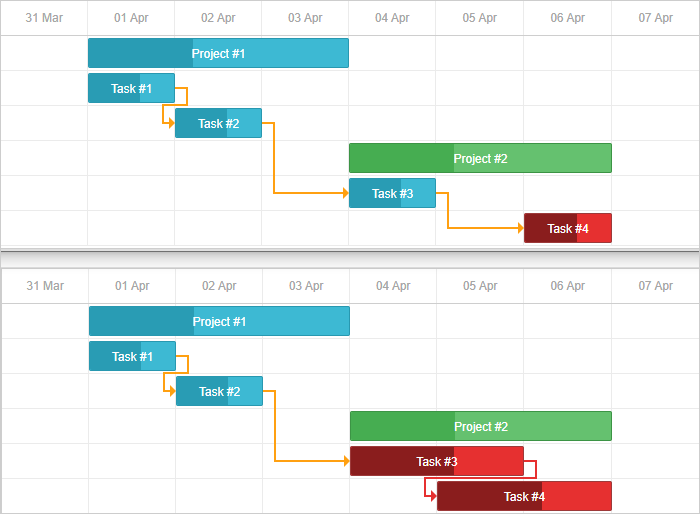
- 指定了 gantt.config.project_end 参数且任务日期大于 gantt.config.project_end 日期。
不幸的是,无法更改定义关键路径的内置逻辑。 但你可以 customize the critical path behaviour。
检查某个任务是否为关键任务
要检查某个任务是否为关键任务,请使用 isCriticalTask 方法:
gantt.config.highlight_critical_path = true; /*!*/
gantt.init("gantt_here");
gantt.parse(tasks);

gantt.isCriticalTask(gantt.getTask("task3"));// ->'true' /*!*/
检查某个链接是否为关键链接
要检查某个链接是否为关键链接(连接了两个关键任务),请使用 isCriticalLink 方法:
gantt.isCriticalLink(gantt.getLink("link1"));
获取自由余量和总余量
自由余量 - 可用于增加任务时长或在时间轴上移动任务而不影响其下一个相连任务的时间的时间段。
自由余量可以用于 'task' 和 'milestone' 类型的任务。
要获取任务的自由余量,请使用 getFreeSlack 方法。它接收一个任务对象作为参数:
var task = gantt.getTask(7);
gantt.getFreeSlack(task);
总余量 - 可用于增加任务时长或在时间轴上移动任务而不影响整个项目结束时间的时间段。
总余量可以计算所有类型的任务,包括项目。
要获取任务的总余量,请使用 getTotalSlack 方法。它也接受一个任务对象作为参数:
var task = gantt.getTask(7);
gantt.getTotalSlack(task);
自定义关键路径行为
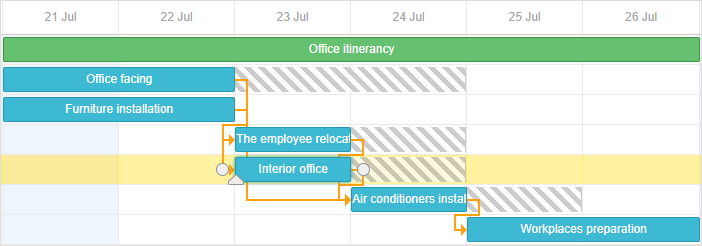
默认情况下,甘特图将关键路径应用默认行为,例如用于高亮的默认样式,以及在每次数据更新时重新计算关键路径。
若要操作关键路径的可见性,请使用以下方法:
var isEnabled = false
function updateCriticalPath(){
    isEnabled = !isEnabled;

    gantt.config.highlight_critical_path = isEnabled;

    gantt.render();
}
当任务数量较多且重新计算关键路径可能影响性能时,这会很有用。
要手动重新计算关键路径并应用相关样式,请使用以下方法:
gantt.templates.task_class = function(start, end, task){
    if(gantt.isCriticalTask(task))
        return "critical_task";
      return "";
};

gantt.templates.link_class = function(link){
    if(gantt.isCriticalLink(link))
        return "critical_link";
      return "";
};

var data = {
    tasks: [
        { id: 1, text: "Office itinerancy", open:true, type:"project" },
        { id: 2, text: "Office facing", start_date: "21-07-2020",
            duration: "20", parent: "1" },
        { id: 3, text: "Furniture installation", start_date: "21-07-2020",
            duration: "5", parent: "1" },
        { id: 4, text: "The employee relocation", start_date: "28-07-2020",
            duration: "15", parent: "1" },
        { id: 5, text: "Interior office", start_date: "28-07-2020",
            duration: "15", parent: "1" }
    ],
    links: [
        { id: "1", source: "2", target: "3", type: "0" },
        { id: "2", source: "3", target: "4", type: "0" },
        { id: "3", source: "4", target: "5", type: "0" }
    ]
};
gantt.init("gantt_here");

gantt.parse(data);
还可以手动高亮任务和链接:
- 如果在 task_class 模板中返回 "gantt_critical_task",该任务将被高亮显示为关键任务。
- 如果在 link_class 模板中返回 "gantt_critical_link",该链接将被高亮显示为关键链接。
相关示例: Custom critical path per project
在任务之间设置滞后和提前时间
可以在关键路径上的任务之间设置滞后和提前时间。详细信息请参见 这里。
调度已完成的任务
默认情况下,关键路径算法对已完成的任务(进度值为 1 的任务)与未完成的任务的处理没有差异。
可选地,您可以启用 auto_scheduling_use_progress 配置来更改此行为:
gantt.config.auto_scheduling_use_progress = true;

gantt.init("gantt_here");
启用该配置后,已完成的任务将被排除在关键路径和自动调度之外。
您可以在 API 页面 上找到更多详细信息。
v10.0 的关键路径与松弛时间
在 v10.0 中,松弛时间和关键路径的计算进行了重构。结果不再依赖于诸如 move_projects 和 gap_behavior 之类的自动调度模式选项——相同的数据总是产生相同的松弛时间和关键路径值。
一些相关的行为说明:
- 当总松弛时间不大于零时,任务被视为关键任务。已完成的任务(当 use_progress 启用时)以及属于依赖循环的任务永远不是关键任务。
getTotalSlack与getFreeSlack在从计算中排除的任务(处于依赖循环中的任务,以及在启用use_progress时的已完成任务)上返回0(而不是undefined)。
切换回先前的计算
以前的计算仍通过一个过渡性退出标志可用。该标志将在 v10.1 中移除,因此仅在过渡阶段使用:
gantt.config.auto_scheduling = {
    enabled: true,
    _analysis_engine: "v1"  // previous slack / critical path calculation
};
有关行为变化的完整列表,请参阅迁移指南 migration guide。