里程碑
此功能仅在 PRO 版中可用
里程碑是持续时间为零的任务,用于标记项目中的重要日期、一些关键事件或目标。 例如,您可以使用里程碑来突出显示评审会议的日期或项目阶段的预期完成日期。
从编程角度来看,milestone 是 预定义的任务类型 之一。但它被当作 常规任务 来处理,即它触发相同的事件和模板。
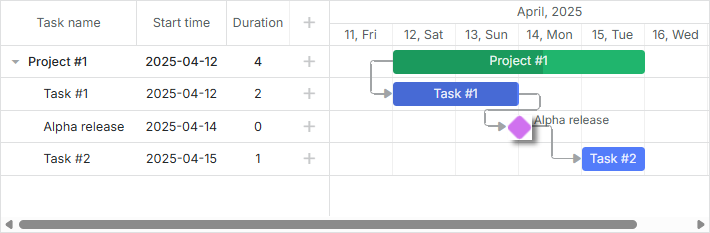
相关示例: Projects and milestones
通常,为图表提供添加里程碑的可能性:
在灯箱(lightbox)中添加一个额外的部分 - Typeselect Control - 这将允许您的用户更改任务类型并选择里程碑。
gantt.config.lightbox.sections = [
    {name: "description", height: 70, map_to: "text", type: "textarea"},
    {name: "type", type: "typeselect", map_to: "type"},
    {name: "time", height: 72, type: "duration", map_to: "auto"}
];
定义 rightside_text 或 leftside_text 模板来为里程碑设置文本标签。 注意,使用 task_text 模板设置的标签不会显示,因为里程碑的持续时间为零。
gantt.templates.rightside_text = function(start, end, task){
    if(task.type == gantt.config.types.milestone){
        return task.text;
    }
    return "";
};
启用 order_branch 属性以简化最终用户的操作。该选项使得能够在父分支内拖动任务,并允许您的用户在任意位置创建里程碑,但随后将它们拖动到正确的位置。
gantt.config.order_branch = true;
完成这些步骤后,您的 Gantt 图就已完全准备好与里程碑一起工作。
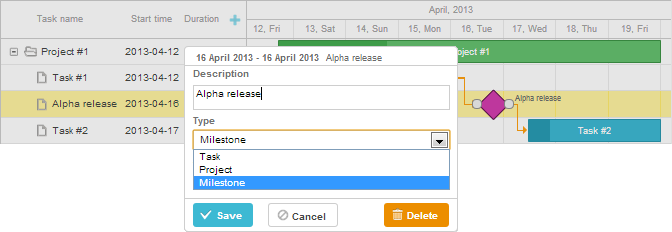
相关示例: Projects and milestones
在数据集中指定里程碑
要在初始数据集中定义里程碑,请将数据项的 [type] 属性设置为 'milestone' 值(值存储在 types 对象中):
var data = {
    tasks:[
        {id:1, text:"Project #1",    type:gantt.config.types.project,    open:true},
        {id:2, text:"Task #1",       start_date:"12-04-2020", duration:3, parent:1},
        {id:3, text:"Alpha release", type:gantt.config.types.milestone,   parent:1, /*!*/
            start_date:"14-04-2020"}],                                              /*!*/
    links:[]
};
Rollup 任务和里程碑
从 v7.1 开始,可以在父项目上显示 tasks 和 milestones。为此,您需要将数据项的 rollup 属性设置为 true:
var data = {
    tasks:[
        {id:11, text:"Project #1", type:"project", progress: 0.6, open: true},
        {id:12, text:"Task #1", start_date:"03-04-2018", duration:"3",
            parent:"11", progress: 1, open: true},
        {id:13, text:"Task #2", start_date:"03-04-2018", type:"project",
            parent:"11", progress: 0.5, open: true},
        {id:16, text:"Final milestone", start_date:"08-04-2018", type:"milestone",  /*!*/
            rollup: true, parent:"11", progress: 0, open: true},  /*!*/
        {id:17, text:"Task #2.1", start_date:"03-04-2018", duration:"2",
            parent:"13", progress: 1, open: true},
        {id:18, text:"Task #2.2", start_date:"06-04-2018", duration:"1",
            parent:"13", progress: 0.8, open: true}],
    links:[]
};
结果将会是如下所示:

还有通过灯箱中的 Rollup 复选框切换 Rollup 功能的能力:
gantt.config.lightbox.milestone_sections = [
    {name: "description", height: 70, map_to: "text", type: "textarea", focus: true},
    {name: "rollup", type: "checkbox", map_to: "rollup"},/*!*/
    {name: "hide_bar", type: "checkbox", map_to: "hide_bar"},
    {name: "type", type: "typeselect", map_to: "type"},
    {name: "time", type: "duration", map_to: "auto"}
];
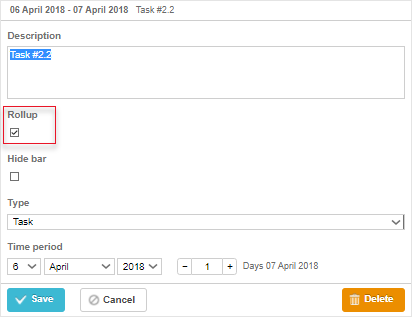
相关示例: Rollup tasks and milestones
隐藏任务和里程碑
从 v7.1 开始,您可以通过在数据项上设置 hide_bar: true 属性在时间线区域隐藏 [task bars] 和 [milestones]:
var data = {
    tasks:[
        {id:11, text:"Project #1", type:"project", progress: 0.6, open: true},
        {id:12, text:"Task #1", start_date:"03-04-2018", duration:"3",
            parent:"11", progress: 1},
        {id:13, text:"Task #2", start_date:"03-04-2018", type:"project",
            parent:"11", progress: 0.5, open: true},
        {id:16, text:"Final milestone", start_date:"08-04-2018", type:"milestone",  /*!*/
            rollup: true, hide_bar: true, parent:"11", progress: 0},  /*!*/
        {id:17, text:"Task #2.1", start_date:"03-04-2018", duration:"2",
            parent:"13", progress: 1},
        {id:18, text:"Task #2.2", start_date:"06-04-2018", duration:"1",
            parent:"13", progress: 0.8}],
    links:[]
};
结果将如下所示:
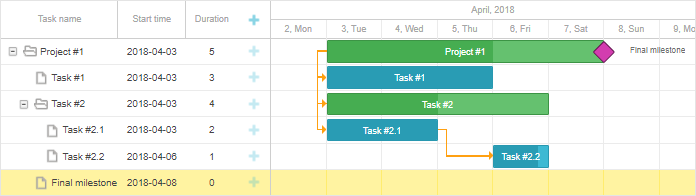
注意,如果数据项同时指定了 hide_bar:true 和 rollup:true 属性,该项在时间线中将被隐藏,但在父项目中仍然显示。
要从父项目中隐藏所有 Rollup 项,请在 project 对象中设置 rollup:false(自 v8.0 起):
{ id:11, text:"Project #1", type:"project", rollup:false, open: true }
您可以通过在灯箱中切换 Hide bar 复选框来在时间线区域隐藏所需的任务/里程碑:
gantt.config.lightbox.sections = [
    {name: "description", height: 70, map_to: "text", type: "textarea", focus: true},
    {name: "rollup", type: "checkbox", map_to: "rollup"},
    {name: "hide_bar", type: "checkbox", map_to: "hide_bar"},  /*!*/
    {name: "type", type: "typeselect", map_to: "type"},
    {name: "time", type: "duration", map_to: "auto"}
];

gantt.config.lightbox.milestone_sections = [
    {name: "description", height: 70, map_to: "text", type: "textarea", focus: true},
    {name: "rollup", type: "checkbox", map_to: "rollup"},
    {name: "hide_bar", type: "checkbox", map_to: "hide_bar"},  /*!*/
    {name: "type", type: "typeselect", map_to: "type"},
    {name: "time", type: "duration", map_to: "auto"}
];

gantt.config.lightbox.project_sections = [
    {name: "description", height: 70, map_to: "text", type: "textarea", focus: true},
    {name: "hide_bar", type: "checkbox", map_to: "hide_bar"},  /*!*/
    {name: "type", type: "typeselect", map_to: "type"},
    {name: "time", type: "duration", map_to: "auto"}
];
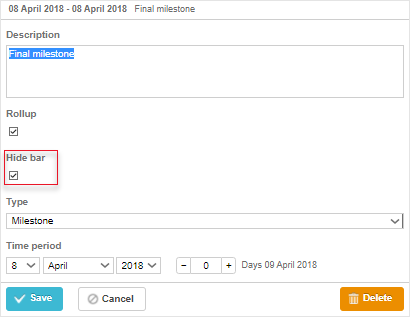
相关示例: Rollup tasks and milestones
API 概览
有一个事件可用于控制 rollup 任务在其父项目上的可见性:
// 在 rollup 任务显示在其父项目上之前
gantt.attachEvent("onBeforeRollupTaskDisplay", function(taskId, task, parentId){
    // 在此处添加自定义逻辑
    return false;
});
单独 Rollup 项的样式
从 v8.0 开始,Rollup 项会带有 task.$rendered_at 属性,该属性包含执行渲染的行的 id。因此,要基于它们显示的行为特定的 rollup 项设置样式,您可以使用 task_class 模板:
gantt.templates.task_class = function(start, end, task) {
    if(task.$rendered_at) {
        if(gantt.calculateTaskLevel(gantt.getTask(task.$rendered_at)) === 1) {
            return "phase-level-rollup";
        }
    }
    return "";
};