Typeselect 控件
信息
此功能仅在 PRO 版中可用。
一个用于改变 任务类型 的下拉框。
该控件从 types 对象加载选项,并具有默认的 onchange 处理程序。其他方面与 Select Control 完全相同。
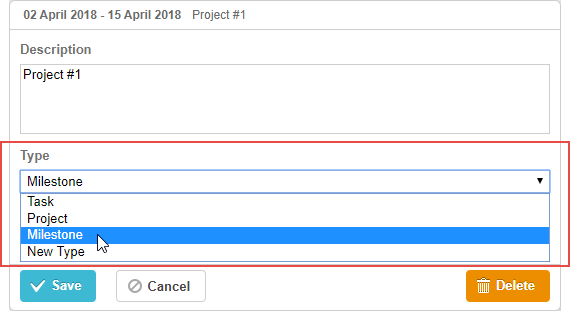
gantt.config.lightbox.sections = [
    {name:"description", height:38, map_to:"text", type:"textarea", focus:true},
    {name: "type", type: "typeselect", map_to: "type"},                             /*!*/
    {name: "time", height: 72, type: "duration", map_to: "auto"}
];
初始化
要将 typeselect 控件添加到 lightbox,只需在 lightbox 配置中添加一个分区,如下所示:
gantt.config.lightbox.sections = [
    {name:"description", height:38, map_to:"text", type:"textarea",focus:true},
    {name: "type", type: "typeselect", map_to: "type"},                             /*!*/
    {name: "time", height: 72, type: "duration", map_to: "auto"}
];
- 每种任务类型都有它自己的 lightbox。您可以创建一种新的任务类型,并为该类型定义一个特定的 lightbox 结构。
- 一旦用户通过控件更改 任务类型,控件将根据所选值刷新 lightbox 的结构。
- 该控件从 types 对象加载选项,并具有默认的 onchange 处理程序。
- 具有 name="type" 的分区已经将标签指定为 “Type”。如果你想为该分区设置不同的标签,请使用以下代码:
gantt.locale.labels.section_type = "New label for the section";
属性
以下属性对于 typeselect 控件来说最为重要且常被设置(完整列表请参见 这里):
- name - (string) 该分区的名称
- height - (number) 该分区的高度
- map_to - (string) 将映射到该分区的数据属性的名称
- type - (string) 该分区控件的类型,分区控件的类型
- focus - (boolean) 如果设为 true,在打开 lightbox 时该分区将获得焦点
- filter - (function) 用于为任务类型设置筛选函数。参数为类型名称
Need help?
Got a question about the documentation? Reach out to our technical support team for help and guidance. For custom component solutions, visit the Services page.