资源分配控件
此功能仅在 Gantt PRO 版中可用。
一个扩展控件,用于将多个资源及其数量分配给一个任务(assigningresources)。
以下是具有默认配置的资源分配控件示例:

gantt.config.lightbox.sections = [
    { name: "description", height: 38, map_to: "text", type: "textarea", focus: true },
    { name: "resource_selector", label: "Resources", type: "resource_selector", map_to: "auto" },
    { name: "time", type: "duration", map_to: "auto" }
];
你可以 配置控件的资源网格列 并提供必要的资源选项:
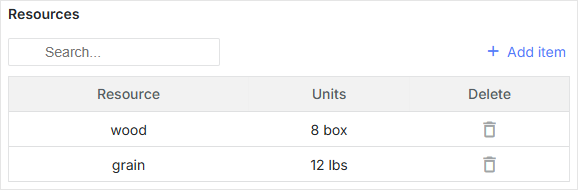
// 资源选项
const usageMap = [
    { key: 1, label: "wood", text: "wood", unit: "box" },
    { key: 2, label: "water", text: "water", unit: "liter" },
    { key: 3, label: "grain", text: "grain", unit: "lbs" }
];

// 辅助编辑器
const selectResEditor = { type: "select", map_to: "resource_id", options: usageMap };
const numberEditor = { type: "number", map_to: "value", min: 0, max: 100 };

// 资源网格列配置
const resourceLightboxConfig = {
    columns: [
        {
               name: "resource",
            label: "Resource",
            editor: selectResEditor
            // 更多列选项
        },
        {
            name: "units",
            label: "Units",
            editor: numberEditor,
            // 更多列选项
        },
        {
            name: "delete",
            label: "Delete",
            // 更多列选项
        }
    ]
};

gantt.config.lightbox.sections = [
    { name: "description", height: 38, map_to: "text", type: "textarea", focus: true },
    { name: "time", type: "duration", map_to: "auto" },
    { name: "resource_selector", type: "resource_selector", map_to: "auto", /*!*/
        config: resourceLightboxConfig } /*!*/
];

gantt.locale.labels.section_resource_selector = "Resources";
你也可以创建一个自定义控件,将多个资源分配给一个任务。自定义第三方编辑器。
初始化
要将 resource_selector 控件添加到 lightbox,请按下列步骤操作:
1. 在 lightbox 配置中添加一个部分:
gantt.config.lightbox.sections = [
    { name: "description", height: 38, map_to: "text", type: "textarea", focus: true },
    { name: "resource_selector", type: "resource_selector", map_to: "auto" },
    { name: "time", type: "duration", map_to: "auto" }
];
默认情况下,资源控件映射到配置中的属性,因此可以省略 map_to 选项。
2. 为该部分设置标签:
gantt.locale.labels.section_resource_selector = "Resources";
属性
以下属性对 resource_selector 控件来说最重要且常被设置:
- name - (string) 该分区的名称
- map_to - (string) 将映射到该分区的数据属性的名称
- type - (string) 分区控件 的类型
- label - (string) 该分区的标签
- config - (object) 在 lightbox 中显示所需列的资源网格配置
- templates - (object) lightbox 中资源网格的模板
初始的 start_date, end_date, 和 duration 属性可能为 null。如果是,它们将使用任务对象中的相应值进行初始化。
在 lightbox 中配置资源网格列
资源表在 lightbox 中的默认列配置如下所示:
// 辅助编辑器
const selectResEditor = {
  type: "select", map_to: "resource_id", options: gantt.serverList("resourceOptions")
};
const numberEditor = { type: "number", map_to: "value", min: 0, max: 100 };

const dateToStr = gantt.date.date_to_str("%d-%m-%Y");
const resourceStore = gantt.getDatastore(gantt.config.resource_store);
// 默认列定义
const defaultResourceLightboxConfig = {
    scale_height: 35, // 网格刻度的高度
    row_height: 35, // 赋值行的高度
    // 配置网格的列
    columns: [
        {
            name: "resource", label: "Resource", align: "center", width: 80,
            editor: selectResEditor, template: function (assignment) {
            let defaultValue = "Unassigned";
            const resource = resourceStore .getItem(assignment.resource_id);
            return resource ? resource.text : defaultValue;
            }
        },
        {
            name: "hours/Day", label: "Hours/Day", align: "center", width: 70,
            editor: numberEditor, template: function (assignment) {
            return assignment.value ? +assignment.value : ``;
            }
        },
        {
            name: "start", label: "Start", align: "center", width: 100,
            template: function (assignment) {
            return assignment.start_date ? dateToStr(assignment.start_date) : ``;
            }
        },
        {
            name: "end", label: "End", align: "center", width: 100,
            template: function (assignment) {
            return assignment.end_date ? dateToStr(assignment.end_date) : ``;
            }
        },
        {
            name: "duration", label: "Duration", align: "center", width: 80,
            template: function (assignment) {
            if (assignment.duration) {
                return `${assignment.duration} day${assignment.duration == 1 ? '' : 's'}`;
            } else {
                return ``;
            }
            }
        },
        {
            name: "delete", label: "Delete", align: "center", width: 80,
            template: function (assignment) {
                return `<div
                    data-assignment-id='${assignment.id}'
                    data-assignment-delete='${assignment.id}'
                    className='dhx_gantt_icon dhx_gantt_icon_delete'
                    >
                    </div>`;
            }
        }
    ],
    // 配置通过“Add Assignment”按钮新增的默认分配
    resource_default_assignment: {
        duration: null,
        value: 8,
        start_date: null,
        end_date: null,
        mode: "default"
    }
};
详解
在 columns 数组中的每一个对象都指定了单列。对象可以采用以下属性:
- name? - (string | number) - 定义列的 ID;
- align? - (string) - 设置水平标题对齐。可选值:'left'、'center',或 'right';
- hide? - (boolean) - 隐藏/显示列(PRO);
- label? - (string | number | any) - 指定列的标题;
- max_width? - (number) - 设置列的最大宽度;
- min_width? - (number) - 设置列的最小宽度;
- width? - (number | string) - 定义列的宽度;
- template? (assignment): any - 设置数据模板。
- assignment - (Assignment) - 赋值对象;
- onrender? (assignment, node): any - 可选,渲染单元格到 DOM 的回调函数。该函数接收一个 assignment 对象和网格单元的 DOM 元素作为参数,可能返回框架的一个组件。详见 modifyingcellsafterrendering;
- assignment - (Assignment) - 赋值对象;
- node - (HTMLElement) - 网格单元的 HTML 元素;
- editor? - (object) - 附带的 内联编辑器;
- type - (string) - 内联编辑器的类型;
- map_to - (string) - 指定应由内联编辑器更新的赋值的属性;
- min? - (Date | number) - 日期和持续时间类型的最小值;
- max? - (Date | number) - 日期和持续时间类型的最大值;
- options? - (Array <any>) - select 类型的选项数组;
- formatter? - (DurationFormatter | LinkFormatter) - 日期和前驱类型的格式化器。
你可以通过在资源 lightbox 配置中指定以下属性来改变默认添加的分配:
- resource_default_assignment - (object) 默认分配的配置对象(将通过“Add Assignment”按钮添加)
- start_date - (Date | string | null) 该分配计划开始的日期
- end_date - (Date | string | null) 该分配计划完成的日期
- value - (number | string) 指派给任务的资源数量
- duration - (number | null) 该分配的持续时间
- mode - (string) 资源分配时间的计算模式: "default" | "fixedDates" | "fixedDuration"
template 属性是一个函数,接受一个数据项对象作为参数并返回最终的数据模板。该函数定义允许你展示几乎任意内容。
使用数据填充控件
如果你使用 Gantt 创建的默认资源 Datastore,resource_selector 控件将连接到 gantt.serverList("resourceOptions") 集合。
该集合将由资源数据存储中的资源填充。你可以使用以下代码访问选项:
const options = gantt.serverList("resourceOptions");
请注意,在将资源加载入 datastore 之前,options 数组将为空。
你也可以使用自定义的选项列表来更新该集合,如下所示:
gantt.updateCollection("resourceOptions", [...]);
请注意,如果之后将资源加载到 gantt,gantt 将更新此集合并覆盖你的更改。
使用服务器端数据填充控件
要从服务器填充控件,请在资源编辑器的选项中使用 serverList() 方法:
const resourceEditor = {
    type: "select", map_to: "resource_id", options: gantt.serverList("resourceOptions")
};

const defaultResourceLightboxConfig = {
    // 其他设置
    ...
    // 包含列配置的数组
    columns:[
        {
              name: "resource",
            label: "Resource",
            align: "center",
            editor: resourceEditor
        },
        // 其他列配置
    ]
}
当选项可用时,gantt.serverList("resourceOptions") 的内容可以通过 updateCollection() 方法定义:
gantt.updateCollection("resourceOptions", [
    // 资源对象
    { id: 1, text: "QA", parent: null },
    { id: 2, text: "Development", parent: null },
    { id: 3, text: "Sales", parent: null },
    { id: 4, text: "Other", parent: null },
    { id: 5, text: "Unassigned", parent: 4 },
    { id: 6, text: "John", parent: 1 },
    { id: 7, text: "Mike", parent: 2 },
    { id: 8, text: "Anna", parent: 2 },
    { id: 9, text: "Bill", parent: 3 },
    { id: 10, text: "Floe", parent: 3 }
]);