持续时间控件
一组选择器,用于通过指定任务的起始日期和持续天数来设置任务的持续时间。
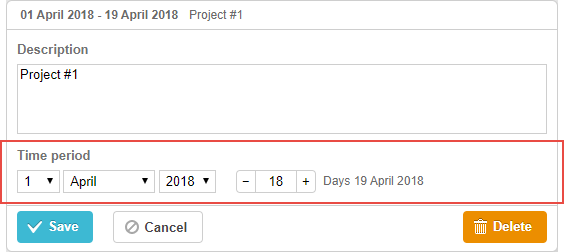
gantt.config.lightbox.sections="["
    {name:"description", height:70, map_to:"text", type:"textarea", focus:true},
    {name:"time",        height:72, map_to:"auto", type:"duration"} /*!*/
];
初始化
默认情况下,灯箱已添加一个 duration 控件。要再添加一个,请按下面的步骤操作:
- 在灯箱配置中添加一个分区:
gantt.config.lightbox.sections="["
    {name:"description", height:70, map_to:"text", type:"textarea",focus:true},
    {name:"time2",       height:72, map_to:"auto", type:"duration"}, /*!*/
    {name:"time",        height:72, map_to:"auto", type:"duration"}
];
- 为该分区设置标签:
gantt.locale.labels.section_time2 = "实际持续时间";
属性
以下属性对 time 控件最重要且常被设置(完整列表见 此处):
- name - (string) 该分区的名称
- height - (number) 该分区的高度
- map_to - (string,object) "auto" 或对象,定义将映射到该分区的数据属性
- formatter - (object) durationFormatter 对象的实例
- type - (string) 分区控件 的类型
- focus - (boolean) 若设置为 true,打开灯箱时该分区将获得焦点
- readonly - (boolean) 若设置为 true,该分区将只读
- year_range - (array,number) 为年份选择器设置范围。范围可通过两种方式设置:
- year_range: [2005, 2025] - 从 2005 年到 2025 年的区间
- year_range: 10 - [当前年份 - 10 年; 当前年份 + 10 年]
- single_date - (boolean) 若设置为 true,该分区仅展示 start date 选择器。编辑任务将仅通过起始日期来定义,持续时间为零。仅对 milestones 有意义
- time_format - (string) 设置日期时间选择器的顺序
配置日期时间选择器
要在“时间段”部分配置选择器,请使用 time_format 属性(参见 Date Format Specification):
将时间选择器添加到“时间段”部分
gantt.config.lightbox.sections = [
    {name:"description", height:38, map_to:"text", type:"textarea", focus:true},
    {name:"time",type:"duration",map_to:"auto",time_format:["%d","%m","%Y","%H:%i"]}/*!*/
];
请注意,time_format 数组的允许成员为:
- "%d" - 日选择器
- "%m" - 月选择器
- "%Y" - 年选择器
- "%H:%i" - 时间选择器(格式通过 time_picker 模板设置)
你可以仅更改数组中这些成员的顺序和数量,但不能更改数据呈现的格式。
例如,你可以按如下格式更改:
// 时间在前
time_format:["%H:%i", "%m", "%d", "%Y"]
// 月份在前
time_format:["%m","%d", "%Y", "%H:%i"]
// 去掉年选择器
time_format:["%H:%i", "%m", "%d"]
// 不正确
time_format:["%H:%i", "%M", "%d", "%Y"] //"%m" 被改为 "%M"
映射到自定义起始/结束日期时间属性
默认映射
通常,时间和持续时间控件通过将 map_to 属性设为 "auto" 值来映射到强制的数据属性 'start_date'、'end_date':
自定义映射
若要将控件映射到自定义日期属性(而不是 'start_date'、'end_date'),请使用 map_to 属性的对象表示法:
gantt.config.lightbox.sections = [
    {name: "description", height: 72, type: "textarea", map_to:"text", focus: true},
    {name: "time",           height: 72, type: "duration", map_to:"auto"},
    {name: "baseline",    height: 72, type: "duration", /*!*/
     map_to:{start_date:"planned_start",end_date:"planned_end"}} /*!*/
];
作为对象,map_to 有 3 个属性:
- start_date- 将存储在输入中设定的起始日期的数据属性的名称
- end_date - 可选,存储输入中设定的结束日期的数据属性的名称
- duration - 可选,存储由输入定义的持续时间的数据属性的名称
注释
如果某些属性未指定,控件将采用相关的强制日期属性的值。
切换分区可见性
如果在为灯箱配置该分区时指定 type:"duration_optional" 和 button: true,就可以切换持续时间分区的可见性:
gantt.config.lightbox.sections = [
  {name: "description", height: 70, map_to: "text", type: "textarea", focus: true},
  {name: "time", map_to: "auto", button: true, type: "duration_optional"} /*!*/
];
并为两个状态的按钮设置标签:
gantt.locale.labels.time_enable_button = 'Schedule';
gantt.locale.labels.time_disable_button = 'Unschedule';
该切换按钮将出现在该分区附近。若分区可见,一切行为就如同指定了 type:"duration"。
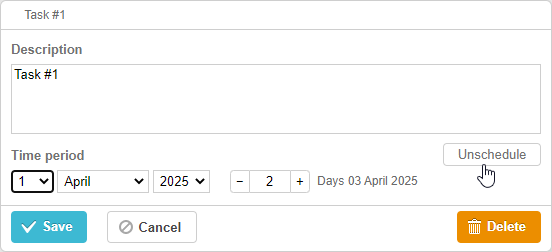
如果你将切换按钮关闭,该分区将变为不可见但不会发生任何事情。单击“Save”按钮后,通过该分区的 map_to 属性映射到任务属性的值将变为 null。
gantt.getTask(1);

// 返回值
{
    id: '1', text: 'Task #1', unscheduled: true,
    duration: 0, parent: '10',
    end_date: null, start_date: null,
    ...
}
此功能在需要将任务设为未计划状态或从 UI 直接定义不应在页面上显示基线的任务时非常有用。请查看相关示例:
相关示例 未计划任务
相关示例 基线
Need help?
Got a question about the documentation? Reach out to our technical support team for help and guidance. For custom component solutions, visit the Services page.