约束控件
信息
此功能仅包含在 PRO 版本中。
一个用于设置 甘特任务的时间约束 的复杂控件。
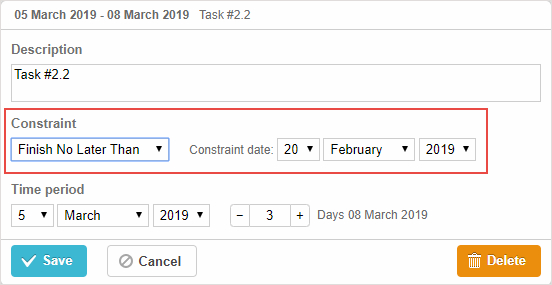
gantt.config.lightbox.sections = [
    { name:"description", height:38, map_to:"text", type:"textarea", focus:true},
    { name:"constraint", type:"constraint" },  /*!*/
    { name:"time", type:"duration", map_to:"auto" }
];
初始化
要将 constraint 控件添加到灯箱,请按照下列步骤执行:
- 在灯箱配置中添加一个 section:
gantt.config.lightbox.sections = [
    { name:"description", height:38, map_to:"text", type:"textarea", focus:true},
    { name:"constraint", type:"constraint" },  /*!*/
    { name:"time", type:"duration", map_to:"auto" }
];
- 为该 section 设置标签:
gantt.locale.labels.section_constraint = "Constraint";
属性
以下属性对 constraint 控件非常重要且常被设置(完整列表请参阅 此处):
- name - (string) 节名称
- type - (string) 该 section control 的类型
Need help?
Got a question about the documentation? Reach out to our technical support team for help and guidance. For custom component solutions, visit the Services page.