配置 Lightbox 元素
Lightbox 是一个用于修改任务详细信息的编辑表单。
下方显示的是默认的 Lightbox。
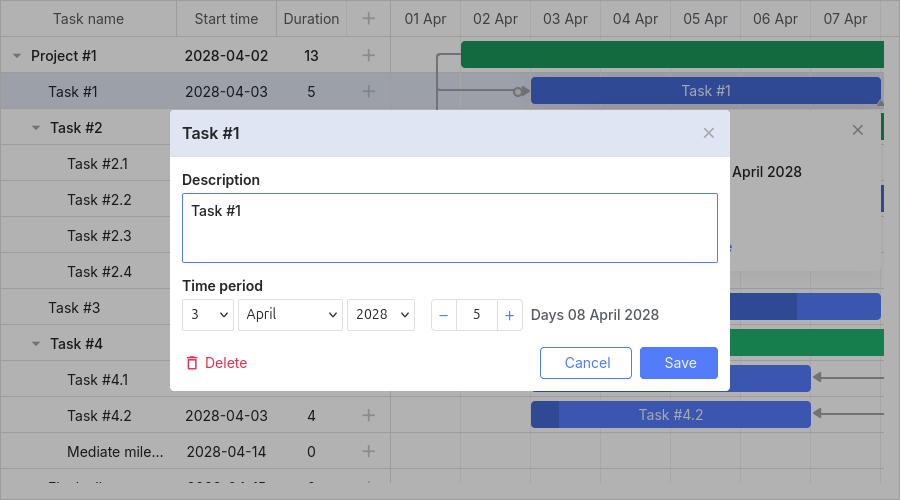
Lightbox 配置会因任务类型而异。每种类型的设置存储在 lightbox 对象中:
- gantt.config.lightbox.sections - 用于常规任务。
- gantt.config.lightbox.project_sections - 用于项目任务。
- gantt.config.lightbox.milestone_sections - 用于里程碑。
你也可以 添加自定义类型 并为其定义 Lightbox 结构。 有关详细信息,请参见 任务类型。
整体类型结构如下所示:
- sections? - (LightboxSection[]) - 可选,常规任务的 lightbox sections 数组
- project_sections? - (LightboxSection[]) - 可选,项目任务的 lightbox sections 数组
- milestone_sections? - (LightboxSection[]) - 可选,里程碑的 lightbox sections 数组
- [lightboxType: string] - (LightboxSection[] | undefined) - 自定义类型的 lightbox sections 数组
注释
自 v7.1.13 起,如果 gantt.config.csp 被设置为 true,或 Gantt 在 Salesforce 环境中运行,Lightbox 将在 Gantt 容器内呈现。
Lightbox 结构
区段
Lightbox 的结构由 Lightbox 对象的 sections 属性指定:
// 默认 Lightbox 定义
gantt.config.lightbox.sections = [
    { name: 'description', height: 70, map_to: 'text', type: 'textarea', focus: true },
    { name: 'time', height: 72, map_to: 'auto', type: 'duration' }
];
sections 数组中的每一项都是一个对象,用于定义 Lightbox 的一个单独区段。 有关可用的区段属性,请参见 Lightbox 配置。
区段控件
Lightbox 的每个区段都基于某种控件。Lightbox 中可使用的控件类型如下:
- 文本区域 - 一个多行文本字段
- 时间 - 通过指定任务的起始日期和结束日期来设置任务时长的一对选择器
- 时长 - 通过指定任务的起始日期和天数来设置任务时长的一组选择器
- 下拉框 - 一个简单的选择框
- 类型选择 - 用于更改任务类型的下拉框
- 父任务 - 用于更改任务父级的下拉框
- 模板 - 包含某些 HTML 内容的容器
- 复选框 - 用于开启/关闭一个或多个选项的复选框
- 单选按钮 - 用于从给定选项集中仅选择一个选项的单选按钮
- 资源 - 一种用于为任务分配若干资源的复杂控件
- 资源分配 - 为任务分配资源的扩展控件
- 约束 - 用于为任务设置约束的复杂控件
- 基线 - 用于为任务设置基线的复杂控件
const opts = [
    { key: 1, label: 'High' },
    { key: 2, label: 'Normal' },
    { key: 3, label: 'Low' }
];

gantt.config.lightbox.sections = [
    { name: 'description', height: 38, map_to: 'text', type: 'textarea', focus: true },
    { name: 'priority', height: 22, map_to: 'priority', type: 'select', options: opts },
    { name: 'time', height: 72, map_to: 'auto', type: 'duration' }
];
Need help?
Got a question about the documentation? Reach out to our technical support team for help and guidance. For custom component solutions, visit the Services page.