Constraint Control
info
This functionality is available in the PRO Edition only.
A complex control used to set time constraints for Gantt tasks.
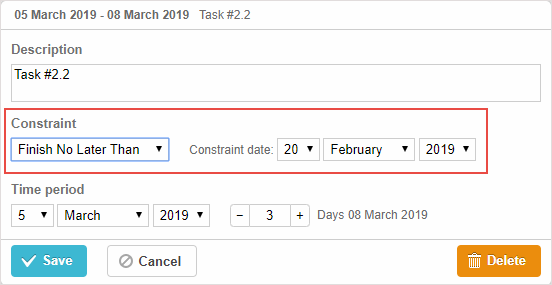
gantt.config.lightbox.sections = [
    { name: "description", height: 38, map_to: "text", type: "textarea", focus: true },
    { name: "constraint", type: "constraint" },
    { name: "time", type: "duration", map_to: "auto" }
];
Related sample: Auto-Schedule From Project Start & Constraints
Initialization
To add the constraint control to the lightbox, follow the steps below:
- Add a section to the lightbox configuration:
gantt.config.lightbox.sections = [
    { name: "description", height: 38, map_to: "text", type: "textarea", focus: true },
    { name: "constraint", type: "constraint" },
    { name: "time", type: "duration", map_to: "auto" }
];
- Set a label for the section:
gantt.locale.labels.section_constraint = "Constraint";
Related sample: Auto-Schedule From Project Start & Constraints
Properties
The following properties are mostly important and commonly set for the constraint control (see the full list here):
- name - (string) the section name
- type - (string) the type of the section control
Need help?
Got a question about the documentation? Reach out to our technical support team for help and guidance. For custom component solutions, visit the Services page.