DHTMLX Gantt overview
DHTMLX Gantt is the most configurable JavaScript Gantt chart, complete with TypeScript definitions. It is designed for building advanced planning and scheduling interfaces. It integrates with React, Angular, Vue, and other frontend frameworks. DHTMLX Gantt also supports AI-assisted development through the DHTMLX MCP Server, Agent Skills, and a structured API.
You can use it in project management, ERP, construction, manufacturing, field service, SaaS, and other business applications that require a configurable visual timeline.
Quick start by framework
You can use DHTMLX Gantt as a vanilla JavaScript widget or integrate it into a modern framework. Start with a step-by-step guide suitable for your preferred technology:


React, Angular and Vue support two integration approaches:
- Official React Gantt, Angular Gantt, and Vue Gantt wrappers (recommended for PRO and evaluation projects)
- Direct integration of the core JavaScript Gantt component with React, Angular, Vue (Community edition)
Live demos
To see DHTMLX Gantt in action, explore some of the most popular demos:
- Basic Gantt Chart with Tasks and Links
- Auto Scheduling and Critical Path examples
- Resource management: Diagram and Histogram
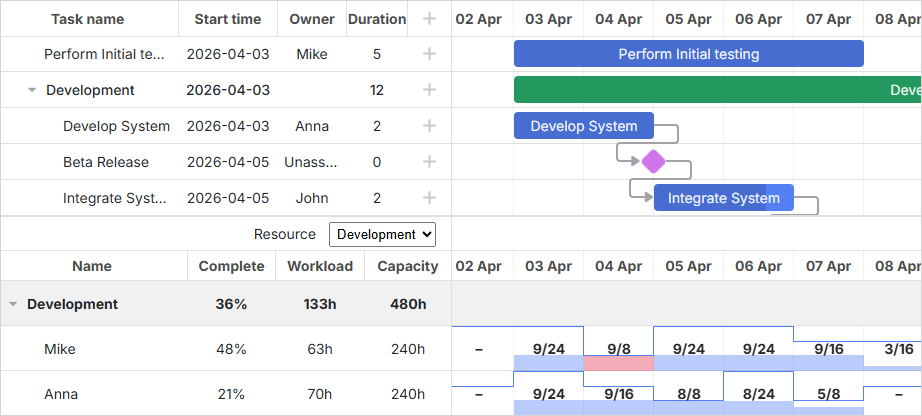
View All Samples to check the full range of Gantt features.
For framework-oriented starting points, see the example repositories for React, Angular, and Vue.
Some samples demonstrate PRO functionality, so check the Community vs PRO comparison before reusing them in a Community edition project.
Developer resources
- Installation guide for Community, trial, and PRO setup flows
- Community vs PRO comparison for feature differences between editions
- Public npm package of the JavaScript Gantt under the Community edition
- GitHub repository for the source code of the Community edition and issue tracking
- API reference and samples for implementation details
- What's New for releases and migration notes
Gantt feature highlights
DHTMLX Gantt includes a scheduling engine, a flexible timeline, and resource tools.
Project scheduling
At its core, the scheduling engine handles project structure and working time. It covers:
- Task types and dependencies.
- Working-time configuration with task and project calendars, plus resource-specific calendars (PRO version).
- Auto scheduling to recalculate plans (PRO version).
- Critical path to highlight the tasks that drive the project finish date (PRO version).
Grid and timeline
The component combines a data grid on the left with a zoomable time scale on the right. Both parts are extensively configurable:
- Flexible layout with additional grids, right-side columns, and custom panels.
- Configurable columns with inline editing, drag-and-drop, and keyboard navigation, plus multi-selection (PRO version).
- Customizable time scale with markers and highlighted time slots.
Advanced project controls (PRO)
For teams that need more than a simple timeline, the PRO edition of DHTMLX Gantt provides tools for detailed project tracking:
- Baselines and deadlines to compare planned dates with current ones.
- Unscheduled tasks and split tasks for incomplete, interrupted, or phased work.
Resource and workload management (PRO)
The PRO edition also adds a dedicated resource layer, turning the Gantt chart into a planning interface that covers both task scheduling and workload visibility. It includes:
- Resource assignments that link resources to tasks for precise scheduling.
- Resource histograms and resource load diagrams to visualize team workload.
- Grouping tasks by resource to track workloads, spot conflicts, and balance the team.
Export and ecosystem
Teams often need to migrate between platforms, keep local backups, or run analytics elsewhere. DHTMLX Gantt integrates with external tools and output formats by supporting:
- Export to PDF/PNG and Excel, including a Node.js export module.
- Export/import to MS Project and Primavera via the supported export service.
Interactivity and editing
Users can edit data directly in the chart, not just view it. This is supported through:
- A configurable lightbox editor for viewing and editing task details, with support for custom fields and buttons.
- Quick info popups and tooltips that surface task details without opening a full form.
- Drag-and-drop task creation and selection, plus mouse-drag scrolling of the timeline.
- Keyboard navigation and accessibility support.
- Undo/redo history for safe editing.
Customization and styling
The chart's appearance can be adjusted at every level, from a full theme to a single task bar, through:
- A set of built-in skins based on CSS variables, with support for deep customization and creating new themes.
- Templates to override how tasks, links, and grid cells are rendered.
- Fine-grained task coloring and link styling to visually highlight specific items.
- Localization support for interface language and date/time formats.
Editions and licensing
DHTMLX Gantt is available in two editions: Community and PRO. You can start with the free Community edition and upgrade to the PRO edition later if you need more features, official support, and a fully maintained Gantt foundation. You may also start directly with the PRO edition either through an official trial or with a paid license. Choose one of the following options to get started with DHTMLX Gantt:
- Community edition. Free and MIT-licensed, it covers the core interactive Gantt features for DHTMLX Gantt v10+.
- Official trial. It lets you evaluate the full PRO feature set and receive technical support during the trial period.
- PRO edition. Built for production environments, it includes advanced planning features, official support and commercial licensing.
To see the exact feature differences between editions, check the Community vs PRO comparison. For the setup flow of each option, see the installation guide.
If you are migrating from an earlier GPL version, use the migration guide. DHTMLX Gantt v10 and later are no longer released under GPL; GPL v2 applies only to earlier versions.
AI coding tools
For AI-assisted development, start with the DHTMLX Gantt guides created specifically for coding assistants:
Backend integration
DHTMLX Gantt lets you connect to any backend by implementing a RESTful API on the server:
- Data is typically loaded and saved as JSON for tasks, links, resources, and assignments.
- The built-in DataProcessor helps route create, update, and delete operations to your server.
- There are tutorials for popular backend platforms and frameworks (Node.js, .NET Core, Laravel, etc.) that cover CRUD operations and best practices for syncing Gantt with your database.
What's next
If you are just getting started, proceed as follows:
- Refer to the How to start guide for your preferred front-end framework or plain JavaScript.
- Configure grid columns, working time calendars, scales, and editing behavior.
- Connect to your backend, set up the DataProcessor and application endpoints for tasks, links, and resources.
- Explore Guides and API reference for deeper customization such as templates, events, and extensions.
If you are already using DHTMLX Gantt and upgrading from an earlier version, check What's New for the release notes and a summary of the latest features and migration guides.