Localization
Localization allows you to present the interface of the Gantt chart in the language you'd like: English, Spanish, French, etc. By default, dhtmlxGantt uses English locale.
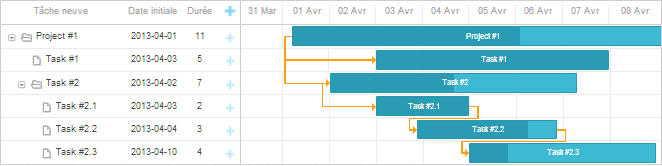
Activating a locale
To implement the Gantt chart in non-English language, you need to activate the necessary locale via the setLocale method of the gantt.i18n object.
gantt.i18n.setLocale("fr");
You can use and update any of the 50+ predefined locales that are bundled with the dhtmlxgantt.js file or define a custom locale.
The locale can be switched dynamically but the changes will be applied only after a complete redrawing of the Gantt chart either with the gantt.render() or gantt.init() call.
gantt.i18n.setLocale("fr");
gantt.init("gantt_here");
Related sample: Localization
Predefined locales
The set of bundled locales was significantly expanded and the translations were reworked in v10.0, so all predefined locales now ship with a complete set of labels.
| Language | Language code | Translation status |
| Afrikaans | af | full |
| Albanian | sq | full |
| Arabic | ar | full |
| Belarusian | be | full |
| Bosnian | bs | full |
| Bulgarian | bg | full |
| Catalan | ca | full |
| Chinese (Simplified) | cn | full |
| Chinese (Hong Kong) | zh_hk | full |
| Chinese (Taiwan) | zh_tw | full |
| Croatian | hr | full |
| Czech | cs | full |
| Danish | da | full |
| Dutch | nl | full |
| Dutch (Belgium) | nl_be | full |
| English | en | full |
| Estonian | et | full |
| Finnish | fi | full |
| French (France) | fr | full |
| French (Canada) | fr_ca | full |
| German (Germany) | de | full |
| German (Austria) | de_at | full |
| Greek | el | full |
| Hebrew | he | full |
| Hungarian | hu | full |
| Indonesian | id | full |
| Irish | ga | full |
| Italian | it | full |
| Japanese | jp | full |
| Korean | kr | full |
| Latvian | lv | full |
| Lithuanian | lt | full |
| Macedonian | mk | full |
| Malay | ms | full |
| Norwegian (Bokmål) | nb | full |
| Norwegian (Nynorsk) | no | full |
| Persian | fa | full |
| Polish | pl | full |
| Portuguese (Portugal) | pt | full |
| Portuguese (Brazil) | pt_br | full |
| Romanian | ro | full |
| Russian | ru | full |
| Slovak | sk | full |
| Slovenian | si | full |
| Spanish (Spain) | es | full |
| Spanish (Mexico) | es_mx | full |
| Swedish | sv | full |
| Thai | th | full |
| Turkish | tr | full |
| Ukrainian | ua | full |
| Vietnamese | vi | full |
Creating a custom locale
The gantt.i18n object is added in v7.0. In previous versions, the gantt.locale object was used. For more information, see the Migration article.
The easiest way to create a custom locale is to make a copy of the default (English) locale from the sample below, and translate all strings from it into the required language.
The custom locale can be applied to the Gantt chart in two ways:
- either override the current locale via passing an object of the locale as a parameter to the setLocale method:
gantt.i18n.setLocale(localeObject);
Note, if you provide a partial locale object, gantt will add your labels into the current locale:
gantt.i18n.setLocale({
    labels: {
        new_task: "New task"
    }
});
- or, if you need to switch between several locales, define the locale with a custom language code and switch the gantt to it later:
gantt.i18n.addLocale("lang", localeObject);
gantt.i18n.setLocale("lang");
Note,
- You can send your custom locale file to support@dhtmlx.com - so we will include it in the next release.
- The currently active locale is also available in the gantt.locale object
- month_full - the full names of months starting from January;
- month_short - the short names of months starting from January;
- day_full - the full names of week days starting from Sunday;
- day_short - the short names of week days starting from Sunday.
gantt.i18n.setLocale({
    date: {
        month_full: ["January", "February", "March", "April", "May", "June",
            "July", "August", "September", "October", "November", "December"],
        month_short: ["Jan", "Feb", "Mar", "Apr", "May", "Jun", "Jul",
            "Aug", "Sep", "Oct", "Nov", "Dec"],
        day_full: ["Sunday", "Monday", "Tuesday", "Wednesday", "Thursday",
             "Friday", "Saturday"],
        day_short: ["Sun", "Mon", "Tue", "Wed", "Thu", "Fri", "Sat"]
    },
    labels: {
        new_task: "New task",
        icon_save: "Save",
        icon_cancel: "Cancel",
        icon_details: "Details",
        icon_edit: "Edit",
        icon_delete: "Delete",
        confirm_deleting: "Task will be deleted permanently, are you sure?",
        section_description: "Description",
        section_time: "Time period",
        section_type: "Type",
        section_deadline: "Deadline",
        section_baselines: "Baselines",
        section_new_resources: "Resources",

        /* grid columns */
        column_wbs: "WBS",
        column_text: "Task name",
        column_start_date: "Start time",
        column_duration: "Duration",
        column_add: "",

        /* link confirmation */
        link: "Link",
        confirm_link_deleting: "will be deleted",
        link_start: " (start)",
        link_end: " (end)",

        type_task: "Task",
        type_project: "Project",
        type_milestone: "Milestone",

        minutes: "Minutes",
        hours: "Hours",
        days: "Days",
        weeks: "Weeks",
        months: "Months",
        years: "Years",

        /* message popup */
        message_ok: "OK",
        message_cancel: "Cancel",

        /* constraints */
        section_constraint: "Constraint",
        constraint_type: "Constraint type",
        constraint_date: "Constraint date",
        asap: "As Soon As Possible",
        alap: "As Late As Possible",
        snet: "Start No Earlier Than",
        snlt: "Start No Later Than",
        fnet: "Finish No Earlier Than",
        fnlt: "Finish No Later Than",
        mso: "Must Start On",
        mfo: "Must Finish On",

        /* resource control */
        resources_add_button: "Add Assignment",
        resources_filter_placeholder: "Search...",
        resources_filter_label: "hide empty",
        resources_section_placeholder: "Nothing assigned yet. Click 'Add Assignment' to assign resources.",

        /* empty state screen */
        empty_state_text_link: "Click here",
        empty_state_text_description: "to create your first task",

        /* baselines control */
        baselines_section_placeholder: "Start adding a new baseline",
        baselines_add_button: "Add Baseline",
        baselines_remove_button: "Remove",
        baselines_remove_all_button: "Remove All",

        /* deadline control */
        deadline_enable_button: "Set",
        deadline_disable_button: "Remove"
    }
});
- If the confirm_closing or confirm_deleting label is not defined - the related confirm dialog will not be shown at all (auto-confirm);
- The section_(name) label refers to the lightbox section of the related name.
- The new_task label defines the default text of a new event.