리소스 할당 컨트롤
이 기능은 Gantt PRO 에디션에서만 사용할 수 있습니다.
다수의 리소스와 해당 수량을 작업에 할당하기 위해 사용되는 확장 컨트롤입니다. 리소스 관리 가이드의 리소스 할당 섹션을 참조하세요.
다음은 기본 구성으로 설정된 리소스 할당 컨트롤의 예시입니다:
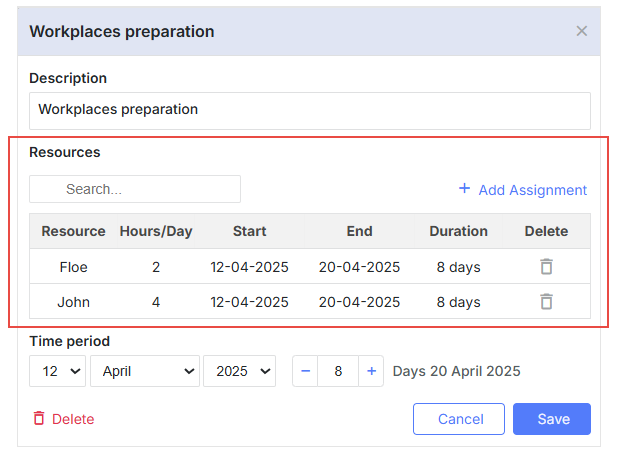
gantt.config.lightbox.sections = [
    { name: "description", height: 38, map_to: "text", type: "textarea", focus: true },
    { name: "resource_selector", label: "Resources", type: "resource_selector", map_to: "auto" },
    { name: "time", type: "duration", map_to: "auto" }
];
컨트롤의 필요 열 구성을 설정하고 필요한 리소스 옵션을 제공할 수 있습니다:
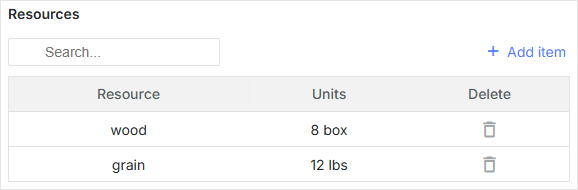
// resource options
const usageMap = [
    { key: 1, label: "wood", text: "wood", unit: "box" },
    { key: 2, label: "water", text: "water", unit: "liter" },
    { key: 3, label: "grain", text: "grain", unit: "lbs" }
];

// helper editors
const selectResEditor = { type: "select", map_to: "resource_id", options: usageMap };
const numberEditor = { type: "number", map_to: "value", min: 0, max: 100 };

// resource grid columns config
const resourceLightboxConfig = {
    columns: [
        {
               name: "resource",
            label: "Resource",
            editor: selectResEditor
            // more column's options
        },
        {
            name: "units",
            label: "Units",
            editor: numberEditor,
            // more column's options
        },
        {
            name: "delete",
            label: "Delete",
            // more column's options
        }
    ]
};

gantt.config.lightbox.sections = [
    { name: "description", height: 38, map_to: "text", type: "textarea", focus: true },
    { name: "time", type: "duration", map_to: "auto" },
    { name: "resource_selector", type: "resource_selector", map_to: "auto", /*!*/
        config: resourceLightboxConfig } /*!*/
];

gantt.locale.labels.section_resource_selector = "Resources";
또한 작업에 다수의 리소스를 할당하기 위한 커스텀 컨트롤을 만들 수 있습니다.다중 리소스 할당용 커스텀 컨트롤 생성.
Initialization
lightbox에 resource_selector 컨트롤을 추가하려면 아래 절차를 따르세요:
1. lightbox 구성에 섹션을 추가합니다:
gantt.config.lightbox.sections = [
    { name: "description", height: 38, map_to: "text", type: "textarea", focus: true },
    { name: "resource_selector", type: "resource_selector", map_to: "auto" },
    { name: "time", type: "duration", map_to: "auto" }
];
기본적으로 리소스 컨트롤은 config에 지정된 속성에 매핑되므로 map_to 옵션은 생략될 수 있습니다.
2. 섹션의 레이블을 설정합니다:
gantt.locale.labels.section_resource_selector = "Resources";
속성
다음 속성은 resource_selector 컨트롤에 대해 가장 중요하고 일반적으로 설정됩니다:
- name - (string) 섹션의 이름
- map_to - (string) 섹션에 매핑될 데이터 속성의 이름
- type - (string) 섹션 컨트롤의 유형
- label - (string) 섹션의 레이블
- config - (object) 라이트박스에 표시할 필요한 열을 구성하는 리소스 그리드 구성
- templates - (object) 라이트박스의 리소스 그리드용 템플릿
초기 start_date, end_date, 및 duration 속성은 null 값을 가질 수 있습니다. 이 경우 작업 객체의 해당 값으로 초기화됩니다.
라이트박스에서 리소스 그리드 열 구성
리소스 테이블 열의 기본 구성을 아래에 제공합니다:
// helper editors
const selectResEditor = {
  type: "select", map_to: "resource_id", options: gantt.serverList("resourceOptions")
};
const numberEditor = { type: "number", map_to: "value", min: 0, max: 100 };

const dateToStr = gantt.date.date_to_str("%d-%m-%Y");
const resourceStore = gantt.getDatastore(gantt.config.resource_store);
// default columns definition
const defaultResourceLightboxConfig = {
    scale_height: 35, // height of the grid scale
    row_height: 35, // height of assignment rows
    // configures the columns of the grid
    columns: [
        {
            name: "resource", label: "Resource", align: "center", width: 80,
            editor: selectResEditor, template: function (assignment) {
            let defaultValue = "Unassigned";
            const resource = resourceStore .getItem(assignment.resource_id);
            return resource ? resource.text : defaultValue;
            }
        },
        {
            name: "hours/Day", label: "Hours/Day", align: "center", width: 70,
            editor: numberEditor, template: function (assignment) {
            return assignment.value ? +assignment.value : ``;
            }
        },
        {
            name: "start", label: "Start", align: "center", width: 100,
            template: function (assignment) {
            return assignment.start_date ? dateToStr(assignment.start_date) : ``;
            }
        },
        {
            name: "end", label: "End", align: "center", width: 100,
            template: function (assignment) {
            return assignment.end_date ? dateToStr(assignment.end_date) : ``;
            }
        },
        {
            name: "duration", label: "Duration", align: "center", width: 80,
            template: function (assignment) {
            if (assignment.duration) {
                return `${assignment.duration} day${assignment.duration == 1 ? '' : 's'}`;
            } else {
                return ``;
            }
            }
        },
        {
            name: "delete", label: "Delete", align: "center", width: 80,
            template: function (assignment) {
                return `<div
                    data-assignment-id='${assignment.id}'
                    data-assignment-delete='${assignment.id}'
                    className='dhx_gantt_icon dhx_gantt_icon_delete'
                    >
                    </div>`;
            }
        }
    ],
    //Configures the default adding assignment(assignment that will be added by "Add Assignment button")
    resource_default_assignment: {
        duration: null,
        value: 8,
        start_date: null,
        end_date: null,
        mode: "default"
    }
};
Details
columns 배열의 각 객체는 단일 열을 정의합니다. 객체는 다음 속성을 가질 수 있습니다:
- name? - (string | number) - 열의 ID를 정의합니다;
- align? - (string) 수평 제목 정렬을 설정합니다. 가능한 값: 'left', 'center', 또는 'right';
- hide? - (boolean) - 열을 숨기거나 표시합니다(PRO);
- label? - (string | number | any) - 열의 제목을 지정합니다;
- max_width? - (number) - 열의 최대 너비를 설정합니다;
- min_width? - (number) - 열의 최소 너비를 설정합니다;
- width? - (number | string) - 열의 너비를 정의합니다;
- template? (assignment): any - 데이터 템플릿을 설정합니다.
- assignment - (Assignment) - Assignment 객체;
- onrender? (assignment, node): any - 선택적이며, 셀을 DOM에 렌더링하기 위한 콜백 함수입니다. 이 함수는 assignment 객체와 그 그리드 셀의 DOM 요소를 매개변수로 받아 프레임워크의 컴포넌트를 반환할 수 있습니다. 자세한 내용은 여기를 참조하십시오.
- assignment - (Assignment) - Assignment 객체;
- node - (HTMLElement) - 그리드 셀의 HTML 요소;
- editor? - (object) - 첨부된 인라인 편집기;
- type - (string) 인라인 편집기의 유형;
- map_to - (string) 인라인 편집기로 업데이트할 Assignment 속성;
- min? - (Date | number) 날짜 및 기간 유형의 최소값;
- max? - (Date | number) 날짜 및 기간 유형의 최대값;
- options? - (Array <any>) 선택형 타입의 옵션 배열;
- formatter? - (DurationFormatter | LinkFormatter) 날짜 및 선행 유형의 포맷터.
리소스 라이트박스 구성에서 기본 추가 할당(“Add Assignment” 버튼으로 추가될 할당)의 기본 값을 변경하려면 다음 속성을 설정합니다:
- resource_default_assignment - (object) 기본 할당의 구성 객체(“Add Assignment” 버튼으로 추가될 것)
- start_date - (Date | string | null) 할당 시작 예정일
- end_date - (Date | string | null) 할당 완료 예정일
- value - (number | string)Task에 할당된 리소스의 수량
- duration - (number | null) 할당의 지속 시간
- mode - (string) 리소스 할당의 시간 계산 모드: "default" | "fixedDates" | "fixedDuration"
template 속성은 데이터 항목 객체를 매개변수로 받아 최종 데이터 템플릿을 반환하는 함수입니다. 이 함수 정의를 통해 거의 모든 콘텐츠를 표현할 수 있습니다.
데이터로 컨트롤 채우기
Gantt에서 생성된 기본 리소스 데이터스토어를 사용하는 경우, resource_selector 컨트롤은 gantt.serverList("resourceOptions") 컬렉션과 연결됩니다. 이 컬렉션은 리소스 데이터스토어의 리소스로 채워집니다. 옵션에 접근하려면 아래 코드를 사용하세요:
const options = gantt.serverList("resourceOptions");
리소스가 데이터스토어에 로드되기 전까지 options 배열은 비어 있을 수 있습니다.
이 컬렉션은 아래와 같이 옵션 목록으로 업데이트할 수 있습니다:
gantt.updateCollection("resourceOptions", [...]);
참고로 그 이후에 gantt에 리소스를 로드하면 이 컬렉션이 업데이트되어 변경 사항이 덮어씌워질 수 있습니다.
서버에서 데이터로 컨트롤 채우기
서버에서 컨트롤을 채우려면 리소스 편집기의 옵션에서 serverList() 메서드를 사용합니다:
const resourceEditor = {
    type: "select", map_to: "resource_id", options: gantt.serverList("resourceOptions")
};

const defaultResourceLightboxConfig = {
    // other settings
    ...
    // an array with the columns configs
    columns:[
        {
              name: "resource",
            label: "Resource",
            align: "center",
            editor: resourceEditor
        },
        // more columns configs
    ]
}
gantt.serverList("resourceOptions")의 내용은 옵션이 사용할 수 있게 되었을 때 updateCollection() 메서드를 사용하여 정의할 수 있습니다:
gantt.updateCollection("resourceOptions", [
    // resource objects
    { id: 1, text: "QA", parent: null },
    { id: 2, text: "Development", parent: null },
    { id: 3, text: "Sales", parent: null },
    { id: 4, text: "Other", parent: null },
    { id: 5, text: "Unassigned", parent: 4 },
    { id: 6, text: "John", parent: 1 },
    { id: 7, text: "Mike", parent: 2 },
    { id: 8, text: "Anna", parent: 2 },
    { id: 9, text: "Bill", parent: 3 },
    { id: 10, text: "Floe", parent: 3 }
]);