라디오 버튼 컨트롤
한 번에 하나의 옵션만 선택할 수 있도록 구성된 옵션 블록입니다.
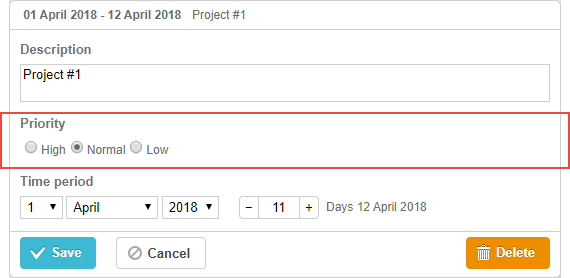
초기화
라이트박스에 라디오 버튼 컨트롤을 추가하려면 다음 단계를 따르십시오:
- 라이트박스 구성에 섹션 추가:
var opts = [
    {key: 1, label: "High"},
    {key: 2, label: "Normal"},
    {key: 3, label: "Low"}
];

gantt.config.lightbox.sections = [
    {name: "description", height: 38, map_to: "text", type: "textarea", focus: true},
    {name: "priority", height: 22, map_to: "priority", type: "radio", options: [opts]}, /*!*/
    {name: "time", type: "duration", map_to: "auto"}
];
- 섹션의 레이블 설정:
gantt.locale.labels.section_priority = "Priority";
속성
다음 속성은 대다수의 경우 중요하며 일반적으로 radio button 컨트롤에 설정됩니다(전체 목록은 여기를 참조하세요):
- name - (string) 섹션 이름
- map_to - (string) 섹션에 매핑될 데이터 속성의 이름
- type - (string) 섹션 컨트롤의 유형 (type of the section control)
- options - (array) 객체의 배열. 컨트롤의 선택 옵션을 정의합니다( (used for the select, checkbox and radio controls) ). 배열의 각 객체는 하나의 옵션을 정의하며 다음 속성들을 가집니다:
- key - (string) 옵션 ID. 이 속성은 작업 데이터 속성과 비교되어 작업에 옵션을 매핑합니다
- label - (string) 옵션 레이블
- focus - (boolean) 값이 true로 설정되면 라이트박스가 열릴 때 섹션에 포커스가 적용됩니다
- default_value - (any) 섹션 컨트롤의 기본값. 입력 값이 underfined일 때에만 적용됩니다
데이터로 컨트롤 채우기
일반적으로 radio button 컨트롤의 값을 설정하려면 options 매개변수를 사용합니다:
gantt.config.lightbox.sections = [
    {name: "priority", map_to: "priority", type: "radio", options: [
        {key: 1, label: "High"},
        {key: 2, label: "Normal"},
        {key: 3, label: "Low"},
    ]}
];
options 매개변수의 항목에는 2개의 필수 속성이 있습니다:
- key - (string) 옵션 ID
- label - (string) 옵션 레이블
Need help?
Got a question about the documentation? Reach out to our technical support team for help and guidance. For custom component solutions, visit the Services page.