자원 제어
이 기능은 PRO 에디션에서만 사용할 수 있습니다.
작업에 여러 자원과 그 수량을 할당하는 데 사용되는 복합 컨트롤입니다. assigningresources로 연결됩니다.
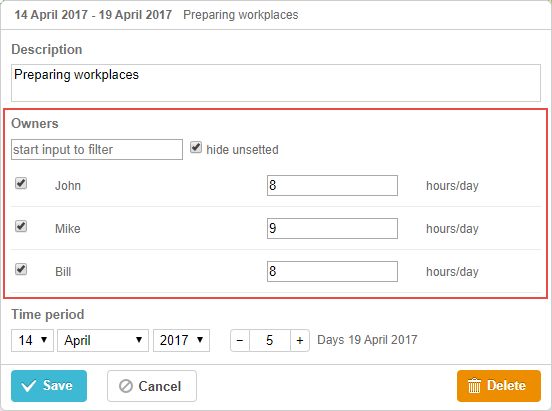
gantt.config.lightbox.sections = [
 { name: "description", height: 38, map_to: "text", type: "textarea", focus: true},
 { name: "owner", height: 60, type: "resources", default_value: 8},   /*!*/
 { name: "time", type: "duration", map_to: "auto"}
];
or

gantt.config.lightbox.sections = [
  { name: "description", height: 38, map_to:"text", type: "textarea", focus: true },
  { name: "time", type: "duration", map_to: "auto" },
  { name: "rooms", type: "resources", map_to: "rooms", options: [  /*!*/
  	  { key: 1, label: "room 1", unit: "hours" },    /*!*/
	  { key: 2, label: "room 2", unit: "hours" },   /*!*/
	  { key: 3, label: "room 3", unit: "hours" }   /*!*/
    ]  /*!*/
  }	   /*!*/
];

gantt.locale.labels.section_rooms = "Rooms";
작업에 다중 자원을 할당하기 위한 사용자 정의 컨트롤을 생성하는 방법도 있습니다. [guides/custom-editor.md#customthirdpartyeditor]를 참고하세요.
초기화
다음 단계에 따라 라이트박스에 자원 컨트롤을 추가합니다:
- 라이트박스 구성에 섹션을 추가합니다:
gantt.config.lightbox.sections = [
  { name: "description", height: 38, map_to: "text", type: "textarea", focus: true },
  { name: "time", type: "duration", map_to: "auto" },
  { name: "rooms", type:"resources" }	   /*!*/
];
- 섹션에 대한 레이블을 설정합니다:
gantt.locale.labels.section_resources = "Rooms";
속성
다음 속성은 자원 컨트롤에 대해 가장 중요하고 일반적으로 설정됩니다(전체 목록은 여기를 참조하십시오):
- name - (string) 섹션 이름
- map_to - (string) 섹션에 매핑될 데이터 속성의 이름
- type - (string) 섹션 컨트롤의 유형
- options - (array) 객체 배열. 컨트롤의 선택 옵션을 정의합니다 (선택, 체크박스, 라디오 및 resources 컨트롤에 사용됨). 배열의 각 객체는 단일 옵션을 지정하며 다음 속성을 포함합니다:
- key - (string) 옵션 ID. 이 속성은 작업 데이터 속성과 비교되어 옵션을 작업에 할당합니다
- label - (string) 옵션 라벨
- unit - (number) 자원의 측정 단위
- focus - (boolean) true로 설정되면 라이트박스를 열 때 해당 섹션에 포커스가 설정됩니다
- default_value - (any) 섹션 컨트롤의 기본값. 자원의 값이 정의되지 않았을 때 적용됩니다. options 배열의 각 옵션은 고유 기본값을 지정할 수 있습니다.
기본적으로 자원 컨트롤은 resource_property 설정에서 지정된 속성에 매핑되므로 map_to 옵션은 생략할 수 있습니다.
기본적으로 자원 컨트롤은 resource datastore에서 자동으로 채워집니다. 이 gantt.serverList("resourceOptions") collection으로 연결됩니다. 기본 동작을 변경하고 싶지 않다면 수동으로 옵션 목록을 지정할 필요가 없습니다.
::+
데이터로 컨트롤 채우기
버전 8.0부터 기본적으로 자원 컨트롤은 resource Datastore에서 옵션을 가져옵니다.
Gantt에서 기본 자원 Datastore를 사용하고 있을 경우, options 매개변수 없이 초기화된 자원 제어는 gantt.serverList("resourceOptions") 컬렉션에 연결됩니다. 이 컬렉션은 자원 데이터스토어의 자원으로 채워집니다. 코드를 통해 옵션에 접근할 수 있습니다:
const options = gantt.serverList("resourceOptions");
참고로 자원이 로드되기 전에는 options 배열이 비어 있습니다.
또한 커스텀 옵션 목록을 사용하여 이 컬렉션을 업데이트할 수 있습니다:
gantt.updateCollection("resourceOptions", [...]);
참고: 그 이후에 gantt에 자원을 로드하면, gantt는 이 컬렉션을 업데이트하고 변경 사항을 덮어씁니다.
라이트박스에 어떤 자원을 표시할지 제어하려면 gantt.config.resources.lightbox_resources 구성을 재정의할 수 있습니다:
gantt.config.resources = {
    lightbox_resources: function selectResourceControlOptions(resources){
          const lightboxOptions = [];
          resources.forEach(function(res) {
             if (!gantt.$resourcesStore.hasChild(res.id)) {
                const copy = gantt.copy(res);
                copy.key = res.id;
                copy.label = res.text;
                lightboxOptions.push(copy);
             }
          });
          return lightboxOptions;
       }
};
자원 데이터스토어를 수동으로 만들 경우, 옵션을 직접 컨트롤에 채워야 합니다.
일반적으로 resources 컨트롤의 값을 설정하려면 options 매개변수를 사용합니다:
gantt.config.lightbox.sections = [
    { name:"rooms",type:"resources",map_to:"rooms",
        options:[
            { key: 1, label: "room 1", unit: "hours" },
            { key: 2, label: "room 2", unit: "hours" },
            { key: 3, label: "room 3", unit: "hours" }
        ]
    }
];
options 매개변수의 항목에는 3개의 필수 속성이 있습니다:
- key - 옵션 ID
- label - 옵션 라벨
- unit - 자원의 측정 단위
서버에서 데이터로 컨트롤 채우기
서버에서 컨트롤을 채우려면 options 옵션을 serverList 메서드가 반환하는 값으로 설정합니다:
gantt.config.lightbox.sections = [
 {name: "description", height: 38, map_to: "text", type: "textarea", focus: true},
 {name: "resources", type: "resources", map_to: "owner_id", default_value:8,
     options: gantt.serverList("resourceOptions")},
 {name: "time", type: "duration", map_to: "auto"}
];

gantt.init("gantt_here");
gantt.load("/data");
gantt.serverList("resourceOptions")의 내용은 옵션이 사용 가능해질 때 updateCollection 메서드를 사용하여 정의할 수 있습니다:
gantt.updateCollection("resourceOptions", [
    { key: 1, label: "room 1", unit: "hours" },
    { key: 2, label: "room 2", unit: "hours" },
    { key: 3, label: "room 3", unit: "hours" }
])