템플릿 제어
일부 HTML 콘텐츠가 포함된 컨테이너입니다.
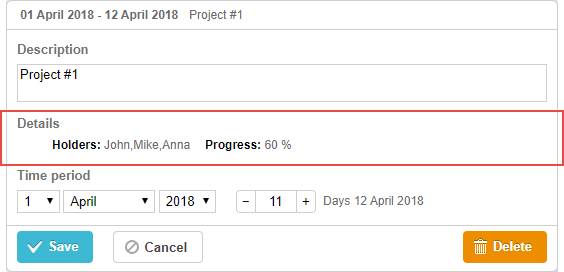
gantt.config.lightbox.sections = [
    {name:"description", height:38, map_to:"text", type:"textarea", focus:true},
    {name:"template", height:16, type:"template", map_to:"my_template"}, /*!*/
    {name:"time", height:72, type:"duration", map_to:"auto"}
];

gantt.locale.labels.section_template = "Details";

gantt.attachEvent("onBeforeLightbox", function(id) {
      var task = gantt.getTask(id);
       task.my_template = "<span id='title1'>Holders: </span>"+ task.users
    +"<span id='title2'>Progress: </span>"+ task.progress*100 +" %";
    return true;
});
초기화
다음 단계에 따라 template 컨트롤을 라이트박스에 추가합니다:
- 라이트박스 구성에 섹션을 추가합니다:
gantt.config.lightbox.sections = [
    {name:"description", height:38, map_to:"text", type:"textarea", focus:true},
    {name:"template", height:16, type:"template", map_to:"my_template"}, /*!*/
    {name:"time", height:72, type:"duration", map_to:"auto"}
];
- 섹션의 레이블을 설정합니다:
gantt.locale.labels.section_template = "Details";
- onBeforeLightbox 이벤트와 같은 이벤트의 도움으로 컨트롤의 내용을 설정합니다:
gantt.attachEvent("onBeforeLightbox", function(id) {
      var task = gantt.getTask(id);
       task.my_template = "<span id='title1'>Holders: </span>"+ task.users
    +"<span id='title2'>Progress: </span>"+ task.progress*100 +" %";
    return true;
});
속성
다음 속성은 대개 중요한 template 컨트롤에 대해 많이 설정되며, 전체 목록은 여기에서 확인할 수 있습니다:
- name - (string) 섹션 이름
- height - (number) 섹션 높이
- map_to - (string) 섹션에 매핑될 데이터 속성의 이름
- type - (string) 섹션 컨트롤의 유형
- focus - (boolean) 값이 true로 설정되면, 라이트박스가 열릴 때 해당 섹션에 포커스가 설정됩니다
Need help?
Got a question about the documentation? Reach out to our technical support team for help and guidance. For custom component solutions, visit the Services page.