grid_elastic_columns
Description
Adjusts the width of columns inside a scrollable grid
grid_elastic_columns: boolean | string
Example
gantt.config.grid_elastic_columns = true;
...
gantt.init("gantt_here");
Default value: false
Details
The property works only when a grid has a horizontal scrollbar.
By default, dhtmlxGantt doesn't adjust the size of columns during resizing of the whole grid.
Therefore, when the width of the grid increases, the width of columns will remain the same. As a result, an empty space will appear on the right side of the grid. In case the width of the grid decreases, the horizontal scroll will be displayed in the grid.
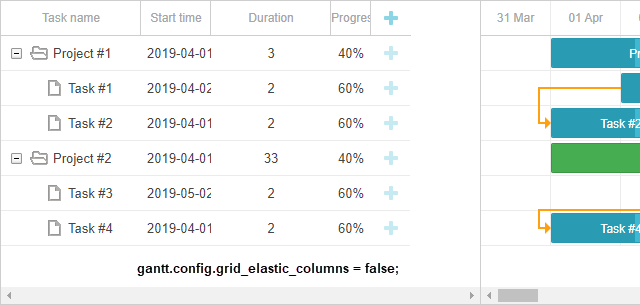
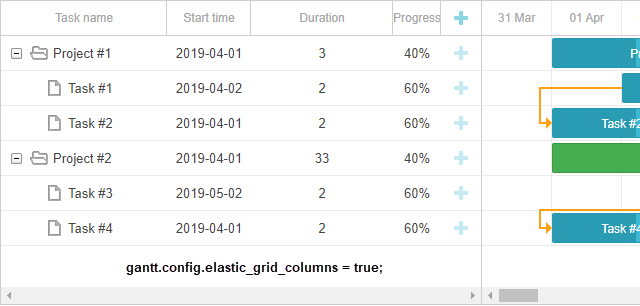
To make columns dependent on the grid size, set grid_elastic_columns to true:
gantt.config.grid_elastic_columns = true;
sample: Elastic columns of Grid
Now, if the width of the grid is changed, the width of columns will be also resized, and vice versa:
- if you widen the grid, the columns will expand to fit the size of the grid and occupy all the remaining space
- if you expand the column width, the size of the grid will increase (the horizontal scrollbar may appear but the size of other columns won't change)
- if you reduce the column width, the size of the grid will reduce (the horizontal scrollbar may disappear but the size of other columns may increase)
One more option is to set the value of the property to "min_width":
gantt.config.grid_elastic_columns = "min_width";
In this case:
- if you widen the grid, the columns will expand to fit the size of the grid and occupy all the remaining space
- if you reduce the width of the grid, the columns will shrink until they reach their minimal width. When all columns reach minimum, the horizontal scroll will appear in the grid.
Change log
- added in v7.0