资源管理
此功能仅包含在 Gantt PRO 版本中。
Gantt 提供了预定义的资源视图,用于可视化资源负载、按资源分解项目以平衡工作量的工具,以及为任务和资源量身定制的日历。
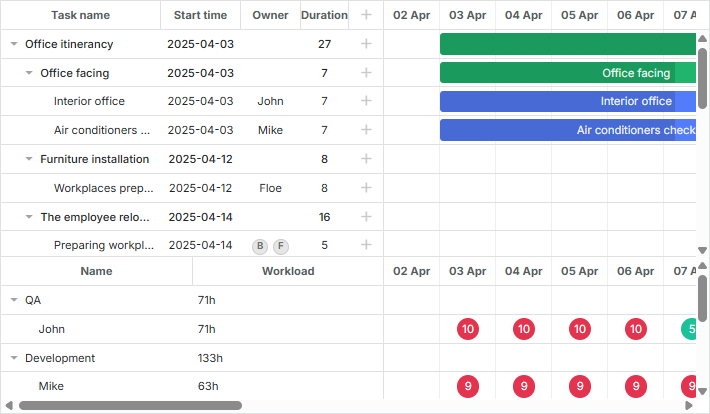
虽然 Gantt 本身不会计算资源负载,也不提供内置方法,但它提供了公共 API,您可以据此实现任何自定义功能。
资源视图面板
dhtmlxGantt 提供了两种预定义布局视图,用于展示资源负载:资源负载图和资源直方图。
资源负载图
该视图包含了网格和时间线的专用视图:"resourceGrid" 和 "resourceTimeline"。
gantt.config.layout = {
    css: "gantt_container",
    rows: [
      {
        // 默认网格和时间线的布局
        cols: [
          {view: "grid", group:"grids", scrollY: "scrollVer"},
          {resizer: true, width: 1},
          {view: "timeline", scrollX: "scrollHor", scrollY: "scrollVer"},
          {view: "scrollbar", id: "scrollVer", group:"vertical"}
        ],
        gravity:2
      },
      { resizer: true, width: 1},
      {
        // 资源面板的网格和时间线布局
        config: resourceConfig, // 网格和时间线的配置
        cols: [
          {view: "resourceGrid", group:"grids", width: 435, scrollY:"resourceVScroll"},
          {resizer: true, width: 1},
          {view: "resourceTimeline", scrollX: "scrollHor", scrollY:"resourceVScroll"},
          {view: "scrollbar", id: "resourceVScroll", group:"vertical"}
        ],
        gravity:1
       },
       {view: "scrollbar", id: "scrollHor"}
    ]
};
设置完成后,resourceGrid 的行为类似于默认的网格视图,但它是只读的。resourceTimeline 使用与默认时间线相同的刻度设置,并包含两个层次:
- 背景行,使用来自 task_row_class 和 timeline_cell_class 的模板。这些可以在布局级别进行自定义。
- 资源层 -- 这是 resourceTimeline 独有的,会在资源被分配了任务的单元格中显示区块。可以通过 resource_cell_class 和 resource_cell_value 模板自定义这些区块的样式和内容:
gantt.templates.resource_cell_value = function(start_date, end_date, resource, tasks,
    assignments){
    var html = "<div>" +  tasks.length * 8 + "h</div>";
        return html;
};
Templates of the Resource diagram
资源直方图
该资源负载布局视图分别为网格和时间线提供了 "resourceGrid" 和 "resourceHistogram" 视图。

gantt.config.layout = {
    css: "gantt_container",
    rows: [
        {
            // 默认网格和时间线的布局
            gravity: 2,
            cols: [
                {view: "grid", group:"grids", scrollY: "scrollVer"},
                {resizer: true, width: 1},
                {view: "timeline", scrollX: "scrollHor", scrollY: "scrollVer"},
                {view: "scrollbar", id: "scrollVer", group:"vertical"}
            ]
        },
        { resizer: true, width: 1, next: "resources"},
        {
            // 资源面板的网格和时间线布局
            gravity:1,
            id: "resources",
            config: resourceConfig, // 网格和时间线的配置
            templates: resourceTemplates, // 网格和时间线的模板
            cols: [
                { view: "resourceGrid", group:"grids", scrollY: "resourceVScroll" },
                { resizer: true, width: 1},
                { view: "resourceHistogram", capacity:24, scrollX: "scrollHor",
                    scrollY: "resourceVScroll"},
                { view: "scrollbar", id: "resourceVScroll", group:"vertical"}
            ]
        },
        {view: "scrollbar", id: "scrollHor"}
    ]
};
与资源负载图类似,resourceGrid 的行为类似于默认网格视图,但为只读。resourceHistogram 提供了多个额外模板:
- histogram_cell_class -- 应用于资源面板单元格的 CSS 类
gantt.templates.histogram_cell_class="function(start_date,end_date,resource,tasks,"
    assignments){
    return "";
};
- histogram_cell_label -- 显示在单元格中的标签
gantt.templates.histogram_cell_label="function(start_date,end_date,resource,tasks,"
    assignments){
     return tasks.length * 8;
};
- histogram_cell_allocated -- 直方图中填充区域的高度,范围为 0 到 maxCapacity。
gantt.templates.histogram_cell_allocated="function(start_date,end_date,resource,tasks,"
    assignments){
     return tasks.length * 8;
};
- histogram_cell_capacity -- 表示资源可用容量的线的高度,范围为 -1 到 maxCapacity。小于 0 的值将隐藏该线。
gantt.templates.histogram_cell_capacity="function(start_date,end_date,resource,tasks,"
    assignments){
     return 24;
};
理解 maxCapacity
可以将每一行直方图看作柱状图,maxCapacity 表示 Y 轴的刻度高度。如下图所示,maxCapacity 设为 24:
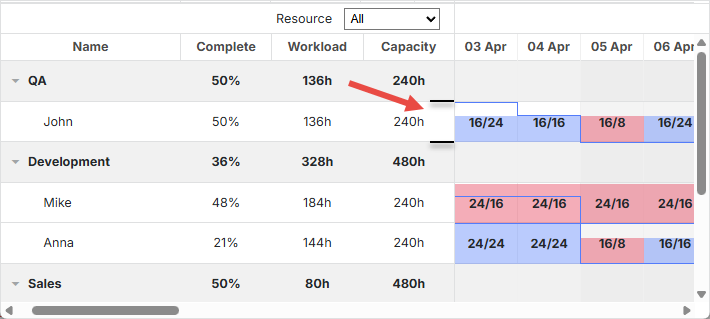
因此,将 histogram_cell_allocated 或 histogram_cell_capacity 设为 24,意味着填充至该行顶端。
默认情况下,maxCapacity 对每个资源都是 24。在 histogram_cell_capacity 返回超过 24 的值时会被正确计算,但资源面板单元格中的填充区域可能不会按预期显示。
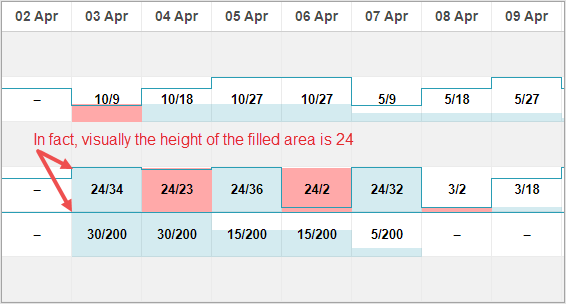
您可以为整个直方图全局配置 maxCapacity,也可以为每个资源单独设置。示例:
Related example: 配置 maxCapacity
maxCapacity 可在直方图级别设置:
{ view: "resourceHistogram", capacity:24, scrollX: "scrollHor",
    scrollY: "resourceVScroll"}
也可为每个资源单独设置:
resourcesStore.parse([
    {id: 1, text: "John", capacity:8},
    {id: 2, text: "Mike", capacity:4},
    {id: 3, text: "Anna", capacity:8},
    {id: 4, text: "Bill", capacity:8},
    {id: 5, text: "Floe", capacity:8}
]);
资源级别的 capacity 会覆盖直方图的全局 capacity 设置。
使用资源视图面板
默认情况下,两种视图("resourceGrid" 和 "resourceTimeline" 或 "resourceGrid" 和 "resourceHistogram")都连接到在 gantt.config.resource_store 设置中指定的数据存储。
数据存储的自动创建
从 v8.0 开始,资源数据存储会在 gantt 初始化时自动创建,并在 "onGanttReady" 事件触发时准备就绪。可以使用 getDatastore 方法访问该存储。
如需自定义资源存储,可通过 gantt.config.resources 选项:
gantt.config.resources = {
    resource_store: {
        type: "treeDataStore",
        fetchTasks: true,
        initItem: function(item) {
            item.parent = item.parent || gantt.config.root_id;
            item[gantt.config.resource_property] = item.parent;
            item.open = true;
            return item;
        }
    },
}
resource_store 内的设置将用于创建默认资源数据存储。如果代码中已存在资源数据存储,gantt 会优先使用已有存储。
加载资源时,可以通过 gantt.parse()/gantt.load()(详见此处)传入,也可以直接用 datastore.parse() 填充:
gantt.attachEvent("onGanttReady", function(){
    const store = gantt.getDatastore(gantt.config.resource_store);
    store.parse([
       {id: 6, text: "John"},
       {id: 7, text: "Mike"},
       {id: 8, text: "Anna"},
       {id: 9, text: "Bill"},
    ])
});
Lightbox 的资源控件会自动关联到资源列表:
gantt.config.lightbox = {
    sections: [
        ...,
        { name: "resources", type: "resources", map_to: "auto", default_value: 8}
    ]
};
手动创建数据存储
也可以使用 createDatastore 方法手动创建数据存储:
var resourcesStore = gantt.createDatastore({
  name: gantt.config.resource_store,
  // 如果您的资源是分层结构(如员工/部门),请使用 treeDatastore;
  // 若为扁平结构,可省略 "type"
  type: "treeDatastore",
  initItem: function (item) {
    item.parent = item.parent || gantt.config.root_id;
    item[gantt.config.resource_property] = item.parent;
    item.open = true;
    return item;
  }
});
填充数据存储可使用 datastore.parse 方法:
resourcesStore.parse([
    {id: 1, text: "QA", parent:null},
      {id: 2, text: "Development", parent:null},
    {id: 3, text: "Sales", parent:null},
    {id: 4, text: "Other", parent:null},
    {id: 5, text: "Unassigned", parent:4},
    {id: 6, text: "John", parent:1},
    {id: 7, text: "Mike", parent:2},
    {id: 8, text: "Anna", parent:2},
    {id: 9, text: "Bill", parent:3},
    {id: 10, text: "Floe", parent:3}
]);
如果您希望在 lightbox 中使用资源,建议在数据存储的 onParse 事件中通过 serverList 方法实现:
resourcesStore.attachEvent("onParse", function(){
  var people = [];
  resourcesStore.eachItem(function(res){
    if(!resourcesStore.hasChild(res.id)){
        var copy = gantt.copy(res);
        copy.key = res.id;
        copy.label = res.text;
        people.push(copy);
    }
  });
  gantt.updateCollection("resourceOptions", people);
});
展开资源面板
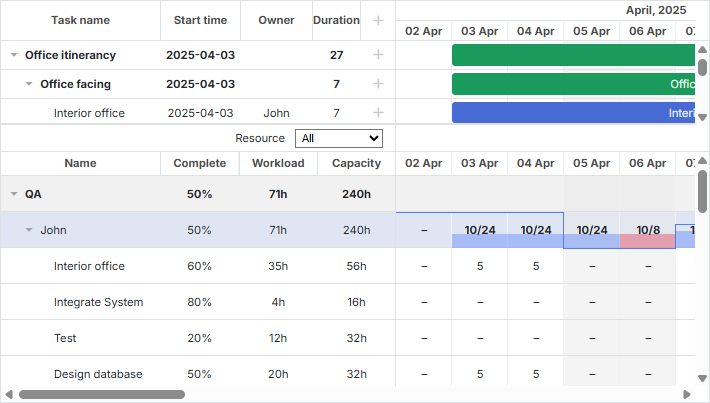
通过在初始化数据存储时启用 fetchTasks 属性,可以展开资源面板,显示分配给特定资源的所有任务:
gantt.config.resources = {
    resource_store: {
        type: "treeDataStore",
        fetchTasks: true, /*!*/
        initItem: function (item) {
             item.parent = item.parent || gantt.config.root_id;
             item[gantt.config.resource_property] = item.parent;
             if(!item.parent){
                 item.open = true;
             }else{
                 item.open = false;
             }
             return item;
         }
    },
};
或
gantt.$resourcesStore = gantt.createDatastore({
     name: gantt.config.resource_store,
    type: "treeDatastore",
     fetchTasks: true, /*!*/
     initItem: function (item) {
         item.parent = item.parent || gantt.config.root_id;
         item[gantt.config.resource_property] = item.parent;
         if(!item.parent){
             item.open = true;
         }else{
             item.open = false;
         }
         return item;
     }
});
Show all assigned tasks in the resource panel
将 fetchTasks 设为 true 后,Gantt 会在资源视图面板中显示与资源关联的所有任务,适用于资源图和资源直方图布局。
如需快速获取分配给某一资源的所有任务,请参见 getResourceAssignments。
gantt.getResourceAssignments("6");
资源分配
连接资源到任务
资源与任务之间的关联由 resource_property 设置控制:
gantt.config.resource_property = "user_id";
// task.user_id <-> resource.id
可以通过任务对象属性以几种不同方式将资源关联到任务:
- 为任务分配单个资源
{
    id: 1, text: "Task #1", start_date: "02-04-2018", duration: 8, progress: 0.6,
    user_id: 5 // 5 是资源 id
}
- 为任务分配多个资源
{
    id: 1, text: "Task #1", start_date: "02-04-2018", duration: 8, progress: 0.6,
    users: [2, 3] // 2 和 3 是资源 id
}
此格式适用于 自定义多选控件。
- 分配多个资源并指定数量
{
    id: 1, text: "Task #1", start_date: "02-04-2018", duration: 8, progress: 0.6,
    users: [{resource_id:2, value:8}, {resource_id:3, value:4}]
}
在这里,id="2" 的资源分配了 8 个单位,id="3" 的资源分配了 4 个单位。此格式受 리소스 컨트롤 lightbox 支持。
从 v8.0 开始,资源分配也可以作为单独的列表加载,Gantt 会自动将其关联到任务:
gantt.parse({
       tasks: [...],
       links: [...],
       resources: [...],
       assignments: [{id:1, resource_id:2, task_id: 5, value: 8}, ...]
});
有关数据格式的更多详细信息请参见 此处。
当将数据发送到服务器时,DataProcessor 会将这些属性序列化为 JSON。为了在服务器端高效处理此类记录,建议使用 "REST_JSON" dataprocessor 模式。
如果希望将资源分配的更改与任务分开保存,请启用以下配置:
gantt.config.resources = {
    dataprocessor_assignments: true,
    dataprocessor_resources: true,
};
详细了解请参见 专门文章。
设置资源分配的时间
默认情况下,资源会被分配到任务的整个持续时间内。
从 v7.1 开始,资源分配对象可以包含额外的可选参数,用于指定分配在任务内的具体日期。
这些额外属性包括:
- id - (string|number) 分配 id
- start_date - (Date|string) 分配开始日期
- end_date - (Date|string) 分配结束日期
- delay - (number) 分配开始与任务开始之间的偏移
- duration - (number) 分配持续时间
- mode - (string) 分配时间的计算方式: "default"|"fixedDates"|"fixedDuration"
{
    id: 5, text: "Interior office", type: "task", start_date: "03-04-2019 00:00",
    duration: 7, parent: "2", progress: 0.6, priority: 1,
    users: [{
        resource_id: "3",
        value: 8,
        delay: 1 /*!*/
    },{
        resource_id: "6",
        value: 3,
        start_date: "03-04-2019 00:00", /*!*/
        end_date: "05-04-2019 00:00", /*!*/
        mode: "fixedDates" /*!*/
    },{
        resource_id: "7",
        value: 3,
        delay: 1, /*!*/
        duration: 2, /*!*/
        mode: "fixedDuration" /*!*/
    }
    ]
}
Assign resource values to specific days
-
资源分配的 开始和结束日期 会显示在资源直方图和图表中。
-
你可以为分配对象添加可选的 id:
{
    id: 1, text: "Task #1", start_date: "02-04-2018", duration: 8, progress: 0.6,
    users: [{
        id: 5,
        resource_id: 2, value: 8,
        delay: 1
    }]
}
此 id 允许你通过 gantt API 访问该分配:
var assignment = gantt.getDatastore("resourceAssignments").getItem(5);
"resourceAssignments" 数据存储仅在启用 process_resource_assignments 配置时可用。
- 其他属性的行为取决于 mode 的值:
- "default" 模式
{
    id: 1, text: "Task #1", start_date: "02-04-2018", duration: 8, progress: 0.6,
    users: [
        { resource_id: 2, value: 8, delay: 1},
        { resource_id: 3, value: 6},
    ]
}
如果 mode 缺失或设置为 "default",分配的 start_date 和 end_date 将根据任务的日期推导。默认情况下,分配从任务的开始日期开始,结束于任务的结束日期。
delay 属性的作用类似于 MS Project 中的 Delay 字段。
如果设置了 delay,分配的 start_date 计算方式为:
gantt.calculateEndDate((start_date:task.start_date, duration:assignment.delay, task:task))。
这意味着分配将在任务开始后指定的延迟时间后开始,并在任务结束时结束。当任务变更时,这些日期会自动更新。
- "fixedDuration" 模式
{
    id: 1, text: "Task #1", start_date: "02-04-2018", duration: 8, progress: 0.6,
    users: [
        {resource_id:2, value:8, duration: 1, delay:0, mode: "fixedDuration"},
        {resource_id:2, value:2, duration: 1, delay:1, mode: "fixedDuration"},
        {resource_id:2, value:3, delay:2, mode: "default"}
    ]
}
在此模式下,start_date 的计算方式与 default 模式相同。
但 end_date 不再与任务的结束日期绑定,而是按如下方式计算:
gantt.calculateEndDate((start_date:assignment.start_date, duration:assignment.duration, task:task))。
当任务更新时,分配的日期会重新计算,但分配的持续时间保持不变。
- "fixedDates" 模式
{
    id: 1, text: "Task #1", start_date: "02-04-2018", duration: 8, progress: 0.6,
    users: [{
        resource_id:2, value:8,
        start_date:"03-04-2018", end_date:"11-04-2018", mode: "fixedDates"
    }]
}
在该模式下,分配的日期完全按照指定值,不会因任务变更而改变。
当 mode 为 "fixedDates" 时,delay 属性无效。
以下是各模式下分配日期的计算方式简要总结:
-
default
- assignment.start_date = task.start_date + assignment.delay
- assignment.end_date = task.end_date
-
fixedDuration
- assignment.start_date = task.start_date + assignment.delay
- assignment.end_date = assignment.start_date + assignment.duration
-
fixedDates
- assignment.start_date = assignment.start_date
- assignment.end_date = assignment.end_date
获取分配给资源的所有任务
要快速获取分配给某个资源的所有任务,请使用 getResourceAssignments 中的方法。
gantt.getResourceAssignments("6");
该方法接收资源 id,返回一个对象数组,表示分配给该资源的任务:
[
    {task_id: 5, resource_id: "6", value: 5, delay: 0, duration: 7,
        start_date: "03-04-2019 00:00", end_date: "12-04-2019 00:00",
        id: 1617258553240, mode: "default"},
    {task_id: 18, resource_id: "6", value: 2, delay: 0, duration: 2,
        start_date: "05-04-2019 00:00", end_date: "09-04-2019 00:00",
        id: 1617258553250, mode: "default"},
    {task_id: 19, resource_id: "6", value: 3, delay: 0, duration: 4,
        start_date: "09-04-2019 00:00", end_date: "13-04-2019 00:00",
        id: 1617258553251, mode: "default"},
    {task_id: 21, resource_id: "6", value: 5, delay: 0, duration: 4,
        start_date: "03-04-2019 00:00", end_date: "09-04-2019 00:00",
        id: 1617258553254, mode: "default"}
]
每个对象包含以下属性:
- task_id - 任务标识符
- resource_id - 资源标识符
- value - 分配给任务的资源数量
- delay - 分配开始与任务开始之间的偏移
- duration - 分配的持续时间
- start_date - 分配开始日期
- end_date - 分配结束日期
- id - 分配标识符
- mode - 分配时间的计算方式: "default"|"fixedDates"|"fixedDuration"
获取任务的资源分配
getTaskAssignments 方法可从数据存储中获取指定任务的资源分配:
gantt.getTaskAssignments(5);
该方法接收任务 id,返回一个对象数组,表示该任务的资源分配:
[
    {task_id: 5, id: 1617254693938, delay: 0, duration: 2,
        start_date: "03-04-2019 00:00", end_date: "05-04-2019 00:00",
        mode: "fixedDuration", resource_id: 6, value: 3},
    {task_id: 5, id: 1617254693946, delay: 3, duration: 1,
        start_date: "06-04-2019 00:00", end_date: "07-04-2019 00:00",
        mode: "fixedDuration", resource_id: 6, value: 6}
]
返回对象的属性与 getResourceAssignments 方法一致。
通过 lightbox 设置关联
可以使用内置 lightbox 功能将资源关联到任务对象的任意属性。
gantt.serverList("people", [
    {key: 1, label: "John"},
    {key: 2, label: "Mike"},
    {key: 3, label: "Anna"},
    {key: 4, label: "Bill"},
    {key: 7, label: "Floe"}
]);

gantt.locale.labels.section_owner = "Owner";

gantt.config.lightbox.sections = [
  {name:"description", height:38, map_to:"text", type:"textarea", focus:true},
  {name:"owner", map_to:"owner_id", type:"select", options:gantt.serverList("people")},
  {name:"time", type:"duration", map_to: "auto"}
];
关于在 lightbox 中配置资源控件的更多细节,请参见 Resources Control 文章。
加载集合
在甘特图初始化后,通过服务器列表定义的集合可以动态加载和更新:
// 使用空集合初始化 lightbox
gantt.locale.labels.section_owner = "Owner";

gantt.config.lightbox.sections = [
  {name:"description", height:38, map_to:"text", type:"textarea", focus:true},
  {name:"owner", map_to:"owner_id", type:"select", options:gantt.serverList("people")},
  {name:"time", type:"duration", map_to: "auto"}
];

// 加载后更新选项
gantt.updateCollection("people", [
    {key: 1, label: "John"},
    {key: 2, label: "Mike"},
    {key: 3, label: "Anna"},
    {key: 4, label: "Bill"},
    {key: 7, label: "Floe"}
]);
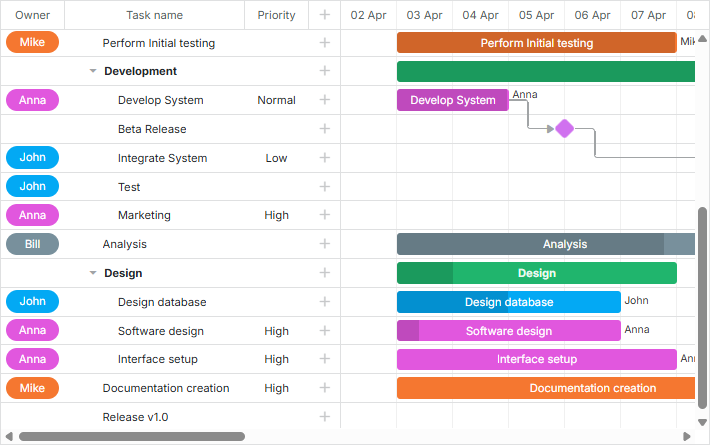
通过 serverList 集合定义资源时,可以与其他数据一起加载。否则需要手动加载。
关于在 lightbox 中配置资源控件的详细指导,请参阅 Resources Control 文章。
加载资源与资源分配
从 v8.0 开始,可以使用 gantt.parse() 或 gantt.load() 方法将资源和资源分配加载到甘特图中:
gantt.parse({
    tasks: [
        ...,
        {
            id: 5,
            text: "Interior office",
            type: "task",
            start_date: "03-04-2024 00:00",
            duration: 7,
            parent: "2",
            owner: [
                {
                    resource_id: "6",
                    value: 3,
                    start_date: "03-04-2024 00:00",
                    end_date: "05-04-2024 00:00",
                }
            ]
        },
        ...
    ],
    links: [],
    resources: [
        {id: 6, text: "John", unit: "hours/day" },
        {id: 7, text: "Mike", unit: "hours/day" },
        {id: 8, text: "Anna", unit: "hours/day" },
        {id: 9, text: "Bill", unit: "hours/day" },
        {id: 10, text: "Floe", unit: "hours/day" }
    ]
});
资源分配也可以与任务分开提供:
gantt.parse({
    tasks: [
        ...,
        {
            id: 5,
            text: "Interior office",
            type: "task",
            start_date: "03-04-2024 00:00",
            duration: 7,
            parent: "2",
            priority: 1
        },
        ...
    ],
    links: [],
    assignments: [
        {
            id: 1, task_id: 5, resource_id: 6, value: 3,
            start_date: "03-04-2024 00:00",
            end_date: "05-04-2024 00:00"
        }
    ],
    resources: [
        {id: 6, text: "John", unit: "hours/day" },
        {id: 7, text: "Mike", unit: "hours/day" },
        {id: 8, text: "Anna", unit: "hours/day" },
        {id: 9, text: "Bill", unit: "hours/day" },
        {id: 10, text: "Floe", unit: "hours/day" }
    ]
});
管理资源分配
解析资源分配
从 v7.1 开始,可以将资源分配作为对象在数据存储中进行管理。
process_resource_assignments 属性用于控制从任务的 gantt.config.resource_property 解析值为内部资源分配对象。这允许通过 DataStore API 操作资源分配,包括获取或更新分配对象。
注意:当需要为资源指定所需工期和时间时,特别是在使用资源图和直方图时,此功能是必要的。
请注意,启用此过程可能会带来性能开销,影响大型项目。如果不需要时间或工期信息,可以关闭解析:
gantt.config.process_resource_assignments = false;
关闭后,gantt.getDatastore("resourceAssignments") 将不可用,分配对象也不会有动态属性。在这种情况下,资源图和直方图会将资源视为在整个任务期间分配。
更新资源分配
资源分配存储在自动创建的 data store 中。
默认情况下,该存储会根据任务对象填充。因此,修改任务的资源属性(如 task.users)会自动更新数据存储:
task[gantt.config.resource_property] = [
    {
        resource_id: "6",
        value: 3,
        start_date: "03-04-2019 00:00",
        end_date: "05-04-2019 00:00",
    }
];
gantt.updateTask(taskId);
但有时需要在通过数据存储 API 更改资源分配后,更新任务对象。要将更改应用回任务对象,请使用 gantt.updateTaskAssignments() 方法:
var assignmentStore = gantt.getDatastore(gantt.config.resource_assignment_store);

assignmentStore.addItem({
    resource_id: 5,
    task_id: 2,
    value: 4
});
assignmentStore.removeItem(assignment.id);
assignmentStore.updateItem(assignment.id);

// 在数据存储中更新分配后,调用 `updateTaskAssignments` 同步到任务对象:
gantt.updateTaskAssignments(taskId);
显示任务资源
资源名称可以作为任务描述的一部分显示,也可以作为网格单元格中的标签显示。由于 gantt 没有内置方法通过 id 从服务器列表获取项,可以使用一个简单的辅助函数:
function byId(list, id) {
    for (var i = 0; i < list.length; i++) {
        if (list[i].key == id)
            return list[i].label || "";
    }
    return "";
}
然后可在模板中使用此辅助函数显示资源名称:
gantt.config.columns = [
    {name: "owner", width: 80, align: "center", template: function (item) {
        return byId(gantt.serverList('people'), item.owner_id)}},
    {name: "text", label: "Task name", tree: true, width: '*'},
    {name: "add", width: 40}
];

gantt.templates.rightside_text = function(start, end, task){
    return byId(gantt.serverList('people'), task.owner_id);
};
可编辑资源图
要直接在资源图中编辑资源分配,请进行如下配置:
gantt.config.resources = {
    editable_resource_diagram: true
};
Assign resource values to specific days
启用 editable_resource_diagram 后,gantt 会自动分配 gantt.templates.resource_cell_value 和 gantt.templates.resource_cell_class 模板以支持资源分配的编辑。
如果为这些模板提供了自定义函数,gantt 会优先使用自定义模板。
默认实现位于 gantt.ext.resources 中:
gantt.templates.resource_cell_value = gantt.ext.resources.editableResourceCellTemplate;
gantt.templates.resource_cell_class = gantt.ext.resources.editableResourceCellClass;
通常不需要手动分配这些模板,启用可编辑资源图时 gantt 会自动处理。
以下是一个带有可编辑单元格的模板示例,可根据需要自定义:
Related example: Customizable resource diagram template
资源的自定义样式
应用颜色时,通常使用以下模板:
- gantt.templates.grid_row_class - 左侧网格行的 CSS 类
- gantt.templates.task_row_class - 时间轴中的背景行(启用智能渲染时不使用)
- gantt.templates.task_class - 任务条元素的 CSS 类
根据实际情况,可以:
- 为每个资源使用预定义类,或
- 随资源一起加载样式信息(如背景和文本颜色),这需要在页面上动态生成 CSS
资源日历
Gantt 支持可自定义的工作时间日历,可与特定资源关联。
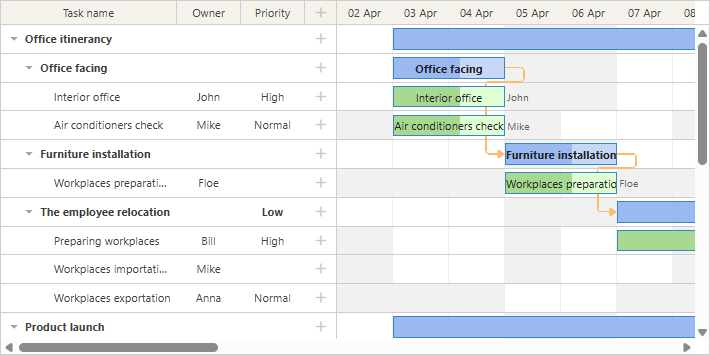
这些日历通过属性与任务一对一映射:
// 资源值取自 `task.resource_id` 属性
gantt.config.resource_property = "resource_id";

gantt.config.resource_calendars = {
    "resource1" : "calendarId1",
    "resource2" : "calendarId2",
    "resource3" : "calendarId3"
};
可使用任意属性将日历分配给资源。如果资源属性动态变化,gantt 会自动使用更新后的日历重新计算任务时间。
当一个任务分配了多个资源时,gantt 可以自动生成一个包含所有分配资源的日历。
更多详情请参阅为资源分配日历相关文章。
平衡资源负载
grouping extension 支持按 resource 属性对整个项目进行分组。
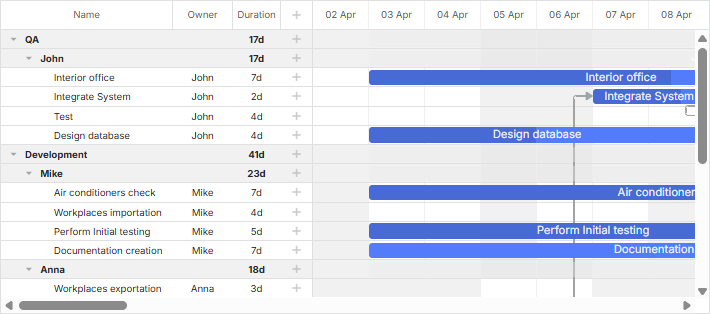
这有助于在日历中平衡资源负载。
关于任务分组的更多信息,请参阅相关文章。
按多个资源分组任务
当任务分配了多个资源时,会按这些资源进行分组。任务不会为每个人重复出现,而是只显示一次,并列出所有分配的人员。分组任务会按其开始日期排序。
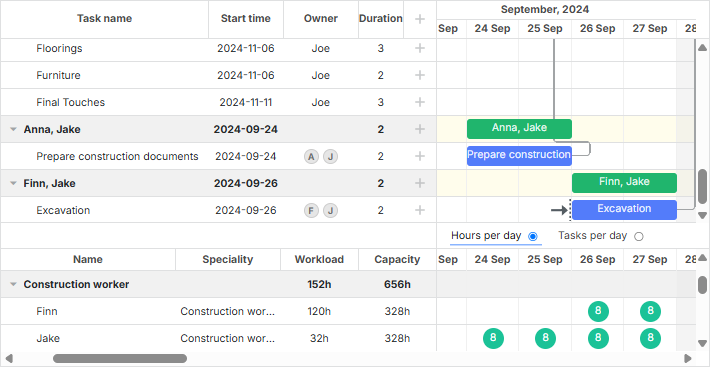
- 如果数据集中的任务分配了多个资源,Gantt 会自动为其创建分组。
- 未分配资源的任务会被放入一个名为 Not assigned 的默认组。如果该组已在传递给 groupBy() 方法的数据中存在,则应包含 default:true 配置,以避免创建重复的默认组。
请注意,无法拖动按多个资源分组的任务。