资源控制
信息
此功能仅包含在 PRO 版本中。
这是一个多功能控件,用于为任务分配多个资源及其数量。
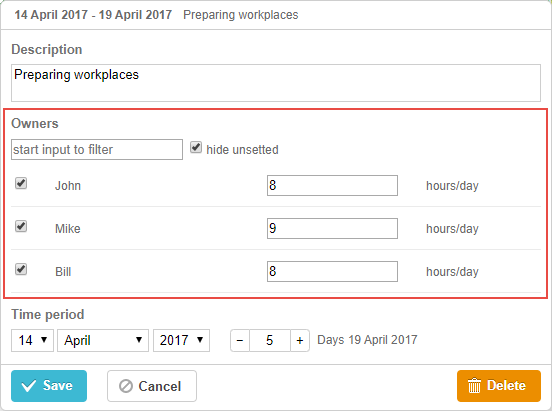
gantt.config.lightbox.sections = [
 {name: "description", height: 38, map_to: "text", type: "textarea", focus: true},
 {name:"owner",height:60, type:"resources", default_value:8},   /*!*/
 {name: "time", type: "duration", map_to: "auto"}
];
或者,

gantt.config.lightbox.sections = [
  { name:"description",height:38,map_to:"text",type:"textarea",focus:true },
  { name:"time",type:"duration",map_to:"auto" },
  { name:"rooms",type:"resources",map_to:"rooms", options:[  /*!*/
        { key: 1, label: "room 1", unit: "hours" },    /*!*/
      { key: 2, label: "room 2", unit: "hours" },   /*!*/
      { key: 3, label: "room 3", unit: "hours" }   /*!*/
    ]  /*!*/
  }       /*!*/
];

gantt.locale.labels.section_rooms = "Rooms";
注释
你也可以创建自定义控件来为任务分配多个资源。
初始化
要在 lightbox 中包含 resources 控件,请按照以下步骤操作:
- 向 lightbox 配置中添加一个 section:
gantt.config.lightbox.sections = [
  { name:"description",height:38,map_to:"text",type:"textarea",focus:true },
  { name:"time",type:"duration",map_to:"auto" },
  { name:"rooms",type:"resources" }       /*!*/
];
- 为该 section 定义一个标签:
gantt.locale.labels.section_resources = "Rooms";
属性
以下是 resources 控件常用的主要属性(完整细节见此处):
- name - (string) section 名称
- map_to - (string) section 映射的数据属性名
- type - (string) section 的控件类型
- options - (array) 定义控件可选项的对象数组(用于 select、checkbox、radio 及 resources 控件)。每个对象包含:
- key - (string) 选项 id,与任务数据属性匹配
- label - (string) 选项标签
- unit - (number) 资源的计量单位
- focus - (boolean) 如果为 true,lightbox 打开时该 section 获得焦点
- default_value - (any) 控件的默认值,当资源值未定义时使用。每个选项可有自己的默认值。
注释
默认情况下,资源控件会映射到 resource_property 中定义的属性,因此 map_to 可选。
为控件填充数据
自 v8.0 起,资源控件会自动从资源数据存储获取选项。
如果你使用 Gantt 提供的默认资源数据存储,资源控件 在未设置 options 参数时会自动关联 gantt.serverList("resourceOptions") 集合,该集合由数据存储中的资源填充。你可以这样在代码中访问这些选项:
const options = gantt.serverList("resourceOptions");
请注意,在资源被加载到数据存储前,options 数组将为空。
你也可以用自定义选项列表更新此集合:
gantt.updateCollection("resourceOptions", [...]);
注意,如果你在更新此集合后又加载了资源数据,这些更改会被覆盖。
如需控制 lightbox 中显示哪些资源,可重定义 gantt.config.resources.lightbox_resources 配置:
gantt.config.resources = {
    lightbox_resources: function selectResourceControlOptions(resources){
          const lightboxOptions = [];
          resources.forEach(function(res) {
             if (!gantt.$resourcesStore.hasChild(res.id)) {
                const copy = gantt.copy(res);
                copy.key = res.id;
                copy.label = res.text;
                lightboxOptions.push(copy);
             }
          });
          return lightboxOptions;
       }
};
如果你手动创建资源数据存储,则需要自行为资源控件填充选项。
通常,设置 resources 控件的值时,使用 options 参数:
gantt.config.lightbox.sections = [
    { name:"rooms",type:"resources",map_to:"rooms",
        options:[
            { key: 1, label: "room 1", unit: "hours" },
            { key: 2, label: "room 2", unit: "hours" },
            { key: 3, label: "room 3", unit: "hours" }
        ]
    }
];
options 数组中的每一项必须包含:
- key - 选项 id
- label - 选项标签
- unit - 资源的计量单位
通过服务器为控件填充数据
若要通过服务器为控件填充数据,将 options 属性设置为 serverList 方法返回的值:
gantt.config.lightbox.sections = [
 {name: "description", height: 38, map_to: "text", type: "textarea", focus: true},
 {name: "resources", type: "resources", map_to: "owner_id", default_value:8,
     options: gantt.serverList("resourceOptions")},
 {name: "time", type: "duration", map_to: "auto"}
];

gantt.init("gantt_here");
gantt.load("/data");
当选项可用时,可以使用 updateCollection 方法为 gantt.serverList("resourceOptions") 设置内容:
gantt.updateCollection("resourceOptions", [
    { key: 1, label: "room 1", unit: "hours" },
    { key: 2, label: "room 2", unit: "hours" },
    { key: 3, label: "room 3", unit: "hours" }
])
Need help?
Got a question about the documentation? Reach out to our technical support team for help and guidance. For custom component solutions, visit the Services page.