复选框控件
这是一个简单的双状态复选框控件,用于切换某个选项或多个值的开启和关闭。
它在以下场景中非常有用:
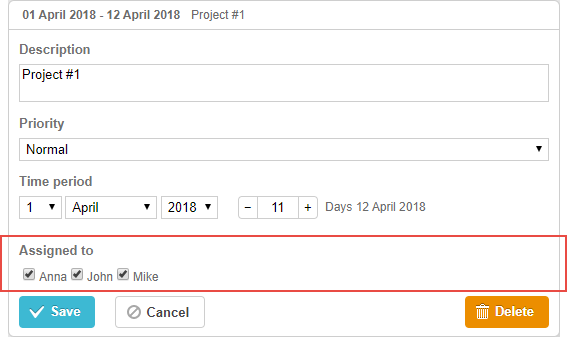
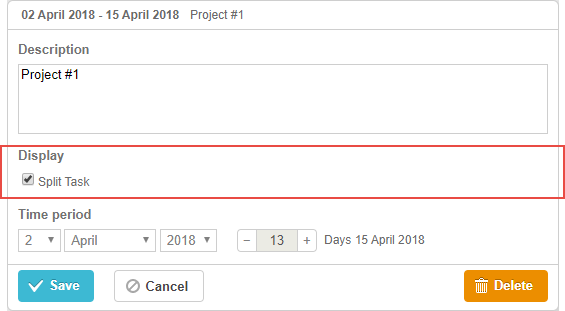
gantt.config.lightbox.project_sections = [
    {name: "description", height: 70, map_to: "text", type: "textarea", focus: true},
    {name: "split", type:"checkbox", map_to: "render", options:[    /*!*/
        {key:"split", label:"Split Task"}                            /*!*/
    ]},                                                                /*!*/
    {name: "time", type: "duration", readonly: true, map_to: "auto"}
];
初始化
要在 lightbox 中包含 checkbox 控件,需要:
- 在 lightbox 配置中添加一个 section:
var opts = [
    {key:"split", label:"Split Task"}
];

gantt.config.lightbox.sections = [
    {name: "description", height: 70, map_to: "text", type: "textarea", focus: true},
    {name: "split", type:"checkbox", map_to: "render", options:opts},            /*!*/
    {name: "time", type: "duration", readonly: true, map_to: "auto"}
];
- 为该 section 定义一个标签:
gantt.locale.labels.section_split = "Display";
属性
以下是 checkbox 控件常用的一些关键属性(完整列表请参见此处):
- name - (string) section 的名称
- map_to - (string) 映射到该 section 的数据属性名称
- type - (string) section 控件的类型
- options - (array) 定义该控件可选项的对象数组(用于 select、checkbox 和 radio 控件)。每个对象包含:
- key - (string) 选项 ID,用于与任务数据属性匹配
- label - (string) 选项的显示标签
- focus - (boolean) 如果为 true,lightbox 打开时该 section 会获得焦点
- default_value - (any) 控件的默认值,仅在输入值为 undefined 时应用
为控件填充数据
要为 checkbox 控件设置值,通常使用 options 参数:
gantt.config.lightbox.sections = [
    {name: "split", type:"checkbox", map_to: "render", options:[
        {key:"split", label:"Split Task"}
    ]}
];
options 数组中的每一项都必须包含以下两个属性:
- key - 选项的 ID
- label - 选项的标签
Need help?
Got a question about the documentation? Reach out to our technical support team for help and guidance. For custom component solutions, visit the Services page.