dhtmlxGantt와 Ruby on Rails 연동하기
이 문서에서는 Ruby on Rails 백엔드를 사용하여 Gantt 차트를 만드는 과정을 안내합니다. 예제에서는 Ruby 2.4.1, Rails 5.1.3, 그리고 MySQL을 사용합니다. 이 사전 조건들이 이미 설치되어 있다고 가정합니다. 만약 설치되어 있지 않다면, 공식 튜토리얼을 먼저 참고하시기 바랍니다.
다른 기술 스택을 사용 중이라면, 아래의 통합 옵션을 참고할 수 있습니다:
- dhtmlxGantt와 ASP.NET Core 사용하기
- dhtmlxGantt와 ASP.NET MVC
- dhtmlxGantt와 Node.js 연동하기
- dhtmlxGantt와 Python
- dhtmlxGantt와 PHP: Laravel 연동
- dhtmlxGantt와 PHP:Slim 연동하기
- dhtmlxGantt와 Salesforce LWC 연동하기
데모는 GitHub에서도 제공됩니다: https://github.com/DHTMLX/gantt-howto-rails.
1단계. 프로젝트 생성
새 프로젝트를 생성하려면 터미널에서 다음 명령어를 실행하세요:
rails new gantt-app -d mysql
2단계. 페이지에 Gantt 추가하기
먼저 컨트롤러와 앱의 기본 페이지를 생성합니다. 애플리케이션 폴더로 이동한 뒤, index 액션이 포함된 새로운 컨트롤러를 생성하세요:
cd gantt-app
rails generate controller gantt index
새 파일이 생성되었다는 메시지가 표시됩니다.
기본 라우트 설정
라우팅을 설정하려면 config/routes.rb 파일을 열고, 기본 라우트를 새 컨트롤러의 "index" 액션을 가리키도록 변경하세요:
config/routes.rb
Rails.application.routes.draw do
  root :to => "gantt#index"
end
이제 서버를 실행해보세요:
rails server
그리고 브라우저에서 http://localhost:3000/ 을 엽니다. 아래와 같이 빈 페이지가 나타납니다:
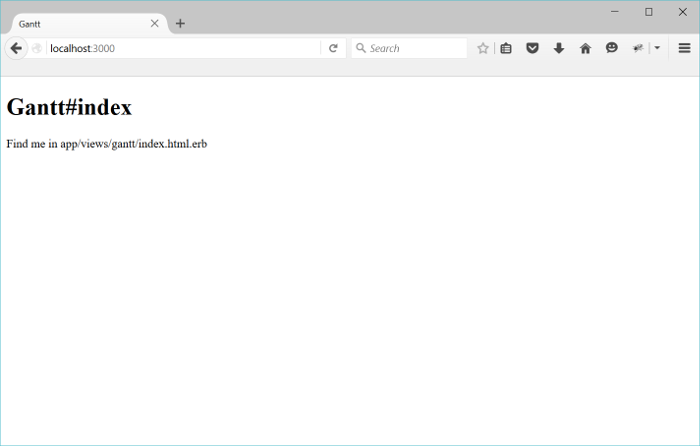
앱이 실행 중이고 기본 페이지가 준비되었으니, 다음 단계는 Gantt 차트를 추가하는 것입니다.
View에 Gantt 추가하기
이제 페이지에 Gantt 차트를 삽입할 차례입니다.
레이아웃 파일을 열고 head 태그 내부에 yield를 추가하세요. 이렇게 하면 dhtmlxGantt 파일을 포함할 수 있습니다:
app/views/layouts/application.html.erb
<!DOCTYPE html>
<html>
<head>
  <title>dhtmlxGantt</title>
  (= stylesheet_link_tag 'application', media:'all','data-turbolinks-track' => true )
  (= javascript_include_tag 'application', 'data-turbolinks-track' => true )
  (= yield(:head) ) /*!*/
  (= csrf_meta_tags )
</head>
<body>

    (= yield )

</body>
</html>
다음으로, gantt/index 뷰를 열고 Gantt 차트를 추가하세요:
app/views/gantt/index.html.erb
( content_for :head do )
    (= stylesheet_link_tag 'https://cdn.dhtmlx.com/gantt/edge/dhtmlxgantt.css' )
    (= javascript_include_tag 'https://cdn.dhtmlx.com/gantt/edge/dhtmlxgantt.js' )
( end )

<div id="gantt_here" style='width:100%; height:800px;'></div>

<script>
    gantt.init("gantt_here");
</script>
여기서는 dhtmlxGantt 파일을 CDN에서 불러옵니다. 개발 시에는 다운로드 패키지에 포함된 소스 파일을 사용할 수도 있습니다.
이제 http://localhost:3000/ 을 다시 열어보세요. 다음과 같은 화면이 나타납니다:
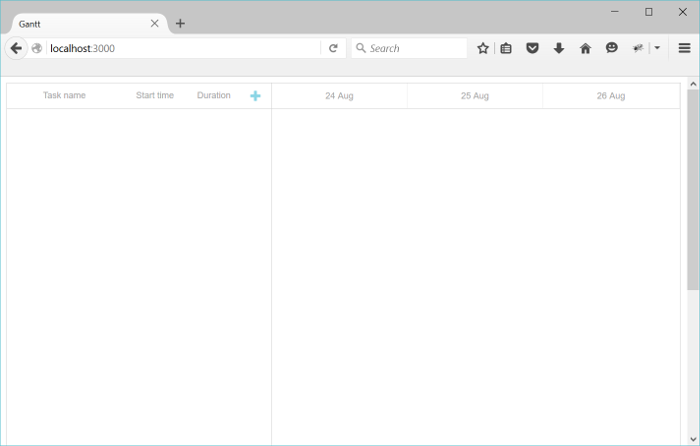
이제 작업을 추가 및 편집할 수 있는 Gantt 차트가 나타납니다. 아직 저장 기능은 구현되지 않았으므로, 다음 단계에서 모델을 생성합니다.
3단계. 모델 생성하기
MySQL을 사용하므로, config/database.yml에서 연결 설정이 올바른지 확인하세요. 예시:
config/database.yml
development:
  adapter: mysql2
  encoding: utf8
  host: localhost
  database: gantt-app
  username: root
  password:
이제 tasks와 links를 위한 모델을 생성해야 합니다.
Task 모델을 생성하려면 다음 명령어를 실행하세요:
rails generate model Task
    text:string
    start_date:datetime
    duration:integer
    parent:integer
    progress:decimal
마찬가지로, Link 모델을 아래 명령어로 생성하세요:
rails generate model Link
    source:integer
    target:integer
    link_type:string:limit1
dhtmlxGantt의 link 객체는 관계 유형(예: start-to-start, finish-to-finish 등)을 지정하는 type 속성이 필요합니다.
하지만 ActiveRecord에서 "type"은 예약어이므로, 여기서는 link_type으로 이름을 지정하고 컨트롤러에서 매핑 처리를 합니다.
필수 및 선택 속성 전체 목록은 Task object 및 Link object 문서를 참고하세요.
이제 다음 명령어로 데이터베이스를 마이그레이션하세요:
rake db:migrate
여기서 테스트 데이터를 추가해봅니다:
- Rails 콘솔을 엽니다:
rails c
- 몇 개의 작업과 링크를 추가합니다:
Task.create :text=>"Task 1", :start_date=>"2015-10-25",  :duration=>2, :progress=>0;
Task.create :text=>"Task 2", :start_date=>"2015-10-27",  :duration=>3, :progress=>0.5;
Link.create :source=>1, :target=>2, :link_type=>"0";
- "exit"을 입력해 콘솔을 종료합니다.
다음은 컨트롤러에서 데이터 로딩 및 저장 기능을 구현합니다.
4단계. 데이터 로딩하기
모델과 마이그레이션이 준비되었으니, 데이터베이스의 데이터를 Gantt 차트에 로드할 수 있습니다.
dhtmlxGantt는 JSON 형식의 데이터를 기대하므로, GanttController에 데이터를 읽고 포맷하여 출력하는 새 액션을 추가합니다:
app/controllers/gantt_controller.rb
class GanttController < ApplicationController
  def index
  end

  def data
    tasks = Task.all
    links = Link.all

    render :json=>{
      :data => tasks.map{|task|{
        :id => task.id,
        :text => task.text,
        :start_date => task.start_date.to_formatted_s(:db),
        :duration => task.duration,
        :progress => task.progress,
        :parent => task.parent,
        :open => true
      }},
      :links => links.map{|link|{
        :id => link.id,
        :source => link.source,
        :target => link.target,
        :type => link.link_type
      }}
    }
  end
end
이 액션을 위한 라우트를 routes.rb에 추가하세요:
config/routes.rb
Rails.application.routes.draw do
  root :to => "gantt#index"

  scope '/api' do/*!*/
    get "/data", :to => "gantt#data"/*!*/
  end/*!*/
end
클라이언트 측에서는 gantt.load 메서드를 사용해 이 액션을 호출합니다:
app/views/gantt/index.html.erb
gantt.config.date_format = "%Y-%m-%d %H:%i:%s";/*!*/

gantt.init("gantt_here");
gantt.load("/api/data");/*!*/
date_format 설정은 서버에서 받아오는 날짜(예: Task의 start_date)의 포맷을 지정하며, 이는 Rails의 날짜 포맷과 일치해야 합니다.
서버를 시작하고 http://localhost:3000/ 을 열면, 데이터베이스에 저장된 작업과 링크가 Gantt 차트에 표시됩니다. 하지만 아직 변경 사항을 저장할 수는 없습니다. 다음 단계에서 이를 처리합니다.
5단계. 변경사항 저장하기
dhtmlxGantt는 사용자의 모든 변경 사항을 백엔드의 RESTful API로 전송하여 데이터베이스에 저장할 수 있습니다. 이 프로토콜의 자세한 내용은 여기에서 확인할 수 있습니다.
저장 기능을 활성화하려면, 먼저 클라이언트에서 변경 사항 전송을 활성화하세요:
app/views/gantt/index.html.erb
gantt.config.date_format = "%Y-%m-%d %H:%i:%s";

gantt.init("gantt_here");
gantt.load("/api/data");

var dp = new gantt.dataProcessor("/api");/*!*/
dp.init(gantt);/*!*/
dp.setTransactionMode("REST");/*!*/
다음으로, Tasks와 Links 각각에 대해 컨트롤러를 추가하고 필요한 액션을 구현합니다.
Task 컨트롤러 생성
Task용 컨트롤러를 생성합니다:
rails generate controller task --no-helper --no-assets --no-view-specs
이 컨트롤러는 뷰가 필요 없으므로 --no- 옵션으로 불필요한 파일 생성을 방지합니다.
다음과 같이 create, update, delete 액션을 구현하세요:
app/controllers/task_controller.rb
class TaskController < ApplicationController
    protect_from_forgery

    def update
        task = Task.find(params["id"])
        task.text = params["text"]
        task.start_date = params["start_date"]
        task.duration = params["duration"]
        task.progress = params["progress"] || 0
        task.parent = params["parent"]
        task.save

        render :json => {:action => "updated"}
    end

    def add
        task = Task.create(
            :text => params["text"],
            :start_date=> params["start_date"],
            :duration => params["duration"],
            :progress => params["progress"] || 0,
            :parent => params["parent"]
        )

        render :json => {:action => "inserted", :tid => task.id}
    end

    def delete
        Task.find(params["id"]).destroy
        render :json => {:action => "deleted"}
    end
end
이 코드에 대한 참고 사항:
- get 액션은 필요하지 않습니다. 모든 데이터는 이미 gantt#data에서 로드됩니다.
- progress 속성은 클라이언트에서 기본적으로 초기화되지 않을 수 있으므로, 여기서 기본값을 할당합니다. 또는 모델 클래스에서(예: migration 이용) 기본값을 지정할 수도 있습니다.
- 새 항목을 생성할 때는, 액션이 새로 삽입된 레코드의 데이터베이스 ID를 클라이언트에 반환합니다.
마지막으로, Gantt 차트에서 작업을 조회, 생성, 수정, 삭제할 수 있도록 라우트를 추가합니다:
config/routes.rb
Rails.application.routes.draw do
  root :to => "gantt#index"

  scope '/api' do
    get "/data", :to => "gantt#data"

    post "/task", :to => "task#add"/*!*/
    put "/task/:id", :to => "task#update"/*!*/
    delete "/task/:id", :to => "task#delete"/*!*/
  end
end
다음 단계에서는 링크에 대해서도 동일한 기능을 구현합니다.
Link 컨트롤러 생성하기
다음 명령어를 사용하여 Link 컨트롤러를 생성하세요:
rails generate controller link --no-helper --no-assets --no-view-specs
아래는 구현 예시입니다:
app/controllers/link_controller.rb
class LinkController < ApplicationController
    protect_from_forgery

    def update
        link = Link.find(params["id"])
        link.source = params["source"]
        link.target = params["target"]
        link.link_type = params["type"]
        link.save

        render :json => {:action => "updated"}
    end

    def add
        link = Link.create(
            :source => params["source"],
            :target => params["target"],
            :link_type => params["type"]
        )

        render :json => {:action => "inserted", :tid => link.id}
    end

    def delete
        Link.find(params["id"]).destroy
        render :json => {:action => "deleted"}
    end
end
다음으로, 새로운 액션에 대한 라우트를 추가합니다:
config/routes.rb
Rails.application.routes.draw do
  root :to => "gantt#index"

  scope '/api' do
    get "/data", :to => "gantt#data"

    post "/task", :to => "task#add"
    put "/task/:id", :to => "task#update"
    delete "/task/:id", :to => "task#delete"

    post "/link", :to => "link#add"/*!*/
    put "/link/:id", :to => "link#update"/*!*/
    delete "/link/:id", :to => "link#delete"/*!*/
  end
end
이렇게 하면 설정이 완료됩니다. 애플리케이션을 실행하면 Rails와 MySQL로 백엔드가 연결된 인터랙티브 간트 차트를 사용할 수 있습니다:
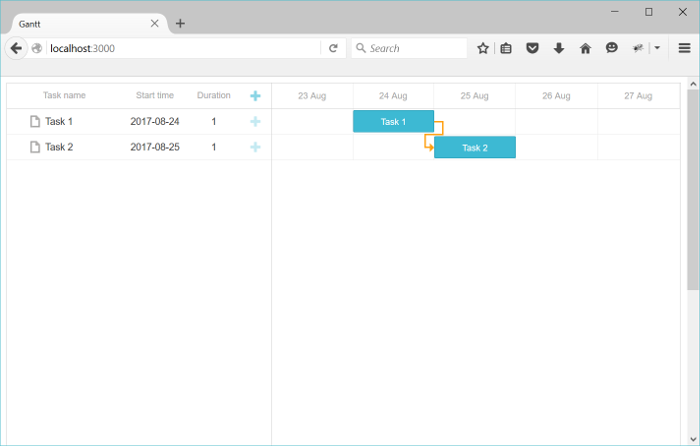
dhtmlxGantt의 더 많은 기능은 가이드를 참고하세요.
작업 순서 저장하기
클라이언트 측 간트에서는 작업 순서 변경을 드래그 앤 드롭으로 지원합니다. 이 기능을 사용할 경우, 작업 순서를 데이터베이스에 저장해야 합니다. 개요는 여기에서 확인할 수 있습니다.
이제 이 기능을 앱에 추가해 보겠습니다.
클라이언트에서 작업 순서 변경 활성화
먼저, Index 뷰의 gantt 설정을 업데이트하여 UI에서 작업 순서 변경을 활성화하세요:
app/views/gantt/index.html.erb
gantt.config.order_branch = true;/*!*/
gantt.config.order_branch_free = true;/*!*/

gantt.init("gantt_here");
이제 백엔드도 변경 사항을 반영해야 합니다. 모델에 순서를 저장할 필드가 필요하며, sortorder라는 이름으로 추가합니다. 모델 선언은 다음과 같이 변경할 수 있습니다:
rails generate model Task
    text:string
    start_date:datetime
    duration:integer
    parent:integer
    progress:decimal
    sortorder:integer  /*!*/
또는 기존 모델에 새 속성을 추가할 수도 있습니다:
- 마이그레이션 생성:
rails generate migration add_sortorder_to_tasks sortorder:integer
- 생성된 마이그레이션 파일을 수정하여 "sortorder" 컬럼의 기본값을 설정하세요:
class AddSortorderToTasks < ActiveRecord::Migration[5.1]
  def change
    add_column :tasks, :sortorder, :integer, :default=>0
  end
end
마이그레이션을 실행합니다:
rake db:migrate
다음으로 컨트롤러의 CRUD 동작을 업데이트하세요:
- data 액션에서
sortorder컬럼 기준으로 작업을 정렬하여 반환합니다:
app/controllers/gantt_controller.rb
class GanttController < ApplicationController
  def index
  end

  def data
    tasks = Task.all
    links = Link.all

    render :json=>{
      :data => tasks.order(:sortorder).map{|task|{ /*!*/
        :id => task.id,
        :text => task.text,
        :start_date => task.start_date.to_formatted_s(:db),
        :duration => task.duration,
        :progress => task.progress,
        :parent => task.parent,
        :open => true
      }},
      :links => links.map{|link|{
        :id => link.id,
        :source => link.source,
        :target => link.target,
        :type => link.link_type
      }}
    }
  end
end
- 새 작업을 추가할 때는 초기
sortorder값을 할당하세요:
app/controllers/task_controller.rb
class TaskController < ApplicationController
    ...
    def add

        maxOrder = Task.maximum("sortorder") || 0/*!*/

        task = Task.create(
            :text => params["text"],
            :start_date=> params["start_date"],
            :duration => params["duration"],
            :progress => params["progress"] || 0,
            :parent => params["parent"],
            :sortorder => maxOrder + 1/*!*/
        )

        render :json => {:action => "inserted", :tid => task.id}
    end

end
- 마지막으로, 사용자가 작업 순서를 변경하면 순서도 업데이트합니다:
app/controllers/task_controller.rb
class TaskController < ApplicationController
    protect_from_forgery

    def update
        task = Task.find(params["id"])
        task.text = params["text"]
        task.start_date = params["start_date"]
        task.duration = params["duration"]
        task.progress = params["progress"] || 0
        task.parent = params["parent"]
        task.save

        if(params['target'])/*!*/
            Task.updateOrder(task.id, params['target'])/*!*/
        end/*!*/

        render :json => {:action => "updated"}
    end

    ...
end
Task.updateOrder 구현 예시는 다음과 같습니다:
app/models/task.rb
class Task < ApplicationRecord
    def self.updateOrder(taskId, target)
        nextTask = false
        targetId = target

        if(target.start_with?('next:'))
            targetId = target['next:'.length, target.length]
            nextTask = true;
        end

        if(targetId == 'null')
            return
        end

        targetTask = self.find(targetId)

        targetOrder = targetTask.sortorder

        if(nextTask)
            targetOrder += 1
        end

        self.where("sortorder >= ?", targetOrder).
            update_all('sortorder = sortorder + 1')

        task = self.find(taskId)
        task.sortorder = targetOrder
        task.save
    end
end
애플리케이션 보안
Gantt 자체에는 SQL 인젝션, XSS, CSRF 공격과 같은 일반적인 위협에 대한 보호 기능이 내장되어 있지 않습니다. 백엔드 구현의 보안은 개발자가 책임져야 합니다. 자세한 내용은 이 문서를 참고하세요.
문제 해결
Ruby on Rails와 Gantt를 연동하는 단계를 모두 따라 했는데도 작업이나 링크가 페이지에 표시되지 않는다면, 백엔드 통합 문제 해결의 가이드를 참고하세요. 일반적인 문제를 진단하는 팁이 포함되어 있습니다.
다음 단계
이제 간트 차트가 완전히 동작하므로, 전체 코드는 GitHub에서 확인할 수 있습니다. 프로젝트에 복제하거나 다운로드하여 사용할 수 있습니다.
또한 다양한 간트 기능 가이드나 다른 백엔드 프레임워크와의 연동 튜토리얼도 살펴보세요.