dhtmlxGantt with Angular
이 문서를 사용하려면 Angular의 기본 개념과 패턴에 익숙해야 합니다. 익숙하지 않은 경우 시작 가이드를 참고하십시오. Angular 문서를 참고해 시작 방법을 확인할 수 있습니다.
DHTMLX Gantt는 Angular와 호환됩니다. GitHub에서 해당 예제를 확인할 수 있습니다: DHTMLX Gantt with Angular Demo.
프로젝트 생성
새 프로젝트를 시작하기 전에 Angular CLI와 Node.js를 설치하십시오.
ng new my-angular-gantt-app
위 명령은 필요한 모든 도구와 의존성을 설치하므로 추가 명령이 필요하지 않습니다.
의존성 설치
그 다음 아래 명령으로 앱 디렉터리로 이동하십시오:
cd my-angular-gantt-app
그런 다음 아래 명령 중 하나로 앱을 실행합니다:
yarn start
또는
npm start
앱은 이제 http://localhost:4200에서 접속할 수 있습니다.
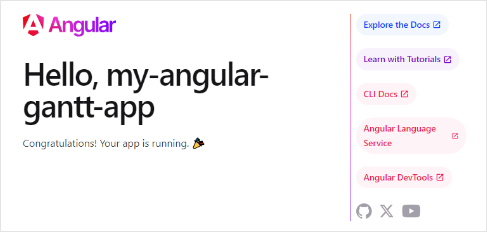
Gantt 생성
이제 DHTMLX Gantt 코드를 얻어야 합니다. 먼저 명령 프롬프트에서 Ctrl+C를 눌러 앱을 중지한 다음 Gantt 패키지 설치를 진행할 수 있습니다.
Step 1. 패키지 설치
라이브러리의 PRO 버전은 당사의 프라이빗 리포지토리에서 npm/yarn 설치로 이용할 수 있습니다. 접근 권한을 얻으려면 이 지침을 따라 주십시오.
평가 버전의 Gantt를 얻은 뒤에는 아래 명령으로 설치할 수 있습니다:
- npm용:
npm install @dhx/trial-gantt
- yarn용:
yarn add @dhx/trial-gantt
또는 zip 패키지로 제공되는 라이브러리를 npm 모듈로 구성된 형태로 사용할 수 있으므로 로컬 폴더에서 설치하기 옵션을 사용할 수 있습니다.
Step 2. 컴포넌트 생성
다음으로 애플리케이션에 Gantt를 추가할 컴포넌트를 생성해야 합니다. src/app/ 디렉터리에 gantt 폴더를 만들고 그 안에 두 개의 파일을 추가하여 각각 gantt.component.ts와 gantt.component.css로 부릅시다.
소스 파일 가져오기
gantt.component.ts 파일을 열고 Gantt 소스 파일을 가져옵니다. 주의 사항은 다음과 같습니다:
- 로컬 폴더에서 Gantt 패키지를 설치한 경우 가져오기 경로는 다음과 같이 보일 수 있습니다:
import { Gantt } from 'dhtmlx-gantt';
@import "@dhtmlx-gantt/codebase/dhtmlxgantt.css";
- Trial 버전을 설치한 경우의 경로는 다음과 같아야 합니다:
import { Gantt } from '@dhx/trial-gantt';
@import "@dhx/trial-gantt/codebase/dhtmlxgantt.css";
이 튜토리얼에서는 trial 버전의 Gantt를 사용할 것입니다.
새로 생성된 gantt.component.ts 파일은 gantt 폴더 내에 Gantt의 템플릿을 포함하게 됩니다. 아래 줄의 코드를 추가합시다:
import { Component, ElementRef, OnInit,
    ViewChild, ViewEncapsulation } from '@angular/core';
import { Gantt, GanttStatic } from "@dhx/trial-gantt";

@Component({
    encapsulation: ViewEncapsulation.None,
    selector: 'gantt',
    styleUrls: ['./gantt.component.css'],
    template: `<div #gantt_here className='gantt-chart'></div>`,
})
export class GanttComponent implements OnInit {
    @ViewChild('gantt_here', { static: true }) ganttContainer!: ElementRef;
    private _gantt?: GanttStatic;

    ngOnInit() {
        let gantt = Gantt.getGanttInstance();
        gantt.init(this.ganttContainer.nativeElement);

        this._gantt = gantt;
    }
    ngOnDestroy() {
        if (this._gantt) this._gantt.destructor();
    }
}
위 코드에서 Angular의 ngOnInit() 메서드를 사용했고, 필요 없게 되었을 때 컴포넌트를 정리하기 위해 ngOnDestroy() 메서드에 gantt.destructor() 호출을 지정한 것을 볼 수 있습니다.
Gantt 스타일은 gantt.component.css 파일에 별도로 선언합니다. 기본 스타일은 아래와 같이 보일 수 있습니다:
@import "@dhx/trial-gantt/codebase/dhtmlxgantt.css";
.gantt-chart {
    position: relative;
    width: 100%;
    height: 600px;
}
Step 3. 앱에 Gantt 추가
이제 컴포넌트를 앱에 추가할 차례입니다. src/app/app.component.ts를 열고 기본 콘텐츠 대신 Gantt 컴포넌트를 사용하도록 아래 코드를 삽입합니다:
import { Component } from '@angular/core';

@Component({
  selector: 'app-root',
  templateUrl: './app.component.html',
  styleUrls: ['./app.component.css']
})
export class AppComponent {
  title = 'DHTMLX Gantt with Angular';
}
그런 다음 src/app/app.module.ts 파일을 src/app/ 디렉터리에 생성하고 아래의 내용으로 GanttComponent를 추가합니다:
import { NgModule } from "@angular/core";
import { BrowserModule } from "@angular/platform-browser";

import { AppComponent } from "./app.component";
import { GanttComponent } from './gantt/gantt.component';

@NgModule({
  declarations: [AppComponent, GanttComponent],
  imports: [BrowserModule],
  providers: [],
  bootstrap: [AppComponent],
})
export class AppModule {}
다음으로 src/app/app.component.html 파일을 열고 기본 내용 대신 아래 코드를 추가합니다:
<gantt></gantt>
마지막으로 src/main.ts 파일을 열어 기존 코드를 아래와 같이 바꿉니다:
import { platformBrowserDynamic } from "@angular/platform-browser-dynamic";
import { AppModule } from "./app/app.module";

platformBrowserDynamic()
  .bootstrapModule(AppModule)
  .catch((err) => console.error(err));
그 후 앱을 시작하면 빈 Gantt가 있는 페이지가 표시됩니다:

Step 4. 데이터 제공
Angular Gantt에 데이터 로딩을 추가하려면 작업(Task)과 연결(Link) 서비스를 추가해야 합니다. 다만 먼저 작업과 연결 모델을 정의해 보겠습니다.
작업 및 연결 모델을 생성하려면 아래 명령을 실행합니다:
ng generate class models/task --skip-tests
ng generate class models/link --skip-tests
새로 생성된 models/task.ts 파일에서, models 폴더 안에 아래의 코드를 추가합니다:
export class Task {
    id!: number;
    start_date!: string;
    text!: string;
    progress!: number;
    duration!: number;
    parent!: number;
}
새로 생성된 models/link.ts 파일 안에 아래의 코드를 추가합니다:
export class Link {
     id!: number;
    source!: number;
    target!: number;
    type!: string;
}
이제 Task와 Link 서비스를 생성해 봅시다. 서비스는 특정 작업이나 연결을 생성하는 역할을 하는 클래스입니다. Angular의 서비스는 Dependency Injection(UnDI) 메커니즘을 사용하여 주입될 수 있습니다. 이 서비스들은 데이터나 함수, 애플리케이션에 필요한 기능을 포함할 수 있습니다. Gantt에 Task와 Link를 제공하는 데이터 서비스를 만들어야 합니다.
Task와 Link 서비스를 생성하려면 아래 명령을 실행합니다:
ng generate service services/task --flat --skip-tests
ng generate service services/link --flat --skip-tests
새로 생성된 task.service.ts 파일 안에 아래의 코드를 추가합니다:
import { Injectable } from '@angular/core';
import { Task } from '../models/task';

@Injectable()
export class TaskService {
    get(): Promise<Task[]>{
        return Promise.resolve([
            { id: 1, text: 'Task #1', start_date: '2023-04-15 00:00',
                duration: 3, progress: 0.6, parent: 0 },
            { id: 2, text: 'Task #2', start_date: '2023-04-18 00:00',
                duration: 3, progress: 0.4, parent: 0 }
        ]);
    }
}
또한 link.service.ts 파일 안에 아래의 내용을 추가합니다:
import { Injectable } from '@angular/core';
import { Link } from '../models/link';

@Injectable()
export class LinkService {
    get(): Promise<Link[]> {
        return Promise.resolve([
            { id: 1, source: 1, target: 2, type: '0' }
        ]);
    }
}
이제 서비스에 @Injectable() 데코레이터를 추가했습니다. 이는 주입기가 인스턴스화할 수 있는 클래스로 표시합니다. 이를 컴포넌트에 주입할 예정입니다. 앞으로 이 서비스들을 컴포넌트에 주입할 것입니다.
현재 get() 메서드는 하드코딩된 데이터로 해석된 프라미스를 반환합니다. 다만 서버 측에서 데이터를 로드하고 프라미스도 반환하게 할 수 있습니다. Gantt 컴포넌트는 작업을 얻기 위해 TaskService, 연결을 얻기 위해 LinkService를 사용할 예정입니다. 이를 가능하게 하려면 컴포넌트에 서비스를 추가합시다. 먼저 gantt.component.ts에 필요한 모듈을 가져옵니다:
import {TaskService} from "../services/task.service";
import {LinkService} from "../services/link.service";
또한 @Component 데코레이터의 providers에 TaskService와 LinkService를 지정해야 합니다:
@Component({
    encapsulation: ViewEncapsulation.None,
    selector: 'gantt',
    styleUrls: ['./gantt.component.css'],
    providers: [TaskService, LinkService],
    template: `<div #gantt_here className='gantt-chart'></div>`,
})
이제 새로운 GanttComponent가 초기화될 때마다 서비스의 새 인스턴스가 생성됩니다. 서비스는 컴포넌트에 주입될 준비가 되어 있어야 합니다. 이를 위해 GanttComponent 클래스에 아래 생성자를 추가합니다:
constructor(private taskService: TaskService, private linkService: LinkService) { }
다음과 같이 ngOnInit() 함수를 수정합니다:
- 작업 데이터를 로드하기 위한 형식(XML)을 설정해야 합니다
- 서비스를 호출해 데이터를 얻고 응답이 오면 이를 Gantt에 전달합니다
let gantt = Gantt.getGanttInstance();
gantt.config.date_format = '%Y-%m-%d %H:%i';
gantt.init(this.ganttContainer.nativeElement);

Promise.all([this.taskService.get(), this.linkService.get()])
    .then( ([data, links]) => {
        gantt.parse({ data, links });
    });
this._gantt = gantt;
다음은 gantt.component.ts 파일의 전체 코드를 보여주는 예시입니다:
import { Component, ElementRef, OnInit,
    ViewChild, ViewEncapsulation } from '@angular/core';
import { TaskService } from '../services/task.service';
import { LinkService } from '../services/link.service';
import { Gantt, GanttStatic } from "@dhx/trial-gantt";

@Component({
    encapsulation: ViewEncapsulation.None,
    selector: 'gantt',
    styleUrls: ['./gantt.component.css'],
    providers: [TaskService, LinkService],
    template: `<div #gantt_here className='gantt-chart'></div>`,
})
export class GanttComponent implements OnInit {
    @ViewChild('gantt_here', { static: true }) ganttContainer!: ElementRef;
    private _gantt?: GanttStatic;
    constructor(private taskService: TaskService, private linkService: LinkService) { }

    ngOnInit() {
        let gantt = Gantt.getGanttInstance();
        gantt.config.date_format = '%Y-%m-%d %H:%i';
        gantt.init(this.ganttContainer.nativeElement);
        Promise.all([this.taskService.get(), this.linkService.get()])
            .then(([data, links]) => {
                gantt.parse({ data, links });
            });
        this._gantt = gantt;
    }
    ngOnDestroy() {
        if (this._gantt) this._gantt.destructor();
    }
}
이제 다시 앱 페이지를 열면 작업이 포함된 Gantt가 보일 것입니다:

Step 5. 데이터 저장
Gantt에서 발생한 변경 사항을 캡처하려면 백엔드 서버와의 통신을 가능하게 하는 dataProcessor 핸들러를 사용할 수 있습니다. 핸들러는 함수나 라우터 객체로 선언될 수 있습니다. dhtmlxGantt는 핸들러의 Promise 응답을 받아들이므로 작업의 완료를 올바르게 처리합니다.
다음과 같이 API 메서드 **createDataProcessor()**를 통해 DataProcessor를 생성하고 변경 사항을 캡처할 수 있습니다:
gantt.createDataProcessor(function(entity, action, data, id) {
gantt.message(`${entity} ${action}`);
});
새 레코드를 생성한 후 작업 ID를 변경하는 서비스가 일반적으로 하는 것처럼, Promise가 데이터를 반환할 때 (id: databaseId) 또는 (tid: databaseId) 형식의 객체를 반환하게 하여 Gantt가 새로운 데이터베이스 ID를 레코드에 적용할 수 있도록 하십시오. 서버 측에 대한 자세한 정보는 서버 측 정보를 확인하십시오.
자, Angular Gantt가 준비되었습니다. GitHub의 전체 데모를 확인해 보시려면 여기를 클릭하십시오.
XSS, CSRF 및 SQL Injection 공격
Gantt가 SQL 주입이나 XSS, CSRF 공격과 같은 다양한 위협으로부터 애플리케이션을 보호하는 수단을 제공하지 않는다는 점에 유의하십시오. 애플리케이션의 안전성을 유지하는 책임은 백엔드를 구현하는 개발자에게 있습니다.
컴포넌트의 취약한 지점과 애플리케이션의 안전성을 높이기 위해 취할 수 있는 조치를 알아보려면 Application Security 문서를 참고하십시오.