빠른 정보(터치 지원)
라이브러리에는 화면에서 작업을 터치하면 해당 작업에 대한 세부 정보가 담긴 팝업을 표시하는 빠른 정보 확장이 포함되어 있습니다.
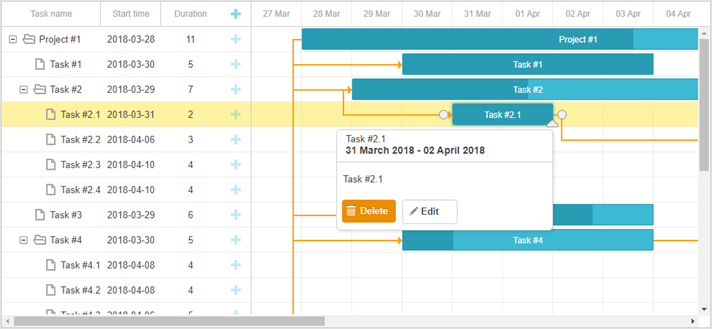
확장 기능을 시작하려면 "Quick Info" 플러그인을 gantt.plugins 메서드를 사용하여 활성화하십시오.
gantt.plugins({
    quick_info: true
});
quick_info 확장을 비활성화하려면 show_quick_info 속성을 false로 설정합니다:
gantt.config.show_quick_info = false;
gantt.init("gantt_here");
API 개요
Quick Info 확장은 Quick Info의 설정을 조작하고 동작을 제어하거나 팝업의 모양을 수정할 수 있는 API 세트를 제공합니다.
다음 아래에 나열된 [gantt.ext.quickInfo 객체의 API](guides/quick-info.md #quickinfoobject) 또는 dhtmlxGantt의 공개 API를 사용할 수 있습니다:
메서드(METHODS)
- showQuickInfo - 지정된 작업에 대한 팝업 작업 양식을 표시합니다
- hideQuickInfo - 팝업 작업 양식을 숨깁니다(현재 활성화되어 있을 경우)
이벤트(Events)
- onQuickInfo - 팝업 편집 양식이 나타날 때 발생합니다
- onAfterQuickInfo - 팝업 편집 양식이 닫힌 후 발생합니다
속성(Properties)
- quick_info_detached - 팝업 양식이 화면의 좌/우에서 나타날지 여부 또는 선택된 작업 근처에서 나타날지 여부를 정의합니다
- quickinfo_buttons - 팝업 작업의 세부 양식에 배치될 버튼들의 모음을 저장합니다
템플릿(Templates)
- quick_info_class - 팝업 편집 양식에 적용될 CSS 클래스를 지정합니다
- quick_info_content - 팝업 편집 양식의 내용을 지정합니다
- quick_info_date - 팝업 편집 양식의 날짜를 지정합니다
- quick_info_title - 팝업 편집 양식의 제목을 지정합니다
QuickInfo 객체
빠른 정보 확장의 기본 동작은 팝업이 자동으로 선택된 작업 위에 나타나는 것을 의미합니다.
버전 7.0부터 Quick Info의 기능이 확장되었습니다. 팝업을 수동으로 제어하기 위한 메서드를 제공하는 gantt.ext.quickInfo 객체가 추가되었습니다.
gantt.ext.quickInfo 객체를 통해 사용할 수 있는 메서드는 다음과 같습니다:
- show() - 지정된 작업에 대해 빠른 정보 팝업을 표시합니다. 하나의 매개변수를 받습니다:
- id - (string|number) 작업/링크/리소스의 ID
- show() - 특정 좌표에서 빠른 정보 팝업을 표시합니다. 매개변수는 다음과 같습니다:
- top - (number) X 좌표
- left - (number) Y 좌표
- hide() - 빠른 정보 팝업을 숨깁니다. 이 메서드는 하나의 선택적 매개변수를 받을 수 있습니다:
- [ force ] - (boolean) gantt.config.quick_info_detached가 false로 설정되어 있을 때 빠른 정보가 즉시 사라지는지 여부를 정의합니다. hide 메서드의 매개변수로 true를 제공하면 즉시 팝업이 제거되고, 그렇지 않으면 짧은 애니메이션 후에 팝업이 사라집니다.
- setContainer() - 빠른 정보를 표시할 컨테이너를 설정합니다.
- container - (string|HTMLElement) QuickInfo 컨테이너. 맞춤 컨테이너가 지정되지 않으면 QuickInfo가 발견된 노드 중 첫 번째인 gantt.$task, gantt.$grid, gantt.$layout에 배치됩니다.
- getNode() - 빠른 정보 팝업의 HTMLElement를 반환합니다. 초기화되지 않은 경우 null을 반환합니다
- setContent(config) - (object) 빠른 정보에 내용을 삽입합니다. 매개변수로 빠른 정보의 구성 객체를 받습니다.
*구성 객체(configuration object)*는 다음 구조를 가집니다:
- taskId - (string|number) 선택적, 빠른 정보의 작업 버튼이 연결될 작업의 ID
- header - 선택적, 팝업 편집 양식의 헤더로 다음을 포함할 수 있습니다:
- title - (string) 선택적, 팝업 편집 양식의 제목
- date - (string) 선택적, 팝업 편집 양식의 날짜
- content - (string) 선택적, 팝업 편집 양식의 내용
- buttons - (string[]) 선택적, 팝업 편집 양식에 배치될 버튼들
헤더와 버튼 중 어느 하나도 지정되지 않으면, 빠른 정보 팝업의 해당 영역은 숨겨집니다.
Showing Quick Info
지정된 작업, 링크, 리소스 패널에 대해 팝업을 표시하거나 화면의 다른 위치에 팝업을 표시하도록 gantt.ext.quickInfo.show() 메서드를 사용할 수 있습니다:
// show the popup for the specified task
var task = gantt.getTask(10);
gantt.ext.quickInfo.show(task.id);

// show the popup at specific coordinates
gantt.ext.quickInfo.show(100, 200);
리소스에 대해 팝업을 표시하는 예시는 아래와 같습니다:
const quickInfo = gantt.ext.quickInfo;
gantt.attachEvent("onGanttReady", function(){
    quickInfo.setContainer(document.body);
})

gantt.attachEvent("onEmptyClick", function (e) {
  const domHelpers = gantt.utils.dom;
  const resourceElement = domHelpers.closest(e.target, "[data-resource-id]");
  if(resourceElement){
    const resourceId = resourceElement.getAttribute("data-resource-id");
    const resource = gantt.$resourcesStore.getItem(resourceId);
    const position = resourceElement.getBoundingClientRect();
    quickInfo.show(position.right, position.top);

    const assignedTasks = gantt.getResourceAssignments(resourceId).map(function(assign){
        return gantt.getTask(assign.task_id).text;
    });

    quickInfo.setContent({
        header: {
        title: resource.text,
        date: ""
    },
        content: "Assigned tasks: " + assignedTasks.join(", "),
        buttons: []
    });
  }
});
다음은 지정된 링크에 대해 팝업을 표시하는 예시입니다:
const quickInfo = gantt.ext.quickInfo;
gantt.attachEvent("onLinkClick", function(id,e){
    //어떤 커스텀 로직도 여기에 위치할 수 있습니다
    const link = gantt.getLink(id);
    const linksFormatter = gantt.ext.formatters.linkFormatter();

    const domHelpers = gantt.utils.dom;
    const position = domHelpers.getRelativeEventPosition(e, gantt.$task_data);

    const sourceTask = gantt.getTask(link.source);
    const targetTask = gantt.getTask(link.target);
    quickInfo.show(position.x, position.y);

    let linkDescr = "";

    if (link.type === gantt.config.links.start_to_start){
        linkDescr = "Start to start";
    } else if (link.type === gantt.config.links.start_to_finish){
        linkDescr = "Start to finish";
    } else if (link.type === gantt.config.links.finish_to_finish){
        linkDescr = "Finish to Finish";
    } else {
        linkDescr = "Finish to start";
    }

    quickInfo.setContent({
        header: {
            title: `${linkDescr} link`,
            date: ""
        },
        content: `Source: ${sourceTask.text}


                    Target: ${targetTask.text}`,
        buttons: []
    });
});
Hiding Quick Info
팝업 편집 양식을 숨기려면 gantt.ext.quickInfo.hide() 메서드를 사용합니다. 이 메서드는 gantt.config.quick_info_detached 설정에 따라 두 가지 가능한 옵션을 전제로 합니다:
- 매개변수 없이 호출될 경우, 짧은 애니메이션 후 화면에서 팝업 편집 양식이 숨겨집니다
gantt.config.quick_info_detached = false;
gantt.init("gantt_here");

// hide the popup after a short animation
gantt.ext.quickInfo.hide();
- 팝업을 즉시 숨기려면 hide 메서드에 true를 매개변수로 전달합니다:
gantt.config.quick_info_detached = false;
gantt.init("gantt_here");

// hide the popup immediately
gantt.ext.quickInfo.hide(true);
참고로 gantt.config.quick_info_detached 설정이 true로 되어 있으면 이 메서드는 항상 팝업을 즉시 숨깁니다.
Custom QuickInfo 만들기
기본적으로 Quick Info 팝업은 제목, 날짜, 내용, 버튼을 포함하며 아래와 같이 보입니다:

팝업 편집 양식의 모양을 바꾸거나 커스텀 팝업을 만들고 싶은 경우, 원하는 HTML 내용을 gantt.ext.quickInfo.setContent() 메서드를 통해 정의할 수 있습니다:
gantt.locale.labels.custom_button = "My button"
gantt.ext.quickInfo.setContent({
    header:{
        title: "My custom header",
        date: "18th of February, 2020"
    },
    content: "some content here",
    buttons: ["custom_button"]
})
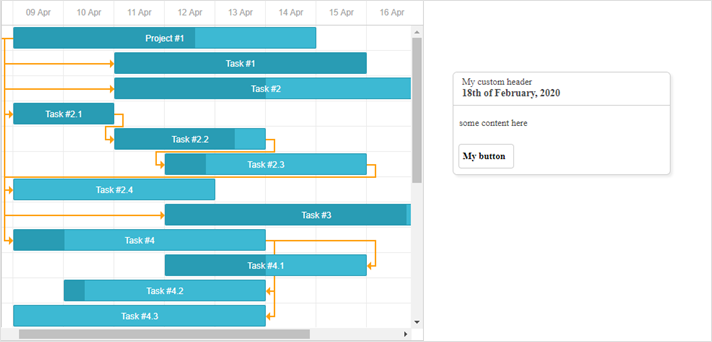
그 결과 페이지에 다음과 같은 Quick Info 팝업이 표시됩니다:

커스텀 동작이 있는 커스텀 버튼 추가하기
$click 객체를 사용하면 팝업 편집 양식에 위치한 커스텀 버튼에 대해 커스텀 동작을 추가할 수 있습니다:
gantt.config.quickinfo_buttons="[""icon_delete","icon_edit","advanced_details_button"];
gantt.locale.labels["advanced_details_button"] = "Advanced Info";
gantt.init("gantt_here");

gantt.$click.buttons.advanced_details_button="function(id){"
    gantt.message("These are advanced details");
    return false; //blocks the default behavior
};
QuickInfo의 컨테이너 설정하기
gantt.ext.quickInfo.setContainer() 메서드를 사용하여 빠른 정보를 커스텀 컨테이너에 표시되도록 설정할 수 있습니다:
const quickInfo = gantt.ext.quickInfo;
quickInfo.setContainer(document.body); /*!*/
gantt.ext.quickInfo.show(1300,100);
gantt.locale.labels.custom_button = "My button"
gantt.ext.quickInfo.setContent({
    header:{
        title: "My custom header",
        date: "18th of February, 2020"
    },
    content: "some content here",
    buttons: ["custom_button"]
});
이제 커스텀 컨텐츠를 가진 팝업이 Gantt 컨테이너 외부의 document.body에 렌더링됩니다: