빈 상태 화면
버전 8.0부터 라이브러리에는 로드된 데이터가 없을 경우 Gantt 차트의 그리드에 자리 표시 요소를 포함한 빈 화면("empty state")을 표시하는 기능이 포함되어 있습니다.
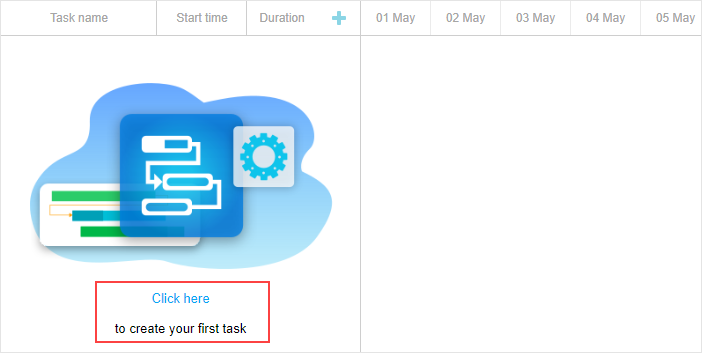
기본적으로 자리 표시 요소는 숨겨져 있습니다. 표시하려면 show_empty_state 구성을 사용하십시오:
gantt.config.show_empty_state = true;
EmptyStateElement 객체
"empty state"는 emptyStateElement 확장에서 제공하는 API 메서드 세트를 포함합니다.
"empty state"의 표시가 가능하다는 것은 Gantt 차트에 로드된 작업이 전혀 없을 때뿐만 아니라 작업이 로드되었지만 필터링되어 페이지에 보이지 않는 경우에도 표시할 수 있음을 의미합니다. 이를 위해 isEnabled() 메서드를 사용하세요:
gantt.ext.emptyStateElement.isEnabled = function (){
    return !gantt.getVisibleTaskCount().length;
}
그리드가 아닌 타임라인 영역에 "empty state"를 표시하려면 getContainer() 메서드를 사용하십시오:
gantt.ext.emptyStateElement.getContainer = function() {
    return gantt.$task_data.closest(".gantt_layout_content");
};
"empty state"에서 렌더링되는 내용을 변경하려면 renderContent() 메서드를 적용하십시오:
gantt.ext.emptyStateElement.renderContent = function (container) {
    const placeholderTextElement = `<div className='gantt_empty_state_text'>
    <div className='gantt_empty_state_text_link' data-empty-state-create-task>
       ${gantt.locale.labels.empty_state_text_link}</div>
    <div className='gantt_empty_state_text_description'>
       ${gantt.locale.labels.empty_state_text_description}</div>
    </div>`;
    const placeholderImageElement = "<div className='gantt_empty_state_image'></div>";

    const placeholderContainer = `<div className='gantt_empty_state'>
       ${placeholderImageElement}${placeholderTextElement}</div>`;
    container.innerHTML = placeholderContainer;
}
Need help?
Got a question about the documentation? Reach out to our technical support team for help and guidance. For custom component solutions, visit the Services page.