空状态屏幕
从 v8.0 开始,库提供在甘特图中未加载数据时,在网格中显示一个空屏幕(空状态)的占位元素的能力。
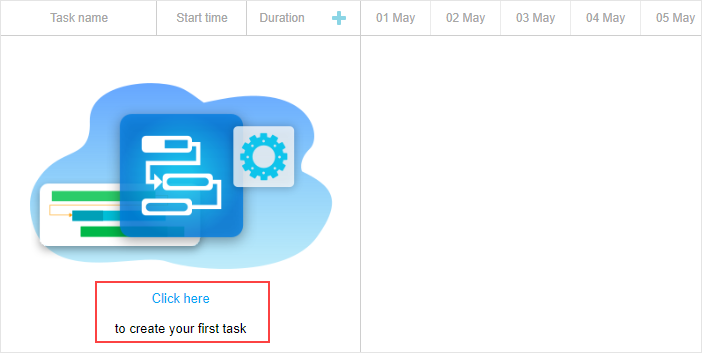
默认情况下,占位元素是隐藏的。若要显示它,请使用 show_empty_state 配置:
gantt.config.show_empty_state = true;
EmptyStateElement 对象
“空状态”带有一组由 emptyStateElement 扩展提供的 API 方法。
显示“空状态”不仅在甘特图中没有加载任务时可以实现。如果任务已经加载但经过筛选且在页面上不可见,也可以显示它。为此,使用 isEnabled() 方法:
gantt.ext.emptyStateElement.isEnabled = function (){
    return !gantt.getVisibleTaskCount().length;
}
如果你想在时间线区域而不是网格中显示“空状态”,请使用 getContainer() 方法:
gantt.ext.emptyStateElement.getContainer = function() {
    return gantt.$task_data.closest(".gantt_layout_content");
};
要改变在“空状态”中呈现的内容,请应用 renderContent() 方法:
gantt.ext.emptyStateElement.renderContent = function (container) {
    const placeholderTextElement = `<div className='gantt_empty_state_text'>
    <div className='gantt_empty_state_text_link' data-empty-state-create-task>
       ${gantt.locale.labels.empty_state_text_link}</div>
    <div className='gantt_empty_state_text_description'>
       ${gantt.locale.labels.empty_state_text_description}</div>
    </div>`;
    const placeholderImageElement = "<div className='gantt_empty_state_image'></div>";

    const placeholderContainer = `<div className='gantt_empty_state'>
       ${placeholderImageElement}${placeholderTextElement}</div>`;
    container.innerHTML = placeholderContainer;
}
Need help?
Got a question about the documentation? Reach out to our technical support team for help and guidance. For custom component solutions, visit the Services page.