全屏模式
从版本 3.3 开始,库中包含了 fullscreen 扩展。
此扩展提供一个 API,通过尽可能使用 FullScreen API 将组件扩展到全屏模式(受支持的浏览器列表)。
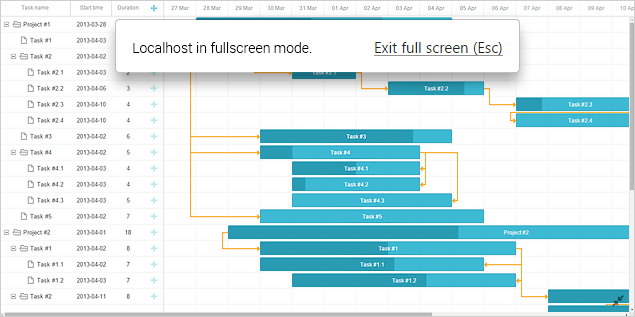
对于较旧的浏览器,它只允许将 Gantt 扩展到窗口大小的 100%。
要启用全屏支持,请通过 gantt.plugins 方法启用 fullscreen 插件:
gantt.plugins({
    fullscreen: true
});
组件本身没有切换此模式的 UI 控件,您需要在页面上某处添加它,或从示例中复制一个:
<input id="fullscreen_button" type="button" value="Toggle Fullscreen"/>

<script>
var button = document.getElementById("fullscreen_button");
     button.addEventListener("click", function(){
          if (!gantt.getState().fullscreen) {
            // 将甘特图切换为全屏
               gantt.expand();
          }
          else {
            // 恢复甘特图为正常大小
               gantt.collapse();
          }
     }, false);
</script>
点击就绪图标将把 Gantt 的大小从原始尺寸切换到“全屏”,反之亦然。
API 概览
有两种方法用于操作 Gantt 的显示模式:
- expand - 将 gantt 展开到全屏模式
gantt.expand();
- collapse - 将 gantt 从全屏模式折叠到正常模式
gantt.collapse();
事件列表
支持的事件如下列出:
// 在 gantt 被扩展到全屏之前
gantt.attachEvent("onBeforeExpand",function(){
    // 任何自定义逻辑在此处
    return true;
});

// 在 gantt 退出全屏模式之前
gantt.attachEvent("onBeforeCollapse",function(){
    // 任何自定义逻辑在此处
    return true;
});

// 当 gantt 被扩展到全屏时
gantt.attachEvent("onExpand", function (){
    // 任何自定义逻辑在此处
});

// 当 gantt 退出全屏模式时
gantt.attachEvent("onCollapse", function (){
    // 任何自定义逻辑在此处
});
Fullscreen API
有四个来自 fullscreen 对象的方法,用于在与附加元素一起控制 Gantt 的显示模式:
- expand() - 将 gantt 展开到全屏模式
gantt.ext.fullscreen.expand();
- collapse() - 将 gantt 从全屏模式折叠到正常模式
gantt.ext.fullscreen.collapse();
- toggle() - 如果 gantt 已展开到全屏,则调用 collapse(),否则调用 expand()
gantt.ext.fullscreen.toggle();
- getFullscreenElement() - 返回一个 DOM 元素,该元素将被 expand() 方法扩展到全屏。
gantt.ext.fullscreen.getFullscreenElement();
默认情况下,getFullscreenElement() 方法返回 Gantt 图的 HTML 容器。您可以重新定义此方法 将 gannt 与附加元素扩展到全屏模式。
Gantt 在全屏中的头部/工具栏
Gantt API 提供一个通过 fullscreen 对象的 getFullscreenElement() 方法将 gantt 扩展到全屏模式的可能性:
gantt.ext.fullscreen.getFullscreenElement();
默认情况下,此方法返回 Gantt 图的 HTML 容器。这意味着只有 Gantt 将被扩展到全屏。
如果您希望在全屏中显示带有附加元素(如头部或工具栏)的 gantt,需要在页面上添加一个自定义容器,如下所示:
<div id="myCover">
    <div class="gantt_control">
        <button id="toggle_fullscreen"
                onclick="gantt.ext.fullscreen.toggle();">toggle fullscreen</button>
    </div>
        <div id="gantt_here"></div>
</div>
之后,您需要重新定义 getFullscreenElement() 方法,以返回一个自定义根节点,该节点将被扩展到全屏:
gantt.ext.fullscreen.getFullscreenElement = function() {
    return document.getElementById("myCover");
}
gantt.init("gantt_here");
Full Screen with additional elements
为什么全屏模式不起作用?
全屏扩展只有在不禁止 Gantt 扩展到全屏模式时才会工作。
在将 Gantt 放置在一个框架内的情况下,例如:
- 缺少 allowfullscreen 属性或缺少 allow="fullscreen"
- 或对 allow 属性未指定 "fullscreen" 值
Gantt 将无法扩展到全屏模式(在我们的片段工具中试试:示例 1, 示例 2)。
Salesforce 中的全屏模式
Fullscreen 扩展在使用 Locker Service 的 Salesforce 应用中不起作用,因为 Locker 阻止将元素切换到全屏模式的能力。
更具体地说,Fullscreen 扩展在 Lightning Aura 框架和 Lightning Web Components 上可能不起作用,但可能适用于 Visualforce 框架。
您可以通过在配置代码中添加以下代码片段来检查应用中对全屏的可用性:
console.log("document.body.requestFullscreen", document.body.requestFullscreen)
如果输出中看到 undefined,则表示该功能被禁用,无法将 Gantt 扩展到全屏。
如果在不支持此功能的环境中激活 fullscreen 支持,可能会出现错误,但 Gantt 将继续工作。