Lightbox 요소 구성하기
Lightbox는 작업 세부 정보를 수정하는 편집 폼 역할을 합니다.
아래는 기본 Lightbox 레이아웃입니다.
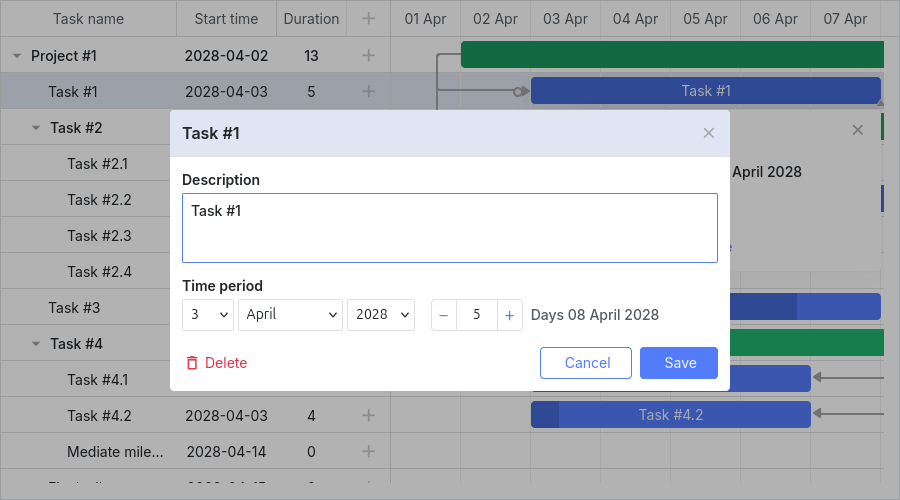
Lightbox는 작업 유형과 해당 작업의 특징에 따라 다르게 구성될 수 있습니다. 각 작업 유형에 대한 구성 설정은 lightbox 객체에서 확인할 수 있습니다. 주요 설정은 다음과 같습니다:
- gantt.config.lightbox.sections - 일반 작업용
- gantt.config.lightbox.project_sections - 프로젝트 작업용
- gantt.config.lightbox.milestone_sections - 마일스톤 작업용
또한, 사용자 정의 유형 추가 및 그에 맞는 Lightbox 구조 정의도 가능합니다. 자세한 내용은 작업 유형에서 확인할 수 있습니다.
전체 유형 구조는 다음과 같습니다:
- sections? - (LightboxSection[]) - 선택 사항, 일반 작업용 Lightbox 섹션 배열
- project_sections? - (LightboxSection[]) - 선택 사항, 프로젝트 작업용 Lightbox 섹션 배열
- milestone_sections? - (LightboxSection[]) - 선택 사항, 마일스톤 작업용 Lightbox 섹션 배열
- [lightboxType: string] - (LightboxSection[] | undefined) - 사용자 정의 유형용 Lightbox 섹션 배열
노트
v7.1.13부터 gantt.config.csp가 true로 설정되어 있거나 Gantt가 Salesforce 환경에서 실행되는 경우, Lightbox는 Gantt 컨테이너 내부에 렌더링됩니다.
Lightbox 구조
섹션(Sections)
Lightbox의 레이아웃은 lightbox 객체 내 sections 속성으로 정의됩니다:
// 기본 Lightbox 정의
gantt.config.lightbox.sections="["
    {name:"description", height:70, map_to:"text", type:"textarea", focus:true},
    {name:"time",          height:72, map_to:"auto", type:"duration"}
];
sections 배열의 각 항목은 Lightbox의 한 섹션을 나타내며, 사용 가능한 섹션 속성을 포함하는 객체로 기술됩니다.
섹션 컨트롤
Lightbox 내 각 섹션은 특정 컨트롤 유형을 기반으로 구성됩니다. 사용 가능한 컨트롤은 다음과 같습니다:
- Textarea - 여러 줄 텍스트 입력
- Time - 작업 시작/종료일 설정 셀렉터
- Duration - 작업 시작일 및 기간(일) 설정 셀렉터
- Select - 드롭다운 선택 상자
- Typeselect - 작업 유형 변경 드롭다운
- Parent - 상위 작업 선택 드롭다운
- Template - 사용자 정의 HTML 콘텐츠 표시 컨테이너
- Checkbox - 옵션 On/Off 토글용 체크박스
- Radio button - 여러 옵션 중 하나를 선택하는 라디오 버튼
- Resources - 작업에 여러 리소스 할당을 위한 복합 컨트롤
- Constraint - 작업 제약 조건 설정용 복합 컨트롤
- Baselines - 작업 기준선 관리용 복합 컨트롤
var opts = [
    { key: 1, label: 'High' },
    { key: 2, label: 'Normal' },
    { key: 3, label: 'Low' }
];

gantt.config.lightbox.sections = [
    {name:"description", height:38, map_to:"text", type:"textarea", focus:true},
    {name:"priority",      height:22, map_to:"priority", type:"select", options:opts},
    {name:"time",          height:72, map_to:"auto", type:"duration"}
];
Need help?
Got a question about the documentation? Reach out to our technical support team for help and guidance. For custom component solutions, visit the Services page.