buttons_left
Description
存储在灯箱左下角的按钮集合
buttons_left: string[]
Example
<style>
    .complete_button{
        margin-top: 2px;
        background-image:url("common/v_complete.png");
        width: 20px;
    }
</style>
<script>
    gantt.locale.labels["complete_button"] = "Complete";
    gantt.attachEvent("onGanttReady", function(){                               /*!*/
          gantt.config.buttons_left = ["gantt_save_btn","gantt_cancel_btn",        /*!*/
            "complete_button"];                                                /*!*/
    });                                                                           /*!*/
    gantt.init("gantt_here");

    gantt.attachEvent("onLightboxButton", function(button_id, node, e){
        if(button_id == "complete_button"){
            var id = gantt.getState().lightbox;
            gantt.getTask(id).progress = 1;
            gantt.updateTask(id);
            gantt.hideLightbox();
        }
    });
</script>
默认值: ["gantt_save_btn", "gantt_cancel_btn"]
Related samples
Details
注释
请注意,如果你使用 Material skin,它将重新定义按钮的配置。 为防止这种情况,你需要在 onGanttReady 事件处理程序中指定按钮的配置。
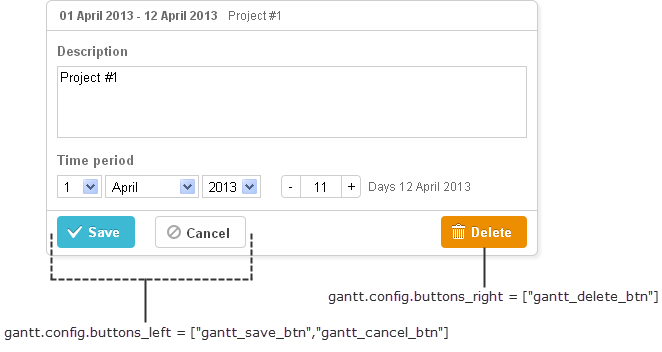
您可以在 Gantt 初始化之前,使用以下语法重新定义左侧按钮的标签:
gantt.locale.labels.icon_save = "New Label";
gantt.locale.labels.icon_cancel = "New Label";

gantt.init("gantt_here");
或者,也可以在 Gantt 初始化之后更新标签,示例如下:
gantt.attachEvent("onGanttReady", function(){
  gantt.locale.labels.gantt_save_btn = "New Label";
  gantt.locale.labels.gantt_cancel_btn = "New Label";
});
从版本 7.0 开始,也可以通过 i18n 对象修改标签:
gantt.i18n.setLocale({
   labels: {
      gantt_save_btn: "New Label",
      gantt_cancel_btn: "New Label"
   }
});
Related API
Related Guides
Need help?
Got a question about the documentation? Reach out to our technical support team for help and guidance. For custom component solutions, visit the Services page.