날짜가 지정되지 않은 작업
Gantt 차트에 날짜가 없는 작업을 추가할 수 있습니다.
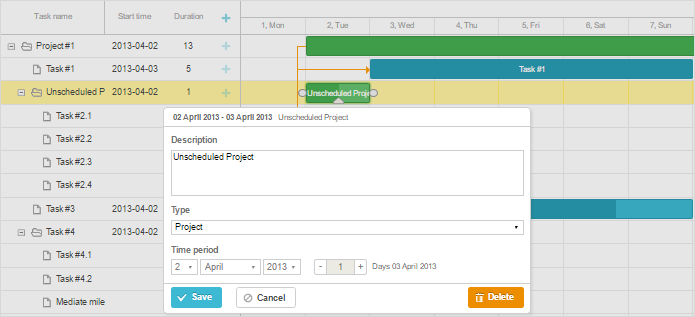
다음과 같이 작업의 설명에서 unscheduled 속성을 값 true로 설정하면 구현할 수 있습니다:
{"id":1, "text":"Project #1", "type":"project", "progress": 0.6, "open": true},
{"id":2, "text":"Task #1", "unscheduled":false, "start_date":"02-04-2019", "parent":"1"},
{"id":3, "text":"Task #2", "unscheduled":true,"start_date":"","duration":"","parent":"1"}
따라서 id가 "3"인 작업은 시작 날짜 없이 Gantt에 추가되며 빈 행으로 표시됩니다.
unscheduled 작업을 표시하려면 구성 매개변수 show_unscheduled을 false로 설정합니다:
gantt.config.show_unscheduled = false;
참고로 gantt는 unsheduled 작업에 기본 날짜를 할당합니다. 즉, 이러한 작업 객체의 start_date/end_date 속성은 비어 있지 않게 됩니다:
var task = gantt.getTask(3);
console.log(task.unscheduled);
// true

console.log(task.start_date);
// Tue Jun 25 2019 18:42:50
Need help?
Got a question about the documentation? Reach out to our technical support team for help and guidance. For custom component solutions, visit the Services page.