task_end_date
Description
라이트박스에서 작업 종료 날짜의 형식을 지정합니다
task_end_date: (date: Date) => string;
Parameters
date- (필수) Date - 형식을 적용해야 하는 날짜
Returns
text- (string) - Gantt에 렌더링될 HTML 텍스트
Example
gantt.templates.task_end_date = function(date){
   return gantt.templates.task_date(new Date(date.valueOf() - 1));
};
Details
종료 날짜를 포함하는 형식 조정하기
템플릿은 간트 차트에서 작업의 종료 날짜 형식을 바꾸기 위해 재정의될 수 있습니다(예: 작업 기간에 종료 날짜를 포함시키기 위해).
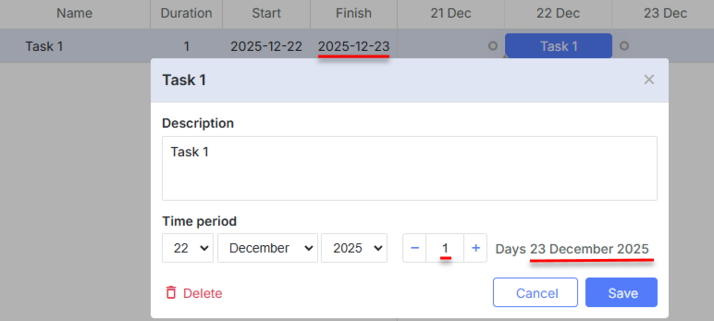
예를 들어 2020년 4월 2일에 시작하여 하루 동안 지속되는 작업을 생각해 봅시다.
기본적으로 이 작업의 종료 날짜는 2020년 4월 3일로 표시됩니다 (03-04-2020 00:00:00):
종료 날짜의 형식을 2020년 4월 2일로 바꿀 수 있습니다:
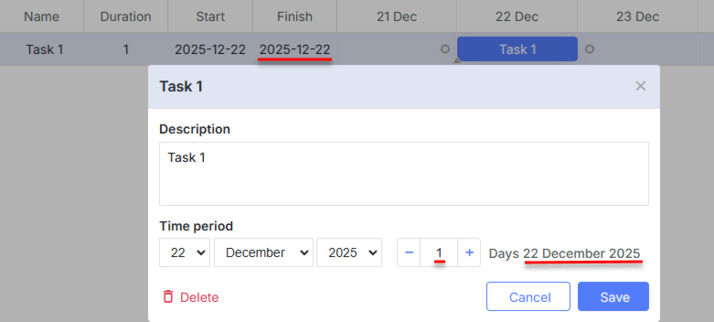
이를 수행하려면 아래와 같이 columns 설정을 재정의해야 합니다:
gantt.config.columns = [
  {name: "wbs", label: "#", width: 60, align: "center", template: gantt.getWBSCode},
  {name: "text", label: "Name", tree: true, width: 200, resize: true},
  {name: "start_date", label: "Start", width:80, align: "center", resize: true},
  {name: "end_date", label: "Finish", width:80, align: "center", resize: true},
  {name:"add"}
];
gantt.templates.task_end_date = function(date){
   return gantt.templates.task_date(new Date(date.valueOf() - 1));
};

var gridDateToStr = gantt.date.date_to_str("%Y-%m-%d");
gantt.templates.grid_date_format = function(date, column){
   if(column === "end_date"){
     return gridDateToStr(new Date(date.valueOf() - 1));
   }else{
     return gridDateToStr(date);
   }
}
gantt.init("gantt_here");
종료 날짜 포맷팅에 관한 추가 정보는 Task end date display & Inclusive end dates 문서를 참고하세요.
Related API
Related Guides
Need help?
Got a question about the documentation? Reach out to our technical support team for help and guidance. For custom component solutions, visit the Services page.