Select 控件
一个下拉列表框。
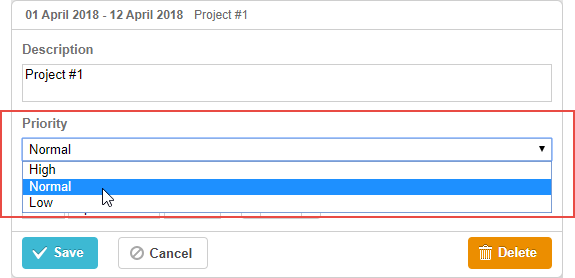
gantt.config.lightbox.sections = [
    {name:"description", height:38, map_to:"text", type:"textarea", focus:true},
    {name:"priority", height:22, map_to:"priority", type:"select", options: [ /*!*/
        {key:1, label: "High"},                                               /*!*/
        {key:2, label: "Normal"},                                             /*!*/
        {key:3, label: "Low"}                                                 /*!*/
     ]},                                                                      /*!*/
    {name:"time", height:72, type:"duration", map_to:"auto"}
];

gantt.locale.labels.section_priority = "Priority";
初始化
要在 lightbox 中包含 select 控件,操作步骤如下:
1)在 lightbox 配置中添加一个 section:
var opts = [
    {key:1, label: "High"},
    {key:2, label: "Normal"},
    {key:3, label: "Low"}
];

gantt.config.lightbox.sections = [
    {name:"description", height:38, map_to:"text", type:"textarea",focus:true},
    {name:"priority", height:22, map_to:"priority",type:"select",options:opts},      /*!*/
    {name:"time", height:72, type:"duration", map_to:"auto"}
];
2)为该 section 定义一个标签:
gantt.locale.labels.section_priority = "Priority";
属性
以下是 select 控件常用的一些关键属性(完整列表请参见 这里):
- name - (string) section 的名称
- height - (number) section 的高度
- map_to - (string) 映射到 section 的数据属性名
- type - (string) section 控件 的类型
- focus - (boolean) 为 true 时,lightbox 打开时该 section 获得焦点
- options - (array) 定义 select 控件选项的对象数组(用于 select、checkbox 和 radio 控件)。每个对象代表一个选项,包含:
- key - (string) 选项 ID,与任务数据属性匹配以分配选项
- label - (string) 选项标签
- default_value - (any) 控件的默认值,当输入值为 undefined 时应用
- onchange - (function) 控件的 'onChange' 事件处理函数
为控件填充数据
要为 select 控件设置选项值,请使用 options 参数:
gantt.config.lightbox.sections = [
    { name:"priority",height:22, map_to:"priority",type:"select",
      options: [
        {key:1, label: "High"},
        {key:2, label: "Normal"},
        {key:3, label: "Low"}
    ]}
];
options 数组中的每一项必须包含以下两个属性:
- key - 选项 ID
- label - 选项标签
通过服务器数据填充控件
如需通过服务器数据为控件填充值,将 options 参数赋值为 serverList 方法返回的值:
gantt.config.lightbox.sections = [
    {name:"description", ...},
    { name:"priority",map_to:"priority",type:"select",
        options:gantt.serverList("priority")}, /*!*/
    {name:"category", map_to:"category", type:"select",
        options:gantt.serverList("category")}, /*!*/
    {name:"time", ...}
];
gantt.init("gantt_here");
gantt.load("/data");
/data 接口返回的数据格式如下:
{
  "tasks":[
    {"id":1,"text":"Project #2","start_date":"01-04-2020","duration":18,"parent":0},
    {"id":2,"text":"Task #1","start_date":"02-04-2020","duration":8,"parent":1},
    {"id":3,"text":"Task #2","start_date":"11-04-2020","duration":8,"parent":1}
  ],
  "links":[
    {"id":1,"source":1,"target":2,"type":"1"},
    {"id":2,"source":2,"target":3,"type":"0"}
  ],
  "collections": { /*!*/
    "priority":[
        {"value":"1","label":"Low"},
        {"value":"2","label":"Medium"},
        {"value":"3","label":"High"}
    ],
    "category":[
        {"value":"1","label":"Simple"},
        {"value":"2","label":"Complex"},
        {"value":"3","label":"Unknown"}
    ]
  }
}
通过 dhtmlxConnector 加载选项
以下是初始化 dhtmlxConnector 的示例:
//data.php
<?php
    include('connector-php/codebase/gantt_connector.php');

    $res = new PDO("mysql:host=localhost;dbname=gantt", "root", "");

    $list = new OptionsConnector($res);
    $list->render_table("priorities","id","id(value),name(label)");

    $gantt = new JSONGanttConnector($res);
    $gantt->set_options("priority", $list);
    $gantt->render_links("gantt_links","id","source_task(source),
                    target_task(target),type");
    $gantt->render_table("gantt_tasks","id","start_date,duration,text,progress,
                    sortorder,parent");
?>
Need help?
Got a question about the documentation? Reach out to our technical support team for help and guidance. For custom component solutions, visit the Services page.