완전한 데모 소스 코드는 GitHub에서 확인 가능: https://github.com/DHTMLX/gantt-migrating-from-devexpress.
DevExpress Gantt에서 DHTMLX Gantt로 마이그레이션하기
소개
이 가이드는 기존 애플리케이션을 DevExpress Gantt에서 DHTMLX Gantt로 마이그레이션하는 과정에 대해 안내합니다. 데이터베이스 스키마 변경, 서버 측 API 수정, 클라이언트 코드 업데이트 등 필요한 모든 단계를 다룹니다.
선행 조건
마이그레이션을 시작하기 전에 다음을 확인하세요:
- DevExpress Gantt를 사용 중인 기존 애플리케이션
- Node.js (>= 20.0.0) 설치
- DevExpress 데이터 구조를 사용하는 MySQL 데이터베이스
- Express.js, React, TypeScript에 대한 기본 지식
1단계: 데이터베이스 마이그레이션
DevExpress 스키마 이해하기
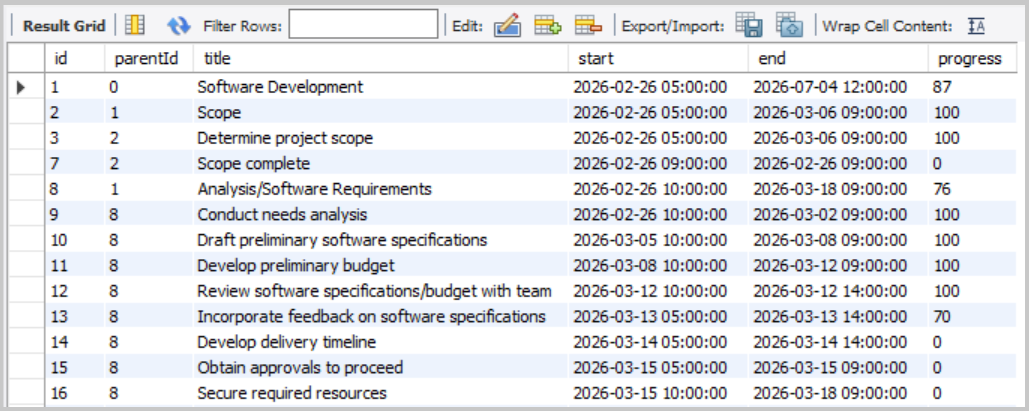
DevExpress의 데모 설정을 따라왔다면 두 개의 테이블이 있을 가능성이 큽니다: devexpress_tasks와 devexpress_dependencies.
devexpress_tasks 테이블 구조:
devexpress_dependencies 테이블 구조:
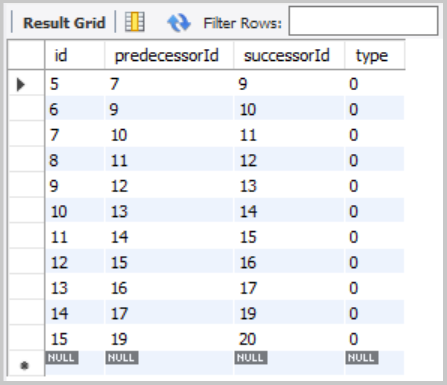
이 두 테이블 구조는 이미 DHTMLX의 접근 방식과 유사하여 마이그레이션이 비교적 쉽습니다.
DHTMLX 테이블 생성
DHTMLX Gantt와 호환되는 두 개의 새로운 테이블을 생성합니다:
CREATE TABLE IF NOT EXISTS gantt_tasks (
    id               INT(11)        NOT NULL AUTO_INCREMENT,
    text             VARCHAR(255)   NOT NULL,
    start_date       DATETIME       NOT NULL,
    end_date         DATETIME       NOT NULL,
    progress         FLOAT          NOT NULL DEFAULT 0,
    parent           INT(11)        NOT NULL DEFAULT 0,
    PRIMARY KEY (id)
);

CREATE TABLE IF NOT EXISTS gantt_links (
    id               INT(11)        NOT NULL AUTO_INCREMENT,
    source           INT(11)        NOT NULL,
    target           INT(11)        NOT NULL,
    type             VARCHAR(1)     NOT NULL,
    PRIMARY KEY (id)
);
참고: DHTMLX Gantt는 시작 날짜와 종료 날짜를 기반으로 자동으로 duration을 계산합니다.
기존 데이터 마이그레이션
이제 기존 DevExpress 데이터를 새 DHTMLX 테이블로 마이그레이션합니다.
작업 마이그레이션:
INSERT INTO gantt_tasks (id, text, start_date, end_date, progress, parent)
SELECT
    id,
    title,
    start,
    end,
    progress / 100,
    COALESCE(parentId, 0)
FROM devexpress_tasks;
링크(의존성) 마이그레이션:
DevExpress는 의존성을 devexpress_dependencies 테이블에 구조화된 형식으로 저장하고 있어 마이그레이션이 간단합니다:
INSERT INTO gantt_links (id, source, target, type)
SELECT
    id,
    predecessorId,              -- predecessorId → source
    successorId,                -- successorId → target
    CASE type
        WHEN 0 THEN '0'         -- Finish-to-Start
        WHEN 1 THEN '1'         -- Start-to-Start
        WHEN 2 THEN '2'         -- Finish-to-Finish
        WHEN 3 THEN '3'         -- Start-to-Finish
        ELSE '0'
    END
FROM devexpress_dependencies;
다음 명령을 실행하여 데이터가 올바르게 마이그레이션되었는지 확인할 수 있습니다:
SELECT * FROM gantt_tasks;
SELECT * FROM gantt_links;
작업과 링크가 올바르게 이전되었고 필드 매핑이 정확한지 확인하세요.
DevExpress 작업 필드를 DHTMLX Gantt로 매핑
| DevExpress Field | DHTMLX Field | 비고 |
|---|---|---|
id | id | Task ID |
title | text | Task name |
start | start_date | Task start date and time |
end | end_date | Task end date and time |
progress | progress | DevExpress: 0-100 (정수), DHTMLX: 0-1 (부동소수점). 마이그레이션 중 100으로 나누기 |
parentId | parent | Parent task ID. NULL 값 → 루트 작업의 경우 0 |
More about task properties: Task Properties.
DevExpress 의존성 필드를 DHTMLX Links로 매핑
| DevExpress Field | DHTMLX Field | 비고 |
|---|---|---|
id | id | Link ID |
predecessorId | source | 의존성이 시작되는 작업의 ID |
successorId | target | 의존성이 가리키는 작업의 ID |
type | type | 의존성 유형. DevExpress는 숫자(0-3)를 사용하고, 기본적으로 DHTMLX는 문자열("0"-"3")을 사용합니다 |
More about link properties: Link Properties.
2단계: 백엔드 마이그레이션 (server.js)
DevExpress 엔드포인트 제거
다음 DevExpress 전용 엔드포인트를 server.js에서 삭제합니다:
app.get('/api/tasks', ...)- DevExpress 작업 로딩 엔드포인트app.post('/api/tasks', ...)- 작업 생성 엔드포인트app.put('/api/tasks/:id', ...)- 작업 업데이트 엔드포인트app.delete('/api/tasks/:id', ...)- 작업 삭제 엔드포인트app.get('/api/dependencies', ...)- DevExpress 의존성 로딩 엔드포인트app.post('/api/dependencies', ...)- 의존성 생성 엔드포인트app.put('/api/dependencies/:id', ...)- 의존성 업데이트 엔드포인트app.delete('/api/dependencies/:id', ...)- 의존성 삭제 엔드포인트
또한 CustomStore 관련 응답 형식 처리를 제거합니다.
DHTMLX Gantt 패키지 설치
DevExpress 의존성을 제거합니다:
npm uninstall devextreme devextreme-react
설치 가이드를 따라 DHTMLX React Gantt를 설치합니다:
npm install @dhtmlx/trial-react-gantt
MySQL DATETIME 변환을 위한 날짜 형식 라이브러리를 설치합니다:
npm install date-format-lite
데이터 로딩 엔드포인트 추가
백엔드에서 DHTMLX 포맷 데이터를 로드하는 GET 엔드포인트를 추가합니다. 맨 위에 date-format-lite 라이브러리를 임포트합니다:
import dateFormat from 'date-format-lite';
다음처럼 데이터 로딩 엔드포인트를 추가합니다:
// GET /load - Load all tasks and links
app.get('/load', async (req, res) => {
  try {
    const [tasks] = await pool.query('SELECT * FROM gantt_tasks ORDER BY id');
    const [links] = await pool.query('SELECT * FROM gantt_links');

    tasks.forEach((task) => {
      if (task.start_date) {
        task.start_date = task.start_date.format('YYYY-MM-DD hh:mm:ss');
      }
      if (task.end_date) {
        task.end_date = task.end_date.format('YYYY-MM-DD hh:mm:ss');
      }
    });

    res.json({
      data: tasks,
      links: links,
    });
  } catch (error) {
    console.error('Error loading data:', error);
    res.status(500).json({ error: 'Failed to load data' });
  }
});
DevExpress는 별도의 배열을 반환하는 반면, DHTMLX는 { data: [...], links: [...] } 형식을 기대합니다.
Tasks 및 Links에 대한 CRUD 엔드포인트 추가
DHTMLX React Gantt는 서버와 데이터를 동기화하기 위해 커스텀 저장 핸들러를 사용합니다. 생성, 업데이트, 삭제 각 작업은 적절한 HTTP 메서드로 전송됩니다.
작업 작업에 대한 핸들러를 추가합니다:
// POST /save/task - Create a new task
app.post('/save/task', async (req, res) => {
  try {
    const task = getTask(req.body);

    const [result] = await pool.query(
      'INSERT INTO gantt_tasks (text, start_date, end_date, progress, parent) VALUES (?, ?, ?, ?, ?)',
      [task.text, task.start_date, task.end_date, task.progress, task.parent],
    );

    sendResponse(res, 'inserted', result.insertId);
  } catch (error) {
    sendResponse(res, 'error', null, error);
  }
});

// PUT /save/task/:id - Update an existing task
app.put('/save/task/:id', async (req, res) => {
  try {
    const taskId = req.params.id;
    const task = getTask(req.body);

    await pool.query(
      'UPDATE gantt_tasks SET text = ?, start_date = ?, end_date = ?, progress = ?, parent = ? WHERE id = ?',
      [task.text, task.start_date, task.end_date, task.progress, task.parent, taskId],
    );

    sendResponse(res, 'updated');
  } catch (error) {
    sendResponse(res, 'error', null, error);
  }
});

// DELETE /save/task/:id - Delete a task
app.delete('/save/task/:id', async (req, res) => {
  try {
    const taskId = req.params.id;
    await pool.query('DELETE FROM gantt_tasks WHERE id = ?', [taskId]);
    sendResponse(res, 'deleted');
  } catch (error) {
    sendResponse(res, 'error', null, error);
  }
});
의존성(링크) 작업에 대한 핸들러도 추가합니다:
// POST /save/link - Create new link
app.post('/save/link', async (req, res) => {
  try {
    const link = getLink(req.body);

    const [result] = await pool.query('INSERT INTO gantt_links (source, target, type) VALUES (?, ?, ?)', [
      link.source,
      link.target,
      link.type,
    ]);

    sendResponse(res, 'inserted', result.insertId);
  } catch (error) {
    sendResponse(res, 'error', null, error);
  }
});

// PUT /save/link/:id - Update existing link
app.put('/save/link/:id', async (req, res) => {
  try {
    const linkId = req.params.id;
    const link = getLink(req.body);

    await pool.query('UPDATE gantt_links SET source = ?, target = ?, type = ? WHERE id = ?', [
      link.source,
      link.target,
      link.type,
      linkId,
    ]);

    sendResponse(res, 'updated');
  } catch (error) {
    sendResponse(res, 'error', null, error);
  }
});

// DELETE /save/link/:id - Delete link
app.delete('/save/link/:id', async (req, res) => {
  try {
    const linkId = req.params.id;
    await pool.query('DELETE FROM gantt_links WHERE id = ?', [linkId]);
    sendResponse(res, 'deleted');
  } catch (error) {
    sendResponse(res, 'error', null, error);
  }
});
유틸리티 함수 추가
데이터를 처리하고 응답을 보내는 유틸리티 함수들을 추가합니다:
// Helper: Parse task data from request
function getTask(data) {
  return {
    text: data.text,
    start_date: data.start_date,
    end_date: data.end_date,
    progress: parseFloat(data.progress) || 0,
    parent: data.parent || 0,
  };
}

// Helper: Parse link data from request
function getLink(data) {
  return {
    source: data.source,
    target: data.target,
    type: data.type,
  };
}

// Helper: Send response to DataProcessor
function sendResponse(res, action, tid = null, error = null) {
  if (error) {
    console.error('Error:', error);
    return res.status(500).json({ action: 'error', message: error.message });
  }

  const result = { action };
  if (tid !== null) result.tid = tid;
  res.json(result);
}
Task 데이터 정 sanitization (XSS 보호)
그랜트 차트는 작업의 텍스트(text)와 같은 자유 텍스트 필드를 렌더링하며, 해당 텍스트에 포함된 HTML은 XSS 벡터가 될 수 있습니다. 입력 데이터를 백엔드에서 저장하기 전에 항상 정화하십시오 — getTask 헬퍼에서 자유 텍스트 필드를 정화합니다:
npm install isomorphic-dompurify
import DOMPurify from 'isomorphic-dompurify';

function getTask(data) {
  return {
    text: DOMPurify.sanitize(data.text),
    // ...나머지 필드는 변경 없이
  };
}
커스텀 셀 또는 도구 툴팁 렌더러를 추가하여_raw HTML_을 출력하는 경우에도 값은 해당 위치에서 이스케이프하십시오. 전체 권고 사항은 — 콘텐츠 보안 정책(Content Security Policy) 및 SQL 주입 가이드(SQL-injection guidance) — 애플리케이션 보안 안내를 참고하세요: Application Security
3단계: 프런트엔드 마이그레이션
DevExpress 컴포넌트 및 서비스 제거
CustomStore 서비스 파일(src/services/dataService.ts)을 삭제합니다 — DHTMLX React Gantt는 CustomStore를 사용하지 않습니다.
index.html에서 DevExpress CSS 링크를 제거합니다
index.html에 DevExpress CSS 링크를 추가한 경우 제거합니다:
<!-- Remove these lines -->
<link rel="stylesheet" type="text/css" href="https://cdn3.devexpress.com/jslib/25.2.4/css/dx.fluent.blue.light.css" />
<link rel="stylesheet" type="text/css" href="https://cdn3.devexpress.com/jslib/25.2.4/css/dx-gantt.min.css" />
DHTMLX React Gantt에는 자체 스타일이 포함되어 있으며, 컴포넌트에 직접 가져옵니다:
import '@dhtmlx/trial-react-gantt/dist/react-gantt.css';
Vite 구성 업데이트
백엔드 서버로 API 요청을 프록시하도록 vite.config.ts를 업데이트합니다. 개발 모드에서 중요합니다:
import { defineConfig } from 'vite';
import react from '@vitejs/plugin-react';

const PORT = process.env.PORT || 1337;

export default defineConfig({
  plugins: [react()],
  server: {
    proxy: {
      '/load': {
        target: `http://localhost:${PORT}`,
        changeOrigin: true,
      },
      '/save': {
        target: `http://localhost:${PORT}`,
        changeOrigin: true,
      },
    },
  },
});
package.json 업데이트
다음 의존성이 정확한지 확인합니다:
"dependencies": {
  "@dhtmlx/trial-react-gantt": "^9.1.4",
  "body-parser": "^2.2.2",
  "cors": "^2.8.6",
  "date-format-lite": "^17.7.0",
  "dotenv": "^17.2.4",
  "express": "^5.2.1",
  "mysql2": "^3.16.3",
  "nodemon": "^3.1.11",
  "react": "^19.2.0",
  "react-dom": "^19.2.0"
},
"devDependencies": {
  "@eslint/js": "^9.39.1",
  "@types/node": "^24.10.1",
  "@types/react": "^19.2.7",
  "@types/react-dom": "^19.2.3",
  "@vitejs/plugin-react": "^5.1.1",
  "eslint": "^9.39.1",
  "eslint-plugin-react-hooks": "^7.0.1",
  "eslint-plugin-react-refresh": "^0.4.24",
  "globals": "^16.5.0",
  "typescript": "~5.9.3",
  "typescript-eslint": "^8.48.0",
  "vite": "^7.3.1"
}
src/App.tsx 업데이트
DevExpress Gantt 컴포넌트를 DHTMLX React Gantt로 교체합니다:
import { useCallback, useMemo, useRef } from 'react';
import ReactGantt, { type GanttConfig, type Link, type ReactGanttRef, type Task } from '@dhtmlx/trial-react-gantt';
import '@dhtmlx/trial-react-gantt/dist/react-gantt.css';
import './App.css';

function App() {
  const ganttRef = useRef<ReactGanttRef>(null);

  const config: GanttConfig = useMemo(
    () => ({
      date_format: '%Y-%m-%d %H:%i:%s',
      scales: [
        { unit: 'month', step: 1, format: '%F %Y' },
        { unit: 'week', step: 1, format: 'Week #%W' },
      ],
      open_tree_initially: true,
    }),
    []
  );

  const save = useCallback(
    async (entity: string, action: 'update' | 'create' | 'delete', item: Task | Link, id: string | number) => {
      switch (action) {
        case 'create':
          return await fetch(`/save/${entity}`, {
            method: 'POST',
            body: JSON.stringify(item),
            headers: {
              'Content-Type': 'application/json',
            },
          })
            .then((response) => response.json())
            .then((result) => ({ id: result.tid }));

        case 'update':
          await fetch(`/save/${entity}/${id}`, {
            method: 'PUT',
            body: JSON.stringify(item),
            headers: {
              'Content-Type': 'application/json',
            },
          });
          break;

        case 'delete':
          await fetch(`/save/${entity}/${id}`, {
            method: 'DELETE',
          });
          break;

        default:
          throw new Error(`Invalid action: ${action}`);
      }
    },
    []
  );

  return (
    <ReactGantt
      ref={ganttRef}
      data={{
        load: '/load',
        save,
      }}
      config={config}
    />
  );
}

export default App;
애플리케이션 실행
개발 모드에서는 두 개의 프로세스를 실행해야 합니다:
터미널 1 - 백엔드(Express):
npm run server
이 명령은 API 서버를 http://localhost:1337에서 시작합니다(또는 .env에 구성된 PORT).
다음과 같은 메시지를 확인할 수 있습니다:
Server is running on port 1337
터미널 2 - 프런트엔드(Vite):
npm run dev
이 명령은 Vite 개발 서버를 http://localhost:5173에서 시작합니다. 브라우저를 열고
http://localhost:5173로 접속합니다. Vite가 API 요청을 Express 백엔드로 자동으로 프록시합니다.
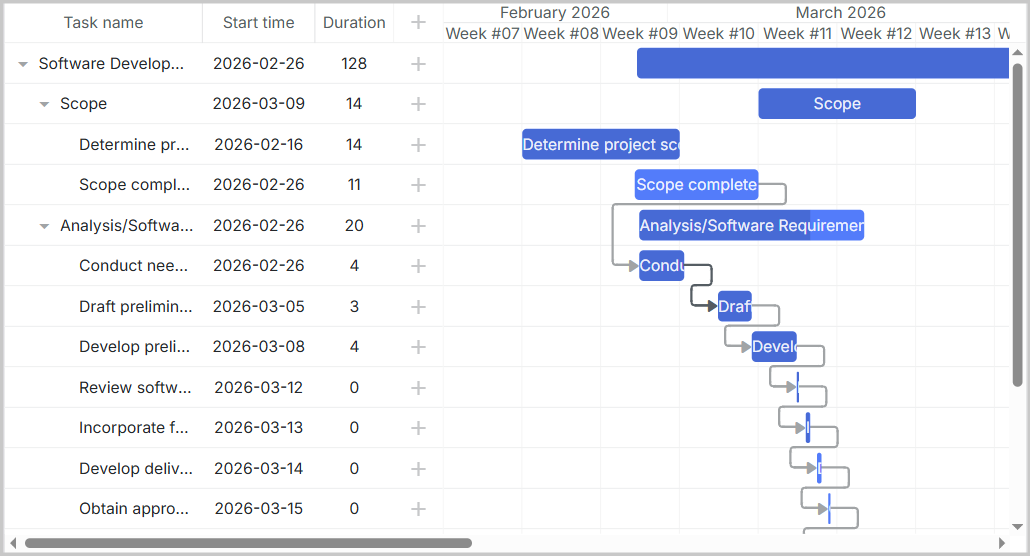
데이터베이스에서 로드된 데이터로 채워진 DHTMLX Gantt 차트를 확인할 수 있습니다: