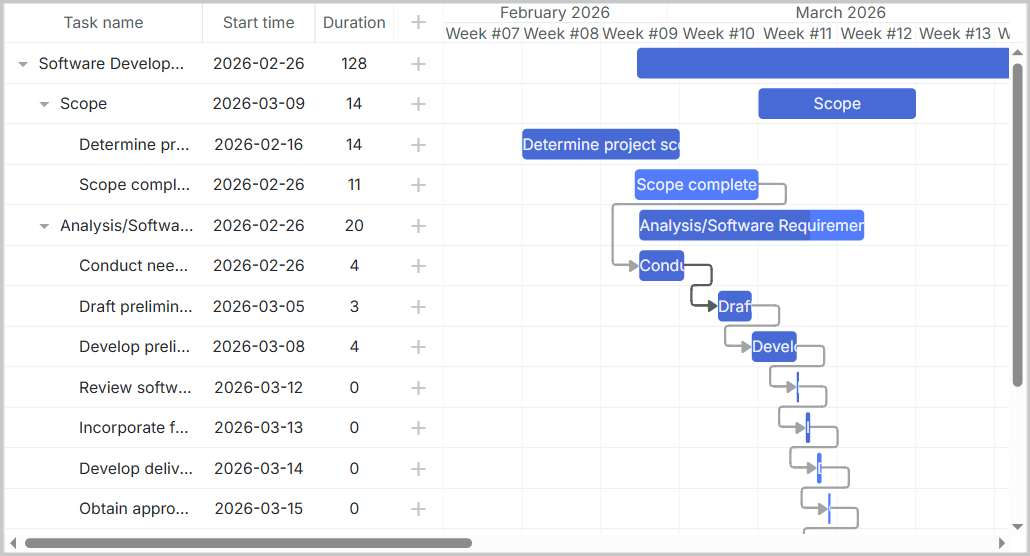
Полный исходник демонстрации доступен на GitHub: https://github.com/DHTMLX/gantt-migrating-from-devexpress.
Миграция с DevExpress Gantt на DHTMLX Gantt
Введение
Этот гид проведет вас через процесс миграции существующего приложения из DevExpress Gantt в DHTMLX Gantt. Мы рассмотрим все необходимые шаги, включая изменения в схеме базы данных, модификации серверного API и обновления клиентского кода.
Требования
Прежде чем начать миграцию, убедитесь, что у вас есть:
- Существующее работающие приложение, использующее DevExpress Gantt
- Node.js (>= 20.0.0) установлен
- База данных MySQL со структурой данных DevExpress
- Базовые знания Express.js, React и TypeScript
Шаг 1: Миграция базы данных
Понимание схемы DevExpress
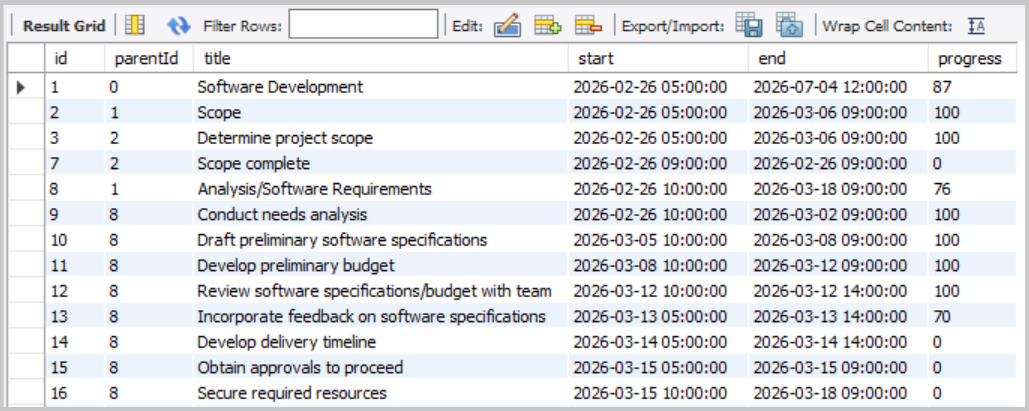
Если вы следовали настройкам демо DevExpress, у вас должно быть две таблицы: devexpress_tasks и devexpress_dependencies.
Структура таблицы devexpress_tasks:
Структура таблицы devexpress_dependencies:
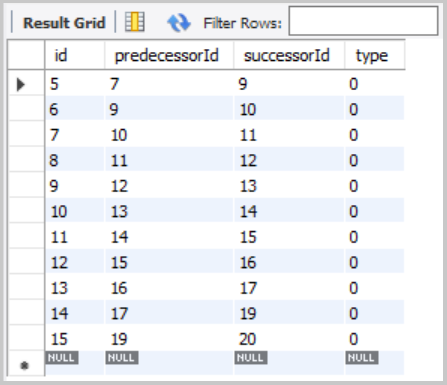
Эта двухтабличная структура уже близка к подходу DHTMLX, что делает миграцию простой.
Создание таблиц DHTMLX
Создайте две новые таблицы, совместимые с DHTMLX Gantt:
CREATE TABLE IF NOT EXISTS gantt_tasks (
    id               INT(11)        NOT NULL AUTO_INCREMENT,
    text             VARCHAR(255)   NOT NULL,
    start_date       DATETIME       NOT NULL,
    end_date         DATETIME       NOT NULL,
    progress         FLOAT          NOT NULL DEFAULT 0,
    parent           INT(11)        NOT NULL DEFAULT 0,
    PRIMARY KEY (id)
);

CREATE TABLE IF NOT EXISTS gantt_links (
    id               INT(11)        NOT NULL AUTO_INCREMENT,
    source           INT(11)        NOT NULL,
    target           INT(11)        NOT NULL,
    type             VARCHAR(1)     NOT NULL,
    PRIMARY KEY (id)
);
Примечание: DHTMLX Gantt будет автоматически вычислять duration на основе start_date и end_date.
Миграция существующих данных
Теперь перенесите существующие данные DevExpress в новые таблицы DHTMLX.
Миграция задач:
INSERT INTO gantt_tasks (id, text, start_date, end_date, progress, parent)
SELECT
    id,
    title,
    start,
    end,
    progress / 100,
    COALESCE(parentId, 0)
FROM devexpress_tasks;
Миграция связей (dependencies):
DevExpress уже хранит зависимости в структурированном виде в таблице devexpress_dependencies, что упрощает миграцию:
INSERT INTO gantt_links (id, source, target, type)
SELECT
    id,
    predecessorId,              -- predecessorId → source
    successorId,                -- successorId → target
    CASE type
        WHEN 0 THEN '0'         -- Finish-to-Start
        WHEN 1 THEN '1'         -- Start-to-Start
        WHEN 2 THEN '2'         -- Finish-to-Finish
        WHEN 3 THEN '3'         -- Start-to-Finish
        ELSE '0'
    END
FROM devexpress_dependencies;
Вы можете проверить, что данные перенесены корректно, выполнив следующие команды:
SELECT * FROM gantt_tasks;
SELECT * FROM gantt_links;
Вы должны увидеть все ваши задачи и связи корректно перенесенными с правильными сопоставлениями полей.
Сопоставление полей задач DevExpress с DHTMLX Gantt
| DevExpress Field | DHTMLX Field | Примечания |
|---|---|---|
id | id | ID задачи |
title | text | Название задачи |
start | start_date | Дата и время начала задачи |
end | end_date | Дата и время окончания задачи |
progress | progress | DevExpress: 0-100 (целое число), DHTMLX: 0-1 (число с плавающей точкой). Разделите на 100 во время миграции |
parentId | parent | ID родительской задачи. Значения NULL → 0 для корневых задач |
Дополнительная информация о свойствах задач: Task Properties.
Сопоставление полей зависимостей DevExpress с DHTMLX Links
| DevExpress Field | DHTMLX Field | Примечания |
|---|---|---|
id | id | ID связи |
predecessorId | source | ID задачи, с которой начинается зависимость |
successorId | target | ID задачи, на которую указывает зависимость |
type | type | Тип зависимости. DevExpress использует числа (0-3), DHTMLX — строки ("0"-"3") по умолчанию |
Дополнительная информация о свойствах связей: Link Properties.
Шаг 2: Миграция бэкенда (server.js)
Удаление Endpoint DevExpress
Удалите следующие эндпойнты, специфичные для DevExpress, из вашего server.js:
app.get('/api/tasks', ...)- эндпойнт загрузки задач DevExpressapp.post('/api/tasks', ...)- создание задачиapp.put('/api/tasks/:id', ...)- обновление задачиapp.delete('/api/tasks/:id', ...)- удаление задачиapp.get('/api/dependencies', ...)- эндпойнт загрузки зависимостей DevExpressapp.post('/api/dependencies', ...)- создание зависимостиapp.put('/api/dependencies/:id', ...)- обновление зависимостиapp.delete('/api/dependencies/:id', ...)- удаление зависимости
Также удалите обработку форматов ответов, связанных с CustomStore.
Установка пакетов DHTMLX Gantt
Уберите зависимости DevExpress:
npm uninstall devextreme devextreme-react
Установите DHTMLX React Gantt, следуя руководству по установке: https://docs.dhtmlx.com/gantt/guides/installation/.
Для данного урока мы будем использовать пробную версию DHTMLX React Gantt:
npm install @dhtmlx/trial-react-gantt
Установите библиотеку форматирования дат для конвертации DATETIME MySQL:
npm install date-format-lite
Добавление Endpoint загрузки данных
Добавьте GET-эндпойнт загрузки данных в формате DHTMLX. В начале вашего server.js импортируйте библиотеку date-format-lite:
import dateFormat from 'date-format-lite';
Затем добавьте эндпойнт загрузки данных:
// GET /load - Load all tasks and links
app.get('/load', async (req, res) => {
  try {
    const [tasks] = await pool.query('SELECT * FROM gantt_tasks ORDER BY id');
    const [links] = await pool.query('SELECT * FROM gantt_links');

    tasks.forEach((task) => {
      if (task.start_date) {
        task.start_date = task.start_date.format('YYYY-MM-DD hh:mm:ss');
      }
      if (task.end_date) {
        task.end_date = task.end_date.format('YYYY-MM-DD hh:mm:ss');
      }
    });

    res.json({
      data: tasks,
      links: links,
    });
  } catch (error) {
    console.error('Error loading data:', error);
    res.status(500).json({ error: 'Failed to load data' });
  }
});
DevExpress возвращает отдельные массивы, DHTMLX ожидает { data: [...], links: [...] }.
Добавление CRUD-эндпойнтов для задач и связей
DHTMLX React Gantt использует пользовательский обработчик сохранения для синхронизации данных с сервером. Каждая операция (создание, обновление, удаление) отправляется соответствующим HTTP-методом.
Добавьте обработчики операций с задачами:
// POST /save/task - Create a new task
app.post('/save/task', async (req, res) => {
  try {
    const task = getTask(req.body);

    const [result] = await pool.query(
      'INSERT INTO gantt_tasks (text, start_date, end_date, progress, parent) VALUES (?, ?, ?, ?, ?)',
      [task.text, task.start_date, task.end_date, task.progress, task.parent],
    );

    sendResponse(res, 'inserted', result.insertId);
  } catch (error) {
    sendResponse(res, 'error', null, error);
  }
});

// PUT /save/task/:id - Update an existing task
app.put('/save/task/:id', async (req, res) => {
  try {
    const taskId = req.params.id;
    const task = getTask(req.body);

    await pool.query(
      'UPDATE gantt_tasks SET text = ?, start_date = ?, end_date = ?, progress = ?, parent = ? WHERE id = ?',
      [task.text, task.start_date, task.end_date, task.progress, task.parent, taskId],
    );

    sendResponse(res, 'updated');
  } catch (error) {
    sendResponse(res, 'error', null, error);
  }
});

// DELETE /save/task/:id - Delete a task
app.delete('/save/task/:id', async (req, res) => {
  try {
    const taskId = req.params.id;
    await pool.query('DELETE FROM gantt_tasks WHERE id = ?', [taskId]);
    sendResponse(res, 'deleted');
  } catch (error) {
    sendResponse(res, 'error', null, error);
  }
});
Добавьте обработчики операций для связей (dependency):
// POST /save/link - Create new link
app.post('/save/link', async (req, res) => {
  try {
    const link = getLink(req.body);

    const [result] = await pool.query('INSERT INTO gantt_links (source, target, type) VALUES (?, ?, ?)', [
      link.source,
      link.target,
      link.type,
    ]);

    sendResponse(res, 'inserted', result.insertId);
  } catch (error) {
    sendResponse(res, 'error', null, error);
  }
});

// PUT /save/link/:id - Update existing link
app.put('/save/link/:id', async (req, res) => {
  try {
    const linkId = req.params.id;
    const link = getLink(req.body);

    await pool.query('UPDATE gantt_links SET source = ?, target = ?, type = ? WHERE id = ?', [
      link.source,
      link.target,
      link.type,
      linkId,
    ]);

    sendResponse(res, 'updated');
  } catch (error) {
    sendResponse(res, 'error', null, error);
  }
});

// DELETE /save/link/:id - Delete link
app.delete('/save/link/:id', async (req, res) => {
  try {
    const linkId = req.params.id;
    await pool.query('DELETE FROM gantt_links WHERE id = ?', [linkId]);
    sendResponse(res, 'deleted');
  } catch (error) {
    sendResponse(res, 'error', null, error);
  }
});
Добавление вспомогательных функций
Добавьте утилиты для обработки данных и отправки ответов:
// Helper: Parse task data from request
function getTask(data) {
  return {
    text: data.text,
    start_date: data.start_date,
    end_date: data.end_date,
    progress: parseFloat(data.progress) || 0,
    parent: data.parent || 0,
  };
}

// Helper: Parse link data from request
function getLink(data) {
  return {
    source: data.source,
    target: data.target,
    type: data.type,
  };
}

// Helper: Send response to DataProcessor
function sendResponse(res, action, tid = null, error = null) {
  if (error) {
    console.error('Error:', error);
    return res.status(500).json({ action: 'error', message: error.message });
  }

  const result = { action };
  if (tid !== null) result.tid = tid;
  res.json(result);
}
Очистка данных задач (защита от XSS)
Гант-таблицы рендерят свободно-текстовые поля, такие как текст задачи, и любой HTML в этом тексте может стать вектором XSS. Всегда валидируйте входящие данные на бэкенде перед сохранением — очищайте свободный текст в помощнике getTask:
npm install isomorphic-dompurify
import DOMPurify from 'isomorphic-dompurify';

function getTask(data) {
  return {
    text: DOMPurify.sanitize(data.text),
    // ...остальные поля без изменений
  };
}
Если вы добавляете настраиваемые рендереры клеток или тултипов, которые выводят сырой HTML, также экранируйте значения там. Для полного набора рекомендаций — руководство по Content Security Policy и рекомендации по защите от SQL-инъекций — смотрите руководство Application Security.
Шаг 3: Миграция фронтенда
Удаление компонентов и сервисов DevExpress
Удалите файл сервиса CustomStore (src/services/dataService.ts) — DHTMLX React Gantt не использует CustomStore.
Удалите ссылки на CSS DevExpress из index.html.
Если вы добавляли ссылки на CSS DevExpress в ваш index.html, удалите их:
<!-- Удалите эти строки -->
<link rel="stylesheet" type="text/css" href="https://cdn3.devexpress.com/jslib/25.2.4/css/dx.fluent.blue.light.css" />
<link rel="stylesheet" type="text/css" href="https://cdn3.devexpress.com/jslib/25.2.4/css/dx-gantt.min.css" />
DHTMLX React Gantt включает свои стили, которые импортируются напрямую в компонент:
import '@dhtmlx/trial-react-gantt/dist/react-gantt.css';
Обновление конфигурации Vite
Обновите ваш vite.config.ts, чтобы проксировать запросы к API на бэкенд-сервер. Это важно в режиме разработки:
import { defineConfig } from 'vite';
import react from '@vitejs/plugin-react';

const PORT = process.env.PORT || 1337;

export default defineConfig({
  plugins: [react()],
  server: {
    proxy: {
      '/load': {
        target: `http://localhost:${PORT}`,
        changeOrigin: true,
      },
      '/save': {
        target: `http://localhost:${PORT}`,
        changeOrigin: true,
      },
    },
  },
});
Обновление package.json
Убедитесь, что в вашем package.json верны зависимости:
"dependencies": {
  "@dhtmlx/trial-react-gantt": "^9.1.4",
  "body-parser": "^2.2.2",
  "cors": "^2.8.6",
  "date-format-lite": "^17.7.0",
  "dotenv": "^17.2.4",
  "express": "^5.2.1",
  "mysql2": "^3.16.3",
  "nodemon": "^3.1.11",
  "react": "^19.2.0",
  "react-dom": "^19.2.0"
},
"devDependencies": {
  "@eslint/js": "^9.39.1",
  "@types/node": "^24.10.1",
  "@types/react": "^19.2.7",
  "@types/react-dom": "^19.2.3",
  "@vitejs/plugin-react": "^5.1.1",
  "eslint": "^9.39.1",
  "eslint-plugin-react-hooks": "^7.0.1",
  "eslint-plugin-react-refresh": "^0.4.24",
  "globals": "^16.5.0",
  "typescript": "~5.9.3",
  "typescript-eslint": "^8.48.0",
  "vite": "^7.3.1"
}
Обновление src/App.tsx
Замените ваш компонент DevExpress Gantt в src/App.tsx на DHTMLX React Gantt:
import { useCallback, useMemo, useRef } from 'react';
import ReactGantt, { type GanttConfig, type Link, type ReactGanttRef, type Task } from '@dhtmlx/trial-react-gantt';
import '@dhtmlx/trial-react-gantt/dist/react-gantt.css';
import './App.css';

function App() {
  const ganttRef = useRef<ReactGanttRef>(null);

  const config: GanttConfig = useMemo(
    () => ({
      date_format: '%Y-%m-%d %H:%i:%s',
      scales: [
        { unit: 'month', step: 1, format: '%F %Y' },
        { unit: 'week', step: 1, format: 'Week #%W' },
      ],
      open_tree_initially: true,
    }),
    []
  );

  const save = useCallback(
    async (entity: string, action: 'update' | 'create' | 'delete', item: Task | Link, id: string | number) => {
      switch (action) {
        case 'create':
          return await fetch(`/save/${entity}`, {
            method: 'POST',
            body: JSON.stringify(item),
            headers: {
              'Content-Type': 'application/json',
            },
          })
            .then((response) => response.json())
            .then((result) => ({ id: result.tid }));

        case 'update':
          await fetch(`/save/${entity}/${id}`, {
            method: 'PUT',
            body: JSON.stringify(item),
            headers: {
              'Content-Type': 'application/json',
            },
          });
          break;

        case 'delete':
          await fetch(`/save/${entity}/${id}`, {
            method: 'DELETE',
          });
          break;

        default:
          throw new Error(`Invalid action: ${action}`);
      }
    },
    []
  );

  return (
    <ReactGantt
      ref={ganttRef}
      data={{
        load: '/load',
        save,
      }}
      config={config}
    />
  );
}

export default App;
Запуск приложения
Для режима разработки нужно запустить два процесса:
Терминал 1 — Бэкенд (Express):
npm run server
Это запускает API-сервер по адресу http://localhost:1337 (или ваш настроенный PORT из .env)
Вы должны увидеть:
Server is running on port 1337
Терминал 2 — Фронтенд (Vite):
npm run dev
Это запускает Vite dev-сервер по адресу http://localhost:5173. Откройте браузер и перейдите на http://localhost:5173. Vite автоматически проксирует API-запросы к бэкенду Express.
Вы должны увидеть диаграмму Gantt DHTMLX с данными из базы данных: