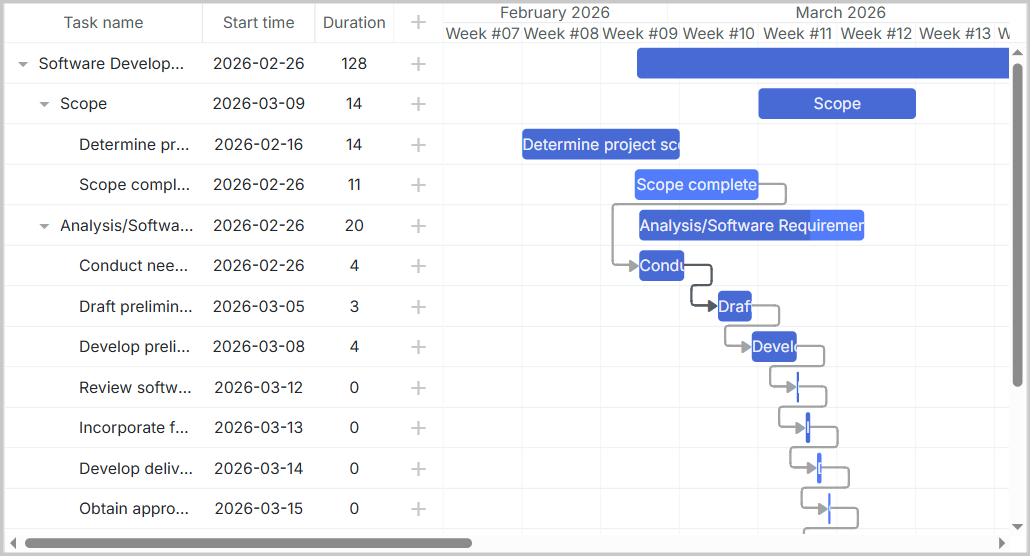
完整的演示源码可在 GitHub 获取:https://github.com/DHTMLX/gantt-migrating-from-devexpress。
从 DevExpress Gantt 迁移到 DHTMLX Gantt
Introduction
本指南将带你完成将现有应用程序从 DevExpress Gantt 迁移到 DHTMLX Gantt 的过程。我们将覆盖所有必要的步骤,包括数据库模式变更、服务端 API 修改以及客户端代码更新。
Prerequisites
在开始迁移之前,请确保你具备:
- 使用 DevExpress Gantt 的现有、可正常工作的应用程序
- 已安装 Node.js (>= 20.0.0)
- 具有 DevExpress 数据结构的 MySQL 数据库
- 对 Express.js、React 和 TypeScript 的基础了解
Step 1: Database Migration
Understanding DevExpress Schema
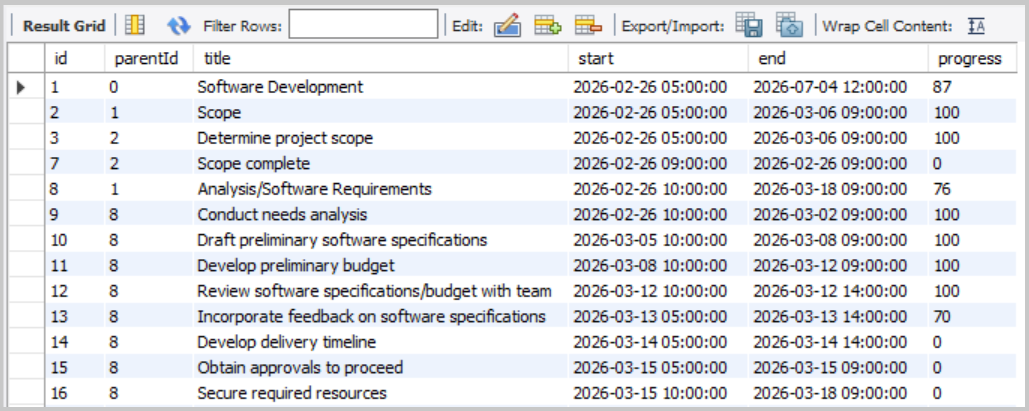
如果你按照 DevExpress 演示设置进行操作,应该拥有两张表:devexpress_tasks 和 devexpress_dependencies。
devexpress_tasks 表结构:
devexpress_dependencies 表结构:
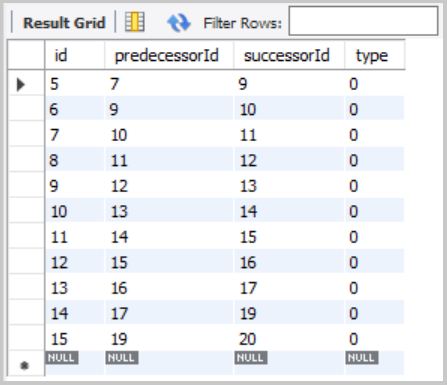
这两张表的结构已经与 DHTMLX 的思路相近,因此迁移相对直接。
Create DHTMLX Tables
创建两张与 DHTMLX Gantt 兼容的新表:
CREATE TABLE IF NOT EXISTS gantt_tasks (
    id               INT(11)        NOT NULL AUTO_INCREMENT,
    text             VARCHAR(255)   NOT NULL,
    start_date       DATETIME       NOT NULL,
    end_date         DATETIME       NOT NULL,
    progress         FLOAT          NOT NULL DEFAULT 0,
    parent           INT(11)        NOT NULL DEFAULT 0,
    PRIMARY KEY (id)
);

CREATE TABLE IF NOT EXISTS gantt_links (
    id               INT(11)        NOT NULL AUTO_INCREMENT,
    source           INT(11)        NOT NULL,
    target           INT(11)        NOT NULL,
    type             VARCHAR(1)     NOT NULL,
    PRIMARY KEY (id)
);
Note: DHTMLX Gantt 将基于 start_date 和 end_date 自动计算 duration。
Migrate Existing Data
现在将现有的 DevExpress 数据迁移到新的 DHTMLX 表中。
迁移任务:
INSERT INTO gantt_tasks (id, text, start_date, end_date, progress, parent)
SELECT
    id,
    title,
    start,
    end,
    progress / 100,
    COALESCE(parentId, 0)
FROM devexpress_tasks;
迁移链接(依赖):
DevExpress 已将依赖以结构化格式存储在 devexpress_dependencies 表中,这使迁移变得简单:
INSERT INTO gantt_links (id, source, target, type)
SELECT
    id,
    predecessorId,              -- predecessorId → source
    successorId,                -- successorId → target
    CASE type
        WHEN 0 THEN '0'         -- Finish-to-Start
        WHEN 1 THEN '1'         -- Start-to-Start
        WHEN 2 THEN '2'         -- Finish-to-Finish
        WHEN 3 THEN '3'         -- Start-to-Finish
        ELSE '0'
    END
FROM devexpress_dependencies;
你可以通过以下命令验证数据是否正确迁移:
SELECT * FROM gantt_tasks;
SELECT * FROM gantt_links;
你应该能看到所有任务和链接已正确传输并且字段映射正确。
Mapping DevExpress Task Fields to DHTMLX Gantt
| DevExpress Field | DHTMLX Field | Notes |
|---|---|---|
id | id | 任务 ID |
title | text | 任务名称 |
start | start_date | 任务开始日期和时间 |
end | end_date | 任务结束日期和时间 |
progress | progress | DevExpress: 0-100(整数),DHTMLX: 0-1(浮点数)。迁移时除以 100 |
parentId | parent | 父任务 ID。根任务的 NULL 值将转换为 0 |
更多关于任务属性的信息,请参阅:Task Properties。
Mapping DevExpress Dependency Fields to DHTMLX Links
| DevExpress Field | DHTMLX Field | Notes |
|---|---|---|
id | id | 链接 ID |
predecessorId | source | 依赖起始任务的 ID |
successorId | target | 依赖指向的目标任务 ID |
type | type | 依赖类型。DevExpress 使用数字(0-3),DHTMLX 默认使用字符串("0"-"3") |
更多关于链接属性的信息:Link Properties。
Step 2: Backend Migration (server.js)
Remove DevExpress Endpoints
从 server.js 中删除以下与 DevExpress 相关的端点:
app.get('/api/tasks', ...)- DevExpress 任务加载端点app.post('/api/tasks', ...)- 创建任务端点app.put('/api/tasks/:id', ...)- 更新任务端点app.delete('/api/tasks/:id', ...)- 删除任务端点app.get('/api/dependencies', ...)- DevExpress 依赖加载端点app.post('/api/dependencies', ...)- 创建依赖端点app.put('/api/dependencies/:id', ...)- 更新依赖端点app.delete('/api/dependencies/:id', ...)- 删除依赖端点
同时移除与 CustomStore 相关的响应格式处理。
Install DHTMLX Gantt Packages
移除 DevExpress 相关依赖:
npm uninstall devextreme devextreme-react
按照 installation guide 安装 DHTMLX React Gantt。
本教程中,我们将使用 DHTMLX React Gantt 的试用版本:
npm install @dhtmlx/trial-react-gantt
为 MySQL 的 DATETIME 转换安装日期格式化库:
npm install date-format-lite
Add Data Loading Endpoint
在 server.js 顶部导入 date-format-lite 库,然后添加用于以 DHTMLX 格式加载数据的 GET 端点:
import dateFormat from 'date-format-lite';
然后添加数据加载端点:
// GET /load - Load all tasks and links
app.get('/load', async (req, res) => {
  try {
    const [tasks] = await pool.query('SELECT * FROM gantt_tasks ORDER BY id');
    const [links] = await pool.query('SELECT * FROM gantt_links');

    tasks.forEach((task) => {
      if (task.start_date) {
        task.start_date = task.start_date.format('YYYY-MM-DD hh:mm:ss');
      }
      if (task.end_date) {
        task.end_date = task.end_date.format('YYYY-MM-DD hh:mm:ss');
      }
    });

    res.json({
      data: tasks,
      links: links,
    });
  } catch (error) {
    console.error('Error loading data:', error);
    res.status(500).json({ error: 'Failed to load data' });
  }
});
DevExpress 返回的是单独的数组,而 DHTMLX 期望的是 { data: [...], links: [...] }。
Add CRUD Endpoints for Tasks and Links
DHTMLX React Gantt 使用自定义保存处理程序将数据与服务器同步。每个操作(创建、更新、删除)都以相应的 HTTP 方法提交。
为任务操作添加处理程序:
// POST /save/task - Create a new task
app.post('/save/task', async (req, res) => {
  try {
    const task = getTask(req.body);

    const [result] = await pool.query(
      'INSERT INTO gantt_tasks (text, start_date, end_date, progress, parent) VALUES (?, ?, ?, ?, ?)',
      [task.text, task.start_date, task.end_date, task.progress, task.parent],
    );

    sendResponse(res, 'inserted', result.insertId);
  } catch (error) {
    sendResponse(res, 'error', null, error);
  }
});

// PUT /save/task/:id - Update an existing task
app.put('/save/task/:id', async (req, res) => {
  try {
    const taskId = req.params.id;
    const task = getTask(req.body);

    await pool.query(
      'UPDATE gantt_tasks SET text = ?, start_date = ?, end_date = ?, progress = ?, parent = ? WHERE id = ?',
      [task.text, task.start_date, task.end_date, task.progress, task.parent, taskId],
    );

    sendResponse(res, 'updated');
  } catch (error) {
    sendResponse(res, 'error', null, error);
  }
});

// DELETE /save/task/:id - Delete a task
app.delete('/save/task/:id', async (req, res) => {
  try {
    const taskId = req.params.id;
    await pool.query('DELETE FROM gantt_tasks WHERE id = ?', [taskId]);
    sendResponse(res, 'deleted');
  } catch (error) {
    sendResponse(res, 'error', null, error);
  }
});
为链接(依赖)操作添加处理程序:
// POST /save/link - Create new link
app.post('/save/link', async (req, res) => {
  try {
    const link = getLink(req.body);

    const [result] = await pool.query('INSERT INTO gantt_links (source, target, type) VALUES (?, ?, ?)', [
      link.source,
      link.target,
      link.type,
    ]);

    sendResponse(res, 'inserted', result.insertId);
  } catch (error) {
    sendResponse(res, 'error', null, error);
  }
});

// PUT /save/link/:id - Update existing link
app.put('/save/link/:id', async (req, res) => {
  try {
    const linkId = req.params.id;
    const link = getLink(req.body);

    await pool.query('UPDATE gantt_links SET source = ?, target = ?, type = ? WHERE id = ?', [
      link.source,
      link.target,
      link.type,
      linkId,
    ]);

    sendResponse(res, 'updated');
  } catch (error) {
    sendResponse(res, 'error', null, error);
  }
});

// DELETE /save/link/:id - Delete link
app.delete('/save/link/:id', async (req, res) => {
  try {
    const linkId = req.params.id;
    await pool.query('DELETE FROM gantt_links WHERE id = ?', [linkId]);
    sendResponse(res, 'deleted');
  } catch (error) {
    sendResponse(res, 'error', null, error);
  }
});
Add Helper Functions
添加用于处理数据和发送响应的工具函数:
// Helper: Parse task data from request
function getTask(data) {
  return {
    text: data.text,
    start_date: data.start_date,
    end_date: data.end_date,
    progress: parseFloat(data.progress) || 0,
    parent: data.parent || 0,
  };
}

// Helper: Parse link data from request
function getLink(data) {
  return {
    source: data.source,
    target: data.target,
    type: data.type,
  };
}

// Helper: Send response to DataProcessor
function sendResponse(res, action, tid = null, error = null) {
  if (error) {
    console.error('Error:', error);
    return res.status(500).json({ action: 'error', message: error.message });
  }

  const result = { action };
  if (tid !== null) result.tid = tid;
  res.json(result);
}
Sanitize Task Data (XSS Protection)
Gantt 图表会呈现诸如任务文本之类的自由文本字段,文本中的任何 HTML 都可能成为 XSS 向量。在存储之前始终在后端对用户输入进行清洗——在 getTask 助手函数中清理自由文本字段:
npm install isomorphic-dompurify
import DOMPurify from 'isomorphic-dompurify';

function getTask(data) {
  return {
    text: DOMPurify.sanitize(data.text),
    // ...其余字段保持不变
  };
}
如果你新增了输出原始 HTML 的自定义单元格或工具提示渲染器,请在相应位置对值进行转义。有关完整的建议集——内容安全策略(Content Security Policy)和防止 SQL 注入的指南——请参阅 Application Security 指南。
Step 3: Frontend Migration
Remove DevExpress Components and Services
删除 CustomStore 服务文件(src/services/dataService.ts)——DHTMLX React Gantt 不使用 CustomStore
从 index.html 中移除 DevExpress 的 CSS 链接
如果你在 index.html 中添加了 DevExpress 的 CSS 链接,请移除它们:
<!-- Remove these lines -->
<link rel="stylesheet" type="text/css" href="https://cdn3.devexpress.com/jslib/25.2.4/css/dx.fluent.blue.light.css" />
<link rel="stylesheet" type="text/css" href="https://cdn3.devexpress.com/jslib/25.2.4/css/dx-gantt.min.css" />
DHTMLX React Gantt 自带样式,直接在组件中导入:
import '@dhtmlx/trial-react-gantt/dist/react-gantt.css';
Update Vite Configuration
更新你的 vite.config.ts,将 API 请求代理到后端服务器。这对于开发模式很重要:
import { defineConfig } from 'vite';
import react from '@vitejs/plugin-react';

const PORT = process.env.PORT || 1337;

export default defineConfig({
  plugins: [react()],
  server: {
    proxy: {
      '/load': {
        target: `http://localhost:${PORT}`,
        changeOrigin: true,
      },
      '/save': {
        target: `http://localhost:${PORT}`,
        changeOrigin: true,
      },
    },
  },
});
Update package.json
确保你的 package.json 具备正确的依赖项:
"dependencies": {
  "@dhtmlx/trial-react-gantt": "^9.1.4",
  "body-parser": "^2.2.2",
  "cors": "^2.8.6",
  "date-format-lite": "^17.7.0",
  "dotenv": "^17.2.4",
  "express": "^5.2.1",
  "mysql2": "^3.16.3",
  "nodemon": "^3.1.11",
  "react": "^19.2.0",
  "react-dom": "^19.2.0"
},
"devDependencies": {
  "@eslint/js": "^9.39.1",
  "@types/node": "^24.10.1",
  "@types/react": "^19.2.7",
  "@types/react-dom": "^19.2.3",
  "@vitejs/plugin-react": "^5.1.1",
  "eslint": "^9.39.1",
  "eslint-plugin-react-hooks": "^7.0.1",
  "eslint-plugin-react-refresh": "^0.4.24",
  "globals": "^16.5.0",
  "typescript": "~5.9.3",
  "typescript-eslint": "^8.48.0",
  "vite": "^7.3.1"
}
Update src/App.tsx
用 DHTMLX React Gantt 替换 src/App.tsx 中的 DevExpress Gantt 组件:
import { useCallback, useMemo, useRef } from 'react';
import ReactGantt, { type GanttConfig, type Link, type ReactGanttRef, type Task } from '@dhtmlx/trial-react-gantt';
import '@dhtmlx/trial-react-gantt/dist/react-gantt.css';
import './App.css';

function App() {
  const ganttRef = useRef<ReactGanttRef>(null);

  const config: GanttConfig = useMemo(
    () => ({
      date_format: '%Y-%m-%d %H:%i:%s',
      scales: [
        { unit: 'month', step: 1, format: '%F %Y' },
        { unit: 'week', step: 1, format: 'Week #%W' },
      ],
      open_tree_initially: true,
    }),
    []
  );

  const save = useCallback(
    async (entity: string, action: 'update' | 'create' | 'delete', item: Task | Link, id: string | number) => {
      switch (action) {
        case 'create':
          return await fetch(`/save/${entity}`, {
            method: 'POST',
            body: JSON.stringify(item),
            headers: {
              'Content-Type': 'application/json',
            },
          })
            .then((response) => response.json())
            .then((result) => ({ id: result.tid }));

        case 'update':
          await fetch(`/save/${entity}/${id}`, {
            method: 'PUT',
            body: JSON.stringify(item),
            headers: {
              'Content-Type': 'application/json',
            },
          });
          break;

        case 'delete':
          await fetch(`/save/${entity}/${id}`, {
            method: 'DELETE',
          });
          break;

        default:
          throw new Error(`Invalid action: ${action}`);
      }
    },
    []
  );

  return (
    <ReactGantt
      ref={ganttRef}
      data={{
        load: '/load',
        save,
      }}
      config={config}
    />
  );
}

export default App;
Running the Application
在开发模式下,你需要同时运行两个进程:
终端 1 - 后端(Express):
npm run server
这将会在 http://localhost:1337 启动 API 服务器(或你在 .env 中配置的端口)
你应该会看到:
Server is running on port 1337
终端 2 - 前端(Vite):
npm run dev
这将会在 http://localhost:5173 启动 Vite 开发服务器。打开浏览器并访问 http://localhost:5173。Vite 将自动把 API 请求代理到 Express 后端。
你应该看到加载自数据库的数据所呈现的 DHTMLX Gantt 图表: