完整的演示源代码可在 GitHub 上获取: https://github.com/DHTMLX/gantt-migrating-from-frappe.
从 Frappe Gantt 迁移到 DHTMLX Gantt
简介
本指南将带您了解将现有应用从 Frappe Gantt 迁移到 DHTMLX Gantt 的过程。我们将涵盖所有必要步骤,包括数据库架构变更、服务器端 API 修改,以及客户端代码更新。
前提条件
在开始迁移之前,请确保你具备:
- 一个正在使用 Frappe Gantt 的现有应用
- 已安装 Node.js (>= 20.0.0)
- 具有 Frappe Gantt 数据结构的 MySQL 数据库
- 对 Express.js 和 JavaScript 有基本了解
步骤 1:数据库迁移
理解当前架构
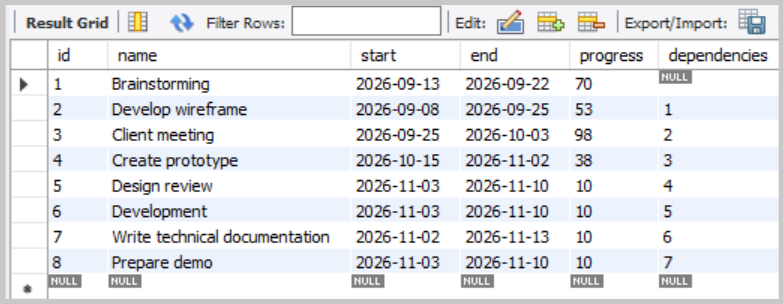
如果你按照 Frappe Gantt 演示设置,你应该只有一个表:frappe_tasks。
frappe_tasks 表结构:
创建 DHTMLX 表
DHTMLX Gantt 使用两张独立的表:一张用于任务,一张用于依赖链接。请在同一个数据库中创建它们:
USE frappe_dhtmlx;

CREATE TABLE IF NOT EXISTS gantt_tasks (
    id          VARCHAR(36)     NOT NULL DEFAULT (UUID()),
    text        VARCHAR(255)    NOT NULL,
    start_date  DATETIME        NOT NULL,
    end_date    DATETIME        NOT NULL,
    duration    INT             NOT NULL,
    progress    FLOAT           NOT NULL DEFAULT 0,
    parent      VARCHAR(36)     NOT NULL DEFAULT '0',
    PRIMARY KEY (id)
);

CREATE TABLE IF NOT EXISTS gantt_links (
    id          VARCHAR(36)     NOT NULL DEFAULT (UUID()),
    source      VARCHAR(36)     NOT NULL,
    target      VARCHAR(36)     NOT NULL,
    type        VARCHAR(1)      NOT NULL,
    PRIMARY KEY (id)
);
迁移现有数据
现在将你现有的 Frappe 数据迁移到新的 DHTMLX 表中。
迁移任务(tasks):
INSERT INTO gantt_tasks (id, text, start_date, end_date, duration, progress, parent)
SELECT
    id,
    name,                           -- name → text
    start,                          -- start → start_date
    end,                            -- end → end_date
    GREATEST(DATEDIFF(end, start), 1),  -- 以天为单位的持续时间(最小 1 天)
    progress / 100.0,               -- 将百分比(0-100)转换为小数(0-1)
    '0'                             -- Frappe 中没有层级结构,所有任务都是根级
FROM frappe_tasks;
你可以验证结果:
SELECT * FROM gantt_tasks;
迁移链接(依赖关系)
在 Frappe Gantt 的数据结构中,依赖关系存储在 frappe_tasks 表的 dependencies 列中,作为字符串形式。
在 DHTMLX Gantt 中,任务和链接存储在分别的表中。每个链接是一行,字段为:
id- 链接的唯一标识source- 依赖起始任务的 idtarget- 依赖结束的任务的 idtype- 依赖类型:"0"(FS)、"1"(SS)、"2"(FF)、"3"(SF)
由于所有 Frappe 依赖都是 FS,迁移时始终将 type 设置为 "0"。
创建一个 migrate-frappe-to-dhtmlx.js 文件并粘贴以下代码:
import mysql from 'mysql2/promise';
import 'dotenv/config';

const dbConfig = {
  host: process.env.HOST,
  user: process.env.MYSQL_USER,
  password: process.env.PASSWORD,
  database: process.env.DATABASE,
};

async function migrateFrappeToDHtmlX() {
  let connection;

  try {
    connection = await mysql.createConnection(dbConfig);

    // 查询所有具有依赖关系的任务
    const [tasks] = await connection.execute(
      'SELECT id, dependencies FROM frappe_tasks WHERE dependencies IS NOT NULL AND dependencies != ""',
    );

    console.log(`Found ${tasks.length} tasks with dependencies`);

    if (tasks.length === 0) {
      console.log('No dependencies to migrate.');
      return;
    }

    const links = [];

    for (const task of tasks) {
      const targetId = task.id;
      const dependencies = task.dependencies;

      // 以逗号分隔的依赖 ID 拆分
      const depIds = dependencies
        .split(',')
        .map((dep) => dep.trim())
        .filter((dep) => dep);

      console.log(`\nTask ${targetId} depends on: ${depIds.join(', ')}`);

      // 每个依赖关系转化为 Finish-to-Start 链接(type "0")
      for (const sourceId of depIds) {
        links.push({
          source: sourceId,
          target: targetId,
          type: '0',
        });
      }
    }

    if (links.length > 0) {
      console.log(`\nInserting ${links.length} links into gantt_links...`);

      await connection.beginTransaction();

      try {
        await connection.execute('DELETE FROM gantt_links');
        console.log('Cleared existing links from gantt_links table');

        for (const link of links) {
          await connection.execute('INSERT INTO gantt_links (source, target, type) VALUES (?, ?, ?)', [
            link.source,
            link.target,
            link.type,
          ]);
        }

        await connection.commit();
        console.log('Links inserted successfully!');
      } catch (error) {
        await connection.rollback();
        throw error;
      }
    }

    const [insertedLinks] = await connection.execute('SELECT * FROM gantt_links');
    console.log(`Total links in gantt_links: ${insertedLinks.length}`);

    console.log('\nMigration completed successfully!');
  } catch (error) {
    console.error('Migration failed:', error.message);
    process.exit(1);
  } finally {
    if (connection) {
      await connection.end();
      console.log('\nDatabase connection closed.');
    }
  }
}

migrateFrappeToDHtmlX();
然后在你的 package.json 中添加一个脚本:
{
  "scripts": {
    "migrate": "node migrate-frappe-to-dhtmlx.js"
  }
}
执行迁移:
npm run migrate
你可以验证链接是否正确迁移:
SELECT * FROM gantt_links;
你应该看到每个依赖关系对应一行,并且 source 与 target 的 ID 正确。
将 Frappe 任务字段映射到 DHTMLX Gantt
| Frappe 字段 | DHTMLX 字段 | 说明 |
|---|---|---|
id | id | 任务 ID |
name | text | 任务名称 |
start | start_date | 任务的开始时间 |
end | end_date | 任务的结束时间 |
| (not stored) | duration | 任务持续时间。在 DHTMLX Gantt 中如果未指定,系统会基于 start_date 和 end_date 自动计算 |
progress | progress | Frappe:整数 0–100;DHTMLX:小数 0.0–1.0 |
| (not supported) | parent | Frappe 没有层级关系。在 DHTMLX Gantt 中你可以指定父任务 |
dependencies | (links table) | Frappe 以字符串形式存储;DHTMLX 使用单独的 gantt_links 表 |
步骤 2:后端迁移(server.js)
删除 Frappe 特定端点与辅助函数
在 Frappe 服务器中,数据加载和任务的 CRUD 操作通过 /data/tasks 进行。删除或替换以下所有内容:
function formatTaskForClient(dbTask)- Frappe 特定的响应格式化函数app.get('/data/tasks', ...)- 返回一个简单的任务对象数组app.post('/data/tasks', ...)- 创建任务;响应返回完整的任务对象app.put('/data/tasks/:id', ...)- 更新任务;响应返回更新后的任务对象app.delete('/data/tasks/:id', ...)- 删除任务;返回 HTTP 204 无主体
安装 DHTMLX Gantt 包
按照 安装指南 安装 DHTMLX Gantt。
本教程中,我们将使用 DHTMLX Gantt 的试用版本:
npm install @dhx/trial-gantt
添加数据加载端点
DHTMLX 期望在一个单独的 GET /data 响应中返回任务和链接,格式为 { tasks: [], links: [] }。
将 Frappe 的 GET /data/tasks 端点替换为:
import dateFormat from 'date-format-lite';

// GET /data - 加载任务和链接
app.get('/data', async (req, res) => {
  try {
    const [tasks] = await pool.query('SELECT * FROM gantt_tasks ORDER BY start_date');
    const [links] = await pool.query('SELECT * FROM gantt_links');

    tasks.forEach((task) => {
      if (task.start_date) {
        task.start_date = task.start_date.format('YYYY-MM-DD hh:mm:ss');
      }
      if (task.end_date) {
        task.end_date = task.end_date.format('YYYY-MM-DD hh:mm:ss');
      }
    });

    res.json({ tasks, links });
  } catch (error) {
    console.error('Error loading data:', error);
    res.status(500).json({ error: 'Failed to load data' });
  }
});
为任务和链接添加 CRUD 端点
DHTMLX Gantt 的 DataProcessor 使用 RESTful 端点与服务器同步数据。每个操作(创建、更新、删除)作为单独的 HTTP 请求发送。了解更多关于 Server-side integration 的信息。
用以下内容替换 Frappe 的任务端点(POST /data/tasks、PUT /data/tasks/:id、DELETE /data/tasks/:id):
import { randomUUID } from 'crypto';

// POST /data/task — 创建新任务
app.post('/data/task', async (req, res) => {
  try {
    const task = getTask(req.body);
    const { text, start_date, end_date, duration, progress, parent } = task;
    const id = randomUUID();

    await pool.query(
      'INSERT INTO gantt_tasks (id, text, start_date, end_date, duration, progress, parent) VALUES (?, ?, ?, ?, ?, ?, ?)',
      [id, text, start_date, end_date, duration, progress, parent],
    );
    sendResponse(res, 'inserted', id);
  } catch (error) {
    sendResponse(res, 'error', null, error);
  }
});

// PUT /data/task/:id — 更新现有任务
app.put('/data/task/:id', async (req, res) => {
  try {
    const taskId = req.params.id;
    const task = getTask(req.body);
    const { text, start_date, end_date, duration, progress, parent } = task;

    await pool.query(
      'UPDATE gantt_tasks SET text = ?, start_date = ?, end_date = ?, duration = ?, progress = ?, parent = ? WHERE id = ?',
      [text, start_date, end_date, duration, progress, parent, taskId],
    );
    sendResponse(res, 'updated');
  } catch (error) {
    sendResponse(res, 'error', null, error);
  }
});

// DELETE /data/task/:id — 删除任务
app.delete('/data/task/:id', async (req, res) => {
  try {
    const taskId = req.params.id;
    await pool.query('DELETE FROM gantt_tasks WHERE id = ?', [taskId]);
    sendResponse(res, 'deleted');
  } catch (error) {
    sendResponse(res, 'error', null, error);
  }
});
为链接(依赖)操作添加处理器:
// POST /data/link — 创建新链接
app.post('/data/link', async (req, res) => {
  try {
    const link = getLink(req.body);
    const id = randomUUID();

    await pool.query('INSERT INTO gantt_links (id, source, target, type) VALUES (?, ?, ?, ?)', [
      id,
      link.source,
      link.target,
      link.type,
    ]);
    sendResponse(res, 'inserted', id);
  } catch (error) {
    sendResponse(res, 'error', null, error);
  }
});

// PUT /data/link/:id — 更新现有链接
app.put('/data/link/:id', async (req, res) => {
  try {
    const linkId = req.params.id;
    const link = getLink(req.body);

    await pool.query('UPDATE gantt_links SET source = ?, target = ?, type = ? WHERE id = ?', [
      link.source,
      link.target,
      link.type,
      linkId,
    ]);
    sendResponse(res, 'updated');
  } catch (error) {
    sendResponse(res, 'error', null, error);
  }
});

// DELETE /data/link/:id — 删除链接
app.delete('/data/link/:id', async (req, res) => {
  try {
    const linkId = req.params.id;
    await pool.query('DELETE FROM gantt_links WHERE id = ?', [linkId]);
    sendResponse(res, 'deleted');
  } catch (error) {
    sendResponse(res, 'error', null, error);
  }
});
添加辅助函数
用 DHTMLX 兼容的助手函数替换 Frappe 的 formatTaskForClient 函数:
// 从请求体解析任务数据
function getTask(data) {
  return {
    text: data.text,
    start_date: data.start_date,
    end_date: data.end_date,
    duration: data.duration || 1,
    progress: parseFloat(data.progress) || 0,
    parent: data.parent || 0,
  };
}

// 从请求体解析链接数据
function getLink(data) {
  return {
    source: data.source,
    target: data.target,
    type: data.type,
  };
}

// 发送 DataProcessor 兼容的响应
function sendResponse(res, action, tid = null, error = null) {
  if (error) {
    console.error('Error:', error);
    return res.status(500).json({ action: 'error', message: error.message });
  }
  const result = { action };
  if (tid !== null) result.tid = tid;
  res.json(result);
}
注意: 响应格式与 Frappe 不同。Frappe 端点返回完整的任务对象(删除时返回 HTTP 204)。DHTMLX 的 DataProcessor 期望的是包含 action 字段的 JSON 对象,例如 { action: "inserted", tid: 5 }、{ action: "updated" }、{ action: "deleted" }。了解更多请参阅 Request and Responses details。
对任务数据进行清洗(XSS 防护)
DHTMLX Gantt 会将任务的 text 等字段渲染为 HTML,并且默认不会对其进行转义,因此迁移的数据(或用户后续输入的数据)中的任意标记都将原样呈现——可能成为 XSS 向量。Frappe 以及大多数其他库的行为也是如此,因此在迁移阶段显式处理这点是值得的。
后端进行清洗(推荐)。 在进入数据库之前清理纯文本字段:
npm install isomorphic-dompurify
import DOMPurify from 'isomorphic-dompurify';

function getTask(data) {
  return {
    text: DOMPurify.sanitize(data.text),
    // ...其余字段保持不变
  };
}
在前端进行转义(深入防护) 覆盖在 src/main.js 中渲染任务文本的模板:
const escapeHTML = (value) =>
String(value ?? '').replace(/[&<>"']/g, (ch) =>
({ '&': '&', '<': '<', '>': '>', '"': '"', "'": ''' }[ch]));
gantt.templates.task_text = (start, end, task) => escapeHTML(task.text);
gantt.templates.tooltip_text = (start, end, task) => escapeHTML(task.text);
// 也可以通过列模板对 "text" 网格列进行转义,例如:template: (task) => escapeHTML(task.text)
关于 Content Security Policy、轻量级对话框清洗和 SQL 注入等建议,请参阅 应用程序安全性 指南。
步骤 3:前端迁移
安装 DHTMLX Gantt 包
本教程中,我们将使用 DHTMLX Gantt 的试用版本:
npm install @dhx/trial-gantt
更新 vite.config.js
在 Frappe 演示中,Vite 代理的作用域限定在 /data/tasks:
proxy: {
  '/data/tasks': {
    target: 'http://localhost:1337',
    changeOrigin: true,
  },
},
将其更新为将所有 /data 请求代理(现在包含任务、任务 CRUD 与链接 CRUD):
proxy: {
  '/data': {
    target: 'http://localhost:1337',
    changeOrigin: true,
  },
},
更新 index.html
在 Frappe 演示中,frappe-gantt 是从 CDN 加载的。此外还有一个包含模态框、复选框和控制按钮的自定义 UI——现在都不再需要,因为 DHTMLX Gantt 提供了内置的编辑对话框用于编辑任务。
替换整个 index.html 内容:
删除:
<script src="https://cdn.jsdelivr.net/npm/frappe-gantt/dist/frappe-gantt.umd.js"></script>
<link rel="stylesheet" href="https://cdn.jsdelivr.net/npm/frappe-gantt/dist/frappe-gantt.css" />
还要删除位于 <body> 内的整个自定义 UI 标记,包括:
- 带有
#add-task、#refresh、#delete-task按钮的.controls容器 - 带有任务复选框的
.delete-section容器 #add-task-modal覆盖层<div id="gantt">容器
替换为一个简化结构:
<!DOCTYPE html>
<html lang="en">
  <head>
    <meta charSet="UTF-8" />
    <link rel="stylesheet" href="/src/style.css" />
    <meta name="viewport" content="width=device-width, initial-scale=1.0" />
    <title>DHTMLX Gantt Demo</title>
  </head>
  <body>
    <div id="gantt_here"></div>
    <script type="module" src="/src/main.js"></script>
  </body>
</html>
更新 src/style.css
Frappe 演示中的 style.css 包含用于控制面板、按钮、模态框和复选框的自定义样式。由于所有自定义 UI 已移除,请将文件替换为 DHTMLX 专用样式:
html,
body {
  margin: 0;
  padding: 0;
  height: 100%;
  width: 100%;
}

#gantt_here {
  width: 100%;
  height: 100%;
}

.weekend {
  background: var(--dhx-gantt-base-colors-background-alt);
}
.weekend 类用于 DHTMLX Gantt 模板以高亮显示周末列(请参阅 src/main.js)。
替换 src/main.js
移除所有 Frappe 相关代码,并将 src/main.js 替换为:
import '@dhx/trial-gantt/codebase/dhtmlxgantt.css';
import gantt from '@dhx/trial-gantt';

gantt.plugins({
  auto_scheduling: true,
  tooltip: true,
});

gantt.config.auto_scheduling = {
  enabled: true,
};

const hourToStr = gantt.date.date_to_str('%H:%i');
const hourRangeFormat = function (step) {
  return function (date) {
    const intervalEnd = new Date(gantt.date.add(date, step, 'hour') - 1);
    return hourToStr(date) + ' - ' + hourToStr(intervalEnd);
  };
};

const zoomConfig = {
  minColumnWidth: 80,
  maxColumnWidth: 150,
  levels: [
    [
      { unit: 'month', format: '%M %Y', step: 1 },
      {
        unit: 'week',
        step: 1,
        format: function (date) {
          const dateToStr = gantt.date.date_to_str('%d %M');
          const endDate = gantt.date.add(date, 7 - date.getDay(), 'day');
          const weekNum = gantt.date.date_to_str('%W')(date);
          return 'Week #' + weekNum + ', ' + dateToStr(date) + ' - ' + dateToStr(endDate);
        },
      },
    ],
    [
      { unit: 'month', format: '%M %Y', step: 1 },
      { unit: 'day', format: '%d %M', step: 1 },
    ],
    [
      { unit: 'day', format: '%d %M', step: 1 },
      { unit: 'hour', format: hourRangeFormat(12), step: 12 },
    ],
    [
      { unit: 'day', format: '%d %M', step: 1 },
      { unit: 'hour', format: hourRangeFormat(8), step: 8 },
    ],
    [
      { unit: 'day', format: '%d %M', step: 1 },
      { unit: 'hour', format: '%H:%i', step: 1 },
    ],
  ],
  useKey: 'ctrlKey',
  trigger: 'wheel',
  element: function () {
    return gantt.$root.querySelector('.gantt_task');
  },
};

gantt.ext.zoom.init(zoomConfig);

gantt.templates.scale_cell_class = function (date) {
  if (date.getDay() == 0 || date.getDay() == 6) {
    return 'weekend';
  }
};
gantt.templates.timeline_cell_class = function (item, date) {
  if (date.getDay() == 0 || date.getDay() == 6) {
    return 'weekend';
  }
};

gantt.config.date_format = '%Y-%m-%d %H:%i:%s';
gantt.config.scale_height = 50;
gantt.config.open_tree_initially = true;

gantt.init('gantt_here');
gantt.load('/data');

const dp = gantt.createDataProcessor({
  url: '/data',
  mode: 'REST',
});
DataProcessor 将自动执行:
- 创建任务时向
POST /data/task发送请求 - 更新任务时向
PUT /data/task/:id发送请求 - 删除任务时向
DELETE /data/task/:id发送请求 - 创建依赖链接时向
POST /data/link发送请求 - 更新链接时向
PUT /data/link/:id发送请求 - 删除链接时向
DELETE /data/link/:id发送请求
步骤 4:迁移测试
运行应用程序
在开发模式下,需要同时运行两个进程。
终端 1 — 后端(Express):
npm run server
这会在 http://localhost:1337 启动 API 服务器(或你配置的端口)。
终端 2 — 前端(Vite):
npm run dev
这会在 http://localhost:5173 启动 Vite 开发服务器。打开浏览器并访问 http://localhost:5173。Vite 会自动将 /data 请求代理到 Express 后端。
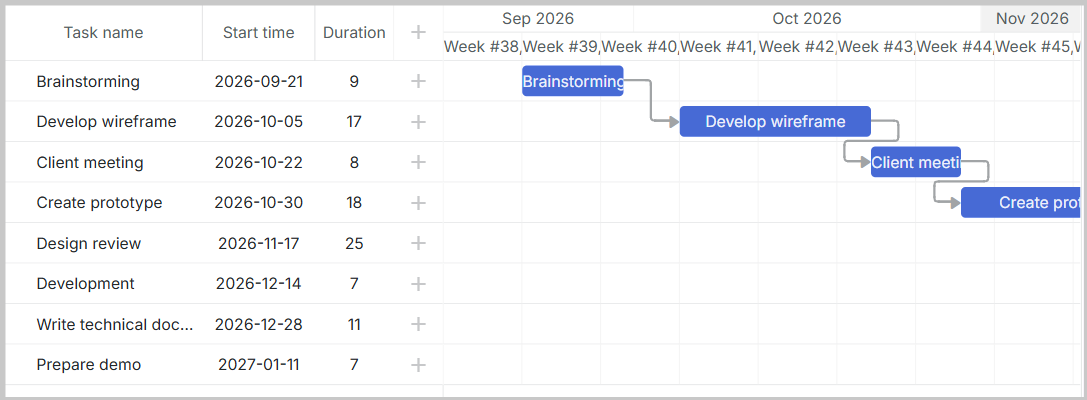
你应该看到 DHTMLX Gantt 图表以及从数据库迁移过来的数据。
下一步
- 了解 DHTMLX Gantt 文档 以获取高级功能
- 查看 API 参考 以获取自定义选项
- 参考 DHTMLX Gantt 示例 以获取实现示例