The complete demo source code is available on GitHub: https://github.com/DHTMLX/gantt-migrating-from-frappe.
Migrating from Frappe Gantt to DHTMLX Gantt
Introduction
This guide will walk you through the process of migrating an existing application from Frappe Gantt to DHTMLX Gantt. We'll cover all necessary steps including database schema changes, server-side API modifications, and client-side code updates.
Prerequisites
Before starting the migration, ensure you have:
- An existing working application using Frappe Gantt
- Node.js (>= 20.0.0) installed
- MySQL database with Frappe Gantt data structure
- Basic knowledge of Express.js and JavaScript
Step 1: Database Migration
Understanding Current Schema
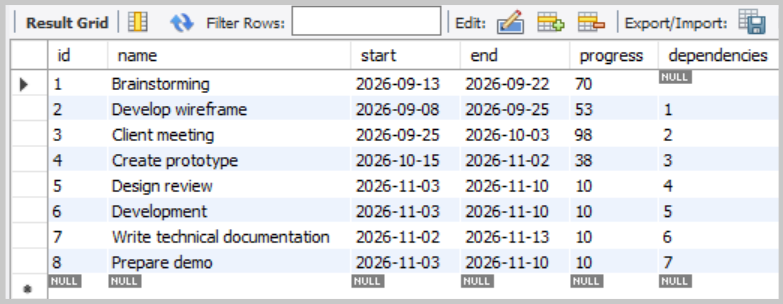
If you followed the Frappe Gantt demo setup, you should have one table: frappe_tasks.
The frappe_tasks table structure:
Create DHTMLX Tables
DHTMLX Gantt uses two separate tables: one for tasks and one for dependency links. Create them in the same database:
USE frappe_dhtmlx;

CREATE TABLE IF NOT EXISTS gantt_tasks (
    id          VARCHAR(36)     NOT NULL DEFAULT (UUID()),
    text        VARCHAR(255)    NOT NULL,
    start_date  DATETIME        NOT NULL,
    end_date    DATETIME        NOT NULL,
    duration    INT             NOT NULL,
    progress    FLOAT           NOT NULL DEFAULT 0,
    parent      VARCHAR(36)     NOT NULL DEFAULT '0',
    PRIMARY KEY (id)
);

CREATE TABLE IF NOT EXISTS gantt_links (
    id          VARCHAR(36)     NOT NULL DEFAULT (UUID()),
    source      VARCHAR(36)     NOT NULL,
    target      VARCHAR(36)     NOT NULL,
    type        VARCHAR(1)      NOT NULL,
    PRIMARY KEY (id)
);
Migrate Existing Data
Now migrate your existing Frappe data to the new DHTMLX tables.
Migrate tasks:
INSERT INTO gantt_tasks (id, text, start_date, end_date, duration, progress, parent)
SELECT
    id,
    name,                           -- name → text
    start,                          -- start → start_date
    end,                            -- end → end_date
    GREATEST(DATEDIFF(end, start), 1),  -- Duration in days (minimum 1)
    progress / 100.0,               -- Convert percentage (0-100) to decimal (0-1)
    '0'                             -- No hierarchy in Frappe, all tasks are root-level
FROM frappe_tasks;
You can verify the result:
SELECT * FROM gantt_tasks;
Migrate links (dependencies)
In Frappe Gantt's data structure, dependencies are stored as strings in the dependencies column of the frappe_tasks table.
In DHTMLX Gantt, tasks and links are stored in separate tables. Each link is a row with:
id- the link idsource- the id of the task the dependency starts fromtarget- the id of the task the dependency ends attype- the dependency type:"0"(FS),"1"(SS),"2"(FF),"3"(SF)
Since all Frappe dependencies are FS, the migration always sets type = "0".
Create a migrate-frappe-to-dhtmlx.js file and paste the following code into it:
import mysql from 'mysql2/promise';
import 'dotenv/config';

const dbConfig = {
  host: process.env.HOST,
  user: process.env.MYSQL_USER,
  password: process.env.PASSWORD,
  database: process.env.DATABASE,
};

async function migrateFrappeToDHtmlX() {
  let connection;

  try {
    connection = await mysql.createConnection(dbConfig);

    // Query all tasks that have dependencies
    const [tasks] = await connection.execute(
      'SELECT id, dependencies FROM frappe_tasks WHERE dependencies IS NOT NULL AND dependencies != ""',
    );

    console.log(`Found ${tasks.length} tasks with dependencies`);

    if (tasks.length === 0) {
      console.log('No dependencies to migrate.');
      return;
    }

    const links = [];

    for (const task of tasks) {
      const targetId = task.id;
      const dependencies = task.dependencies;

      // Split comma-separated dependency IDs
      const depIds = dependencies
        .split(',')
        .map((dep) => dep.trim())
        .filter((dep) => dep);

      console.log(`\nTask ${targetId} depends on: ${depIds.join(', ')}`);

      // Each dependency becomes a Finish-to-Start link (type "0")
      for (const sourceId of depIds) {
        links.push({
          source: sourceId,
          target: targetId,
          type: '0',
        });
      }
    }

    if (links.length > 0) {
      console.log(`\nInserting ${links.length} links into gantt_links...`);

      await connection.beginTransaction();

      try {
        await connection.execute('DELETE FROM gantt_links');
        console.log('Cleared existing links from gantt_links table');

        for (const link of links) {
          await connection.execute('INSERT INTO gantt_links (source, target, type) VALUES (?, ?, ?)', [
            link.source,
            link.target,
            link.type,
          ]);
        }

        await connection.commit();
        console.log('Links inserted successfully!');
      } catch (error) {
        await connection.rollback();
        throw error;
      }
    }

    const [insertedLinks] = await connection.execute('SELECT * FROM gantt_links');
    console.log(`Total links in gantt_links: ${insertedLinks.length}`);

    console.log('\nMigration completed successfully!');
  } catch (error) {
    console.error('Migration failed:', error.message);
    process.exit(1);
  } finally {
    if (connection) {
      await connection.end();
      console.log('\nDatabase connection closed.');
    }
  }
}

migrateFrappeToDHtmlX();
Then add a script to your package.json:
{
  "scripts": {
    "migrate": "node migrate-frappe-to-dhtmlx.js"
  }
}
Run the migration:
npm run migrate
You can verify that the links were migrated correctly:
SELECT * FROM gantt_links;
You should see one row per dependency, with correct source and target IDs.
Mapping Frappe Task Fields to DHTMLX Gantt
| Frappe Field | DHTMLX Field | Notes |
|---|---|---|
id | id | Task id |
name | text | Task name |
start | start_date | The start date of the task |
end | end_date | The end date of the task |
| (not stored) | duration | The task duration. In DHTMLX Gantt, if not specified, Gantt will calculate it based on the start_date and end_date properties |
progress | progress | Frappe: integer 0–100; DHTMLX: decimal 0.0–1.0 |
| (not supported) | parent | Frappe has no hierarchy. In DHTMLX Gantt you can specify the parent task |
dependencies | (links table) | Frappe stores as strings; DHTMLX uses a separate gantt_links table |
Step 2: Backend Migration (server.js)
Remove Frappe-Specific Endpoints and Helper
In the Frappe server, data loading and CRUD for tasks go through /data/tasks. Delete or replace all of the following:
function formatTaskForClient(dbTask)- the Frappe-specific response formatterapp.get('/data/tasks', ...)- returns a plain array of task objectsapp.post('/data/tasks', ...)- creates a task; response returns the full task objectapp.put('/data/tasks/:id', ...)- updates a task; response returns the updated task objectapp.delete('/data/tasks/:id', ...)- deletes a task; returns HTTP 204 with no body
Install DHTMLX Gantt Package
Install DHTMLX Gantt following the installation guide.
For this tutorial, we will use the trial version of DHTMLX Gantt:
npm install @dhx/trial-gantt
Add Data Loading Endpoint
DHTMLX expects both tasks and links to be returned in a single GET /data response as { tasks: [], links: [] }.
Replace the Frappe GET /data/tasks endpoint with:
import dateFormat from 'date-format-lite';

// GET /data - Load tasks and links
app.get('/data', async (req, res) => {
  try {
    const [tasks] = await pool.query('SELECT * FROM gantt_tasks ORDER BY start_date');
    const [links] = await pool.query('SELECT * FROM gantt_links');

    tasks.forEach((task) => {
      if (task.start_date) {
        task.start_date = task.start_date.format('YYYY-MM-DD hh:mm:ss');
      }
      if (task.end_date) {
        task.end_date = task.end_date.format('YYYY-MM-DD hh:mm:ss');
      }
    });

    res.json({ tasks, links });
  } catch (error) {
    console.error('Error loading data:', error);
    res.status(500).json({ error: 'Failed to load data' });
  }
});
Add CRUD Endpoints for Tasks and Links
DHTMLX Gantt's DataProcessor uses RESTful endpoints to synchronize data with the server. Each operation (create, update, delete) is sent as a separate HTTP request. Learn more about Server-side integration.
Replace the Frappe task endpoints (POST /data/tasks, PUT /data/tasks/:id, DELETE /data/tasks/:id) with:
import { randomUUID } from 'crypto';

// POST /data/task — Create a new task
app.post('/data/task', async (req, res) => {
  try {
    const task = getTask(req.body);
    const { text, start_date, end_date, duration, progress, parent } = task;
    const id = randomUUID();

    await pool.query(
      'INSERT INTO gantt_tasks (id, text, start_date, end_date, duration, progress, parent) VALUES (?, ?, ?, ?, ?, ?, ?)',
      [id, text, start_date, end_date, duration, progress, parent],
    );
    sendResponse(res, 'inserted', id);
  } catch (error) {
    sendResponse(res, 'error', null, error);
  }
});

// PUT /data/task/:id — Update an existing task
app.put('/data/task/:id', async (req, res) => {
  try {
    const taskId = req.params.id;
    const task = getTask(req.body);
    const { text, start_date, end_date, duration, progress, parent } = task;

    await pool.query(
      'UPDATE gantt_tasks SET text = ?, start_date = ?, end_date = ?, duration = ?, progress = ?, parent = ? WHERE id = ?',
      [text, start_date, end_date, duration, progress, parent, taskId],
    );
    sendResponse(res, 'updated');
  } catch (error) {
    sendResponse(res, 'error', null, error);
  }
});

// DELETE /data/task/:id — Delete a task
app.delete('/data/task/:id', async (req, res) => {
  try {
    const taskId = req.params.id;
    await pool.query('DELETE FROM gantt_tasks WHERE id = ?', [taskId]);
    sendResponse(res, 'deleted');
  } catch (error) {
    sendResponse(res, 'error', null, error);
  }
});
Add handlers for link (dependency) operations:
// POST /data/link — Create a new link
app.post('/data/link', async (req, res) => {
  try {
    const link = getLink(req.body);
    const id = randomUUID();

    await pool.query('INSERT INTO gantt_links (id, source, target, type) VALUES (?, ?, ?, ?)', [
      id,
      link.source,
      link.target,
      link.type,
    ]);
    sendResponse(res, 'inserted', id);
  } catch (error) {
    sendResponse(res, 'error', null, error);
  }
});

// PUT /data/link/:id — Update an existing link
app.put('/data/link/:id', async (req, res) => {
  try {
    const linkId = req.params.id;
    const link = getLink(req.body);

    await pool.query('UPDATE gantt_links SET source = ?, target = ?, type = ? WHERE id = ?', [
      link.source,
      link.target,
      link.type,
      linkId,
    ]);
    sendResponse(res, 'updated');
  } catch (error) {
    sendResponse(res, 'error', null, error);
  }
});

// DELETE /data/link/:id — Delete a link
app.delete('/data/link/:id', async (req, res) => {
  try {
    const linkId = req.params.id;
    await pool.query('DELETE FROM gantt_links WHERE id = ?', [linkId]);
    sendResponse(res, 'deleted');
  } catch (error) {
    sendResponse(res, 'error', null, error);
  }
});
Add Helper Functions
Replace the Frappe formatTaskForClient function with DHTMLX-compatible helpers:
// Parse task data from request body
function getTask(data) {
  return {
    text: data.text,
    start_date: data.start_date,
    end_date: data.end_date,
    duration: data.duration || 1,
    progress: parseFloat(data.progress) || 0,
    parent: data.parent || 0,
  };
}

// Parse link data from request body
function getLink(data) {
  return {
    source: data.source,
    target: data.target,
    type: data.type,
  };
}

// Send DataProcessor-compatible response
function sendResponse(res, action, tid = null, error = null) {
  if (error) {
    console.error('Error:', error);
    return res.status(500).json({ action: 'error', message: error.message });
  }
  const result = { action };
  if (tid !== null) result.tid = tid;
  res.json(result);
}
Note: The response format is different from Frappe. Frappe endpoints returned the full task object (or HTTP 204 for deletes). DHTMLX's DataProcessor expects a JSON object with an action field (e.g., { action: "inserted", tid: 5 }, { action: "updated" }, { action: "deleted" }). Learn more the Request and Responses details.
Sanitize Task Data (XSS Protection)
DHTMLX Gantt renders fields such as a task's text as HTML and does not escape them by default, so any markup in your migrated data (or entered later by a user) is rendered as-is — a potential XSS vector. Frappe and most other libraries behave the same way, so it's worth handling this explicitly during migration.
Sanitize on the backend (recommended). Clean free-text fields before they reach the database:
npm install isomorphic-dompurify
import DOMPurify from 'isomorphic-dompurify';

function getTask(data) {
  return {
    text: DOMPurify.sanitize(data.text),
    // ...the remaining fields unchanged
  };
}
Escape on the frontend (defense in depth). Override the templates that render task text in src/main.js:
const escapeHTML = (value) =>
String(value ?? '').replace(/[&<>"']/g, (ch) =>
({ '&': '&', '<': '<', '>': '>', '"': '"', "'": ''' }[ch]));
gantt.templates.task_text = (start, end, task) => escapeHTML(task.text);
gantt.templates.tooltip_text = (start, end, task) => escapeHTML(task.text);
// also escape the "text" grid column via a column template: template: (task) => escapeHTML(task.text)
For the full set of recommendations — Content Security Policy, lightbox sanitization, and SQL-injection guidance — see the Application Security guide.
Step 3: Frontend Migration
Install the DHTMLX Gantt package
For this tutorial, we will use the trial version of DHTMLX Gantt:
npm install @dhx/trial-gantt
Update vite.config.js
In the Frappe demo, the Vite proxy was scoped to /data/tasks:
proxy: {
  '/data/tasks': {
    target: 'http://localhost:1337',
    changeOrigin: true,
  },
},
Update it to proxy all /data requests (which now cover tasks, task CRUD, and link CRUD):
proxy: {
  '/data': {
    target: 'http://localhost:1337',
    changeOrigin: true,
  },
},
Update index.html
In the Frappe demo, frappe-gantt is loaded from a CDN. There is also a complex custom UI with modals, checkboxes, and control buttons - all of which are no longer needed because DHTMLX Gantt provides a built-in lightbox for editing tasks.
Replace the entire index.html content:
Remove:
<script src="https://cdn.jsdelivr.net/npm/frappe-gantt/dist/frappe-gantt.umd.js"></script>
<link rel="stylesheet" href="https://cdn.jsdelivr.net/npm/frappe-gantt/dist/frappe-gantt.css" />
Also remove the entire custom UI markup inside <body> including:
- The
.controlsdiv with#add-task,#refresh, and#delete-taskbuttons - The
.delete-sectiondiv with task checkboxes - The
#add-task-modaloverlay - The
<div id="gantt">container
Replace with a minimal structure:
<!DOCTYPE html>
<html lang="en">
  <head>
    <meta charSet="UTF-8" />
    <link rel="stylesheet" href="/src/style.css" />
    <meta name="viewport" content="width=device-width, initial-scale=1.0" />
    <title>DHTMLX Gantt Demo</title>
  </head>
  <body>
    <div id="gantt_here"></div>
    <script type="module" src="/src/main.js"></script>
  </body>
</html>
Update src/style.css
The Frappe demo's style.css contains custom styles for the control panel, buttons, modals, and checkboxes. Since all that custom UI is removed, replace the file with DHTMLX-specific styles:
html,
body {
  margin: 0;
  padding: 0;
  height: 100%;
  width: 100%;
}

#gantt_here {
  width: 100%;
  height: 100%;
}

.weekend {
  background: var(--dhx-gantt-base-colors-background-alt);
}
The .weekend class is used by DHTMLX Gantt templates to highlight weekend columns (see src/main.js).
Replace src/main.js
Remove all Frappe related code and replace src/main.js with:
import '@dhx/trial-gantt/codebase/dhtmlxgantt.css';
import gantt from '@dhx/trial-gantt';

gantt.plugins({
  auto_scheduling: true,
  tooltip: true,
});

gantt.config.auto_scheduling = {
  enabled: true,
};

const hourToStr = gantt.date.date_to_str('%H:%i');
const hourRangeFormat = function (step) {
  return function (date) {
    const intervalEnd = new Date(gantt.date.add(date, step, 'hour') - 1);
    return hourToStr(date) + ' - ' + hourToStr(intervalEnd);
  };
};

const zoomConfig = {
  minColumnWidth: 80,
  maxColumnWidth: 150,
  levels: [
    [
      { unit: 'month', format: '%M %Y', step: 1 },
      {
        unit: 'week',
        step: 1,
        format: function (date) {
          const dateToStr = gantt.date.date_to_str('%d %M');
          const endDate = gantt.date.add(date, 7 - date.getDay(), 'day');
          const weekNum = gantt.date.date_to_str('%W')(date);
          return 'Week #' + weekNum + ', ' + dateToStr(date) + ' - ' + dateToStr(endDate);
        },
      },
    ],
    [
      { unit: 'month', format: '%M %Y', step: 1 },
      { unit: 'day', format: '%d %M', step: 1 },
    ],
    [
      { unit: 'day', format: '%d %M', step: 1 },
      { unit: 'hour', format: hourRangeFormat(12), step: 12 },
    ],
    [
      { unit: 'day', format: '%d %M', step: 1 },
      { unit: 'hour', format: hourRangeFormat(8), step: 8 },
    ],
    [
      { unit: 'day', format: '%d %M', step: 1 },
      { unit: 'hour', format: '%H:%i', step: 1 },
    ],
  ],
  useKey: 'ctrlKey',
  trigger: 'wheel',
  element: function () {
    return gantt.$root.querySelector('.gantt_task');
  },
};

gantt.ext.zoom.init(zoomConfig);

gantt.templates.scale_cell_class = function (date) {
  if (date.getDay() == 0 || date.getDay() == 6) {
    return 'weekend';
  }
};
gantt.templates.timeline_cell_class = function (item, date) {
  if (date.getDay() == 0 || date.getDay() == 6) {
    return 'weekend';
  }
};

gantt.config.date_format = '%Y-%m-%d %H:%i:%s';
gantt.config.scale_height = 50;
gantt.config.open_tree_initially = true;

gantt.init('gantt_here');
gantt.load('/data');

const dp = gantt.createDataProcessor({
  url: '/data',
  mode: 'REST',
});
The DataProcessor will automatically:
- Send
POSTto/data/taskwhen creating a task - Send
PUTto/data/task/:idwhen updating a task - Send
DELETEto/data/task/:idwhen deleting a task - Send
POSTto/data/linkwhen creating a dependency link - Send
PUTto/data/link/:idwhen updating a link - Send
DELETEto/data/link/:idwhen deleting a link
Step 4: Testing the Migration
Running the Application
For development mode, you need to run two processes.
Terminal 1 — Backend (Express):
npm run server
This starts the API server on http://localhost:1337 (or your configured port).
Terminal 2 — Frontend (Vite):
npm run dev
This starts the Vite dev server on http://localhost:5173. Open your browser and navigate to http://localhost:5173. Vite will proxy /data requests to the Express backend automatically.
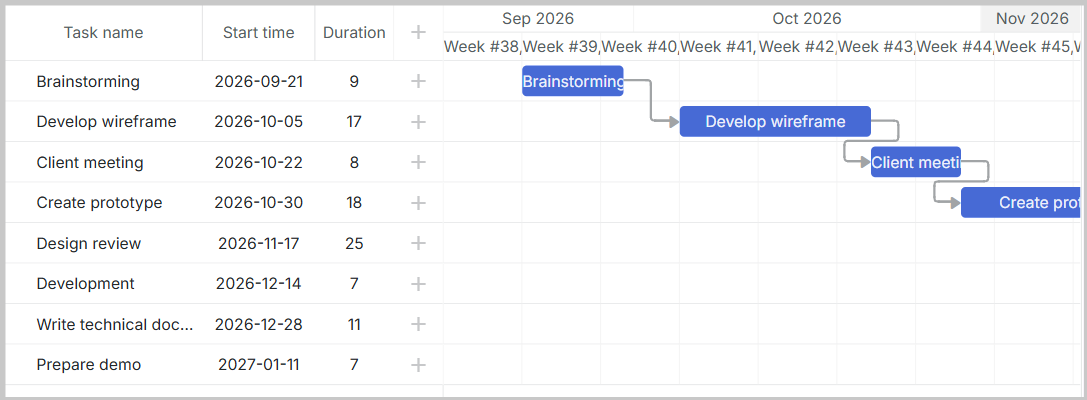
You should see the DHTMLX Gantt chart with your migrated data loaded from the database.
Next Steps
- Explore DHTMLX Gantt documentation for advanced features
- Review the API reference for customization options
- Check out DHTMLX Gantt samples for implementation examples