시간 슬롯 하이라이트
특정 시간 슬롯에 사용자의 주의를 기울이려면 해당 시간 슬롯을 강조할 수 있습니다.
- 타임라인 영역의 셀을 강조하려면 timeline_cell_class 템플릿을 사용합니다.
- 타임라인의 시간 눈금(스케일) 셀을 강조하려면 scale_cell_class 템플릿을 사용합니다.
템플릿은 모든 날짜를 순회하면서 관련 셀에 지정된 CSS 클래스를 적용하는 함수입니다.
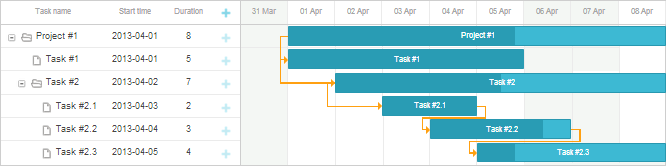
예를 들어 축을 주 단위로 시각적으로 구분하기 위해 주말을 강조할 수 있습니다:
<style>
.weekend{ background: #f4f7f4 !important;}
</style>
gantt.templates.scale_cell_class = function(date){
    if(date.getDay()==0||date.getDay()==6){
        return "weekend";
    }
};
gantt.templates.timeline_cell_class = function(task,date){
    if(date.getDay()==0||date.getDay()==6){
        return "weekend" ;
    }
};
gantt.init("gantt_here");
참고로 작업 시간 계산를 사용할 때는 하드코딩된 값 대신 isWorkTime를 사용할 수 있습니다:
gantt.config.work_time = true;

gantt.templates.scale_cell_class = function(date){
    if(!gantt.isWorkTime(date)){
        return "weekend";
    }
};
gantt.templates.timeline_cell_class = function(task,date){
    if(!gantt.isWorkTime({task:task, date:date})){
        return "weekend" ;
    }
};
gantt.init("gantt_here");
노트
셀에 지정된 CSS 속성이 적용되도록 하려면 'important' 키워드를 사용하세요.
Need help?
Got a question about the documentation? Reach out to our technical support team for help and guidance. For custom component solutions, visit the Services page.