高亮时间段
为引起用户对特定时间段的关注,您可以对其进行高亮显示。
- 要高亮时间线区域的单元格,请使用 timeline_cell_class 模板。
- 要高亮时间线的时间刻度上的单元格,请使用 scale_cell_class 模板。
该模板是一个遍历所有日期并将指定的 CSS 类应用于相关单元格的函数。
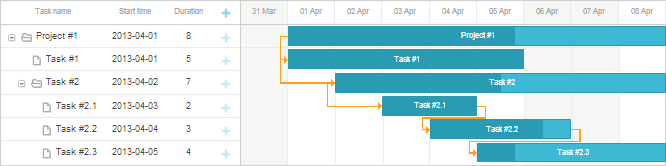
例如,您可以高亮周末以将时间标尺按周进行视觉分割:
<style>
.weekend{ background: #f4f7f4 !important;}
</style>
gantt.templates.scale_cell_class = function(date){
    if(date.getDay()==0||date.getDay()==6){
        return "weekend";
    }
};
gantt.templates.timeline_cell_class = function(task,date){
    if(date.getDay()==0||date.getDay()==6){
        return "weekend" ;
    }
};
gantt.init("gantt_here");
请注意,在使用 work time calculations 时,您可以使用 isWorkTime 来替代硬编码的值:
gantt.config.work_time = true;

gantt.templates.scale_cell_class = function(date){
    if(!gantt.isWorkTime(date)){
        return "weekend";
    }
};
gantt.templates.timeline_cell_class = function(task,date){
    if(!gantt.isWorkTime({task:task, date:date})){
        return "weekend" ;
    }
};
gantt.init("gantt_here");
注释
使用 'important' 关键字可确保将指定的 CSS 属性应用到单元格。
Need help?
Got a question about the documentation? Reach out to our technical support team for help and guidance. For custom component solutions, visit the Services page.