RTL(从右到左)模式
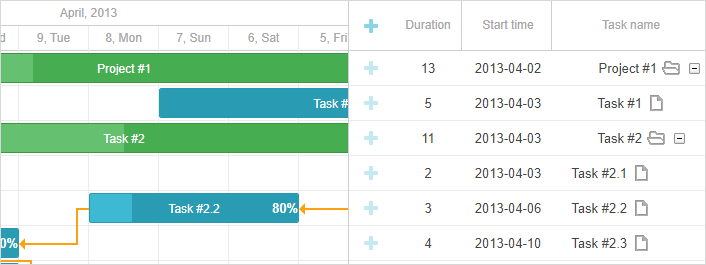
你可以在从右到左模式下使用甘特图,该模式通过 rtl 配置选项启用。 将其设置为 true,将改变时间轴在时间线上的方向,以及网格中行的顺序,使其从右到左。
gantt.config.rtl = true;
启用 rtl 模式不会影响甘特图的 gantt.config.layout,因此您需要重新定义它以交换网格和时间线的位置。实现方式如下:
gantt.config.layout = {
    css: "gantt_container",
    rows: [
        {
            cols: [
                {view: "scrollbar", id: "scrollVer"},
                {view: "timeline", scrollX: "scrollHor", scrollY: "scrollVer"},
                {resizer: true, width: 1},
                {view: "grid", scrollX: "scrollHor", scrollY: "scrollVer"}
            ]
        },
        {view: "scrollbar", id: "scrollHor", height: 20}
    ]
};
你也可能希望 为甘特图中标签的文本设置方向。
Need help?
Got a question about the documentation? Reach out to our technical support team for help and guidance. For custom component solutions, visit the Services page.