dhtmlxGantt 与 ASP.NET MVC
本教程将为您提供一个清晰、循序渐进的指南,介绍如何使用 ASP.NET 和服务器端 REST API 创建甘特图。
如果您需要其他服务器端集成方案,可以参考以下教程:
- dhtmlxGantt와 ASP.NET Core 사용하기
- dhtmlxGantt와 Node.js 연동하기
- dhtmlxGantt와 Python
- dhtmlxGantt와 PHP: Laravel 연동
- dhtmlxGantt와 PHP:Slim 연동하기
- dhtmlxGantt와 Salesforce LWC 연동하기
- dhtmlxGantt와 Ruby on Rails 연동하기
本示例使用 ASP.NET MVC 5 框架及 Web API 2 控制器来构建甘特图应用的 REST API。Entity Framework 用于管理数据库交互。开发工作将在 Visual Studio IDE 中进行。
完整源代码已发布在 GitHub。
步骤 1. 创建项目
创建新的 Visual Studio 项目
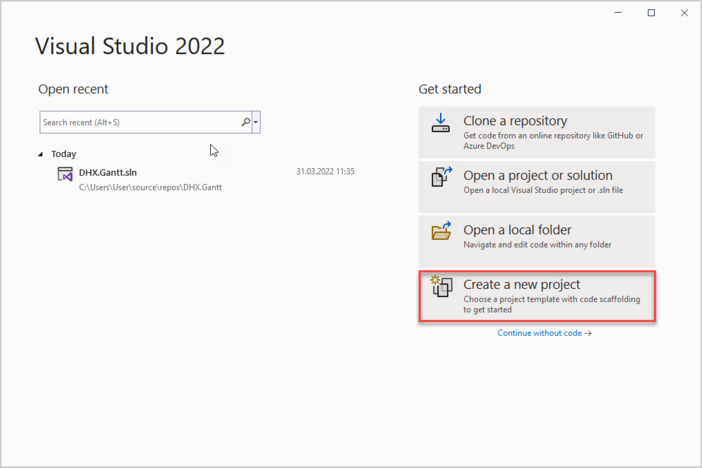
启动 Visual Studio 2022,选择 Create a new project。
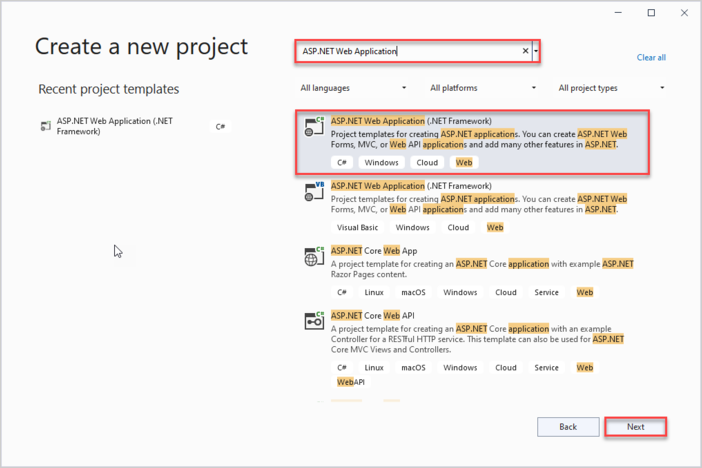
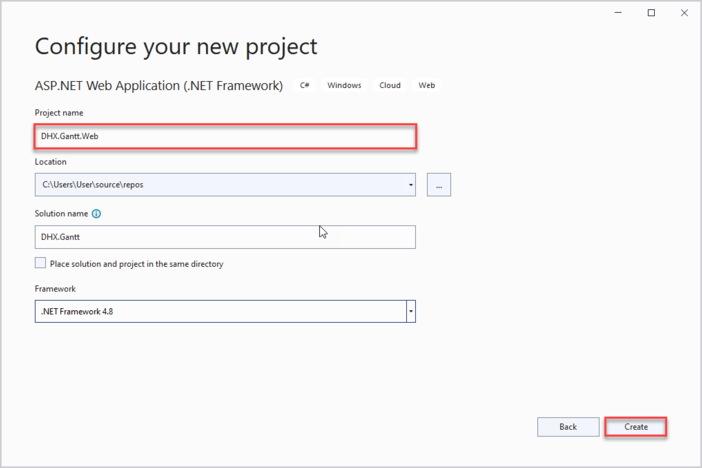
然后选择 "ASP.NET Web Application",并命名为 DHX.Gantt.Web。如果未找到该模板,请参考 Troubleshooting 部分。
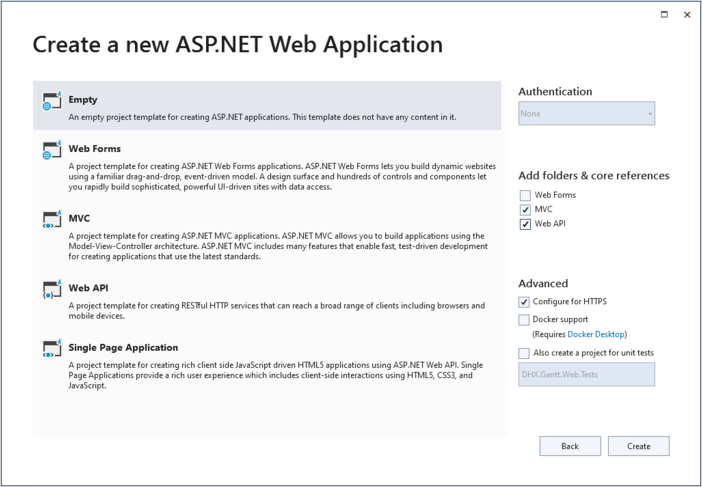
选择 Empty 项目模板,并确保勾选 MVC 和 Web API 选项。
步骤 2. 将 Gantt 添加到页面
创建控制器
项目创建完成后,下一步是添加一个 MVC 控制器,用于显示甘特图页面。
右键点击 Controllers 文件夹,选择 Add->Controller,然后选择 MVC 5 Controller -> Empty。将新控制器命名为 "HomeController"。
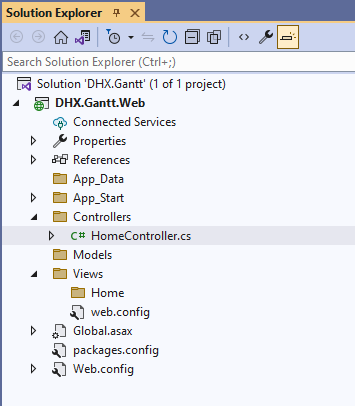
HomeController 默认包含 Index() 方法(继承自 ActionResult 类),因此无需添加额外逻辑。接下来将为该方法添加视图。
Controllers/HomeController.cs
using System;
using System.Collections.Generic;
using System.Linq;
using System.Web;
using System.Web.Mvc;

namespace DHX.Gantt.Web.Controllers
{
    public class HomeController : Controller
    {
        // GET: Home
        public ActionResult Index()
        {
            return View();
        }
    }
}
创建视图
接下来创建首页。进入 Views/Home 文件夹,添加一个名为 Index 的空视图:
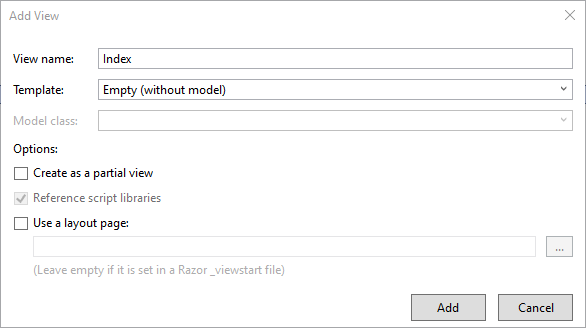
打开该视图,插入以下代码: Views/Home/Index.cshtml
@{
    Layout = null;
}

<!DOCTYPE html>

<html>
<head>
    <meta name="viewport" content="width="device-width"" />
    <title>Index</title>
    <link href="https://cdn.dhtmlx.com/gantt/edge/dhtmlxgantt.css"
        rel="stylesheet" type="text/css" />
    <script src="https://cdn.dhtmlx.com/gantt/edge/dhtmlxgantt.js"></script>
    <script>
        document.addEventListener("DOMContentLoaded", function(event) {
            // specifying the date format
            gantt.config.date_format = "%Y-%m-%d %H:%i";
            // initializing gantt
            gantt.init("gantt_here");

            // initiating data loading
            gantt.load("/api/data");
            // initializing dataProcessor
            var dp = new gantt.dataProcessor("/api/");
            // and attaching it to gantt
            dp.init(gantt);
            // setting the REST mode for dataProcessor
            dp.setTransactionMode("REST");
        });
    </script>
</head>
<body>
    <div id="gantt_here" style="width: 100%; height: 100vh;"></div>
</body>
</html>
上述代码实现了以下功能:
- 为甘特图应用设置了简单的页面布局
- 通过 CDN 链接 引入了 dhtmlxGantt 的 JavaScript 和 CSS
- 在页面上初始化了甘特图
需要注意的是日期格式的配置:
Views/Home/Index.cshtml
gantt.config.date_format = "%Y-%m-%d %H:%i";
这样可以确保客户端能够正确解析从服务器接收到的日期。
此外,Gantt 配置为与后端 RESTful API 协同工作,使用 "/api/" 作为基础路由:
Views/Home/Index.cshtml
gantt.load("/api/data");
// initializing dataProcessor
var dp = new gantt.dataProcessor("/api/");
// and attaching it to gantt
dp.init(gantt);
// setting the REST mode for dataProcessor
dp.setTransactionMode("REST");
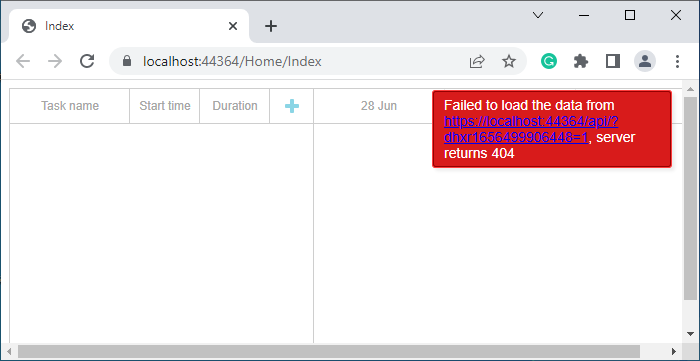
服务器端的实现将在后续介绍。此时,您可以运行应用并看到甘特图出现在页面上。
步骤 3. 创建模型和数据库
创建模型
接下来需要为甘特图定义模型类。数据模型由 Links 和 Tasks 组成。
dhtmlxGantt 的数据模型命名规范与常规 C# 命名有所不同。有些客户端属性无需存储在数据库中,但会在客户端或后端逻辑中使用。
为此,将采用 数据传输对象(DTO) 模式:领域模型类用于 EF 和内部逻辑,DTO 类用于与 Web API 通信。模型之间将实现映射。
让我们开始吧!
Task 模型
首先为 Task 创建一个类,示例如下:
Models/Task.cs
using System;

namespace DHX.Gantt.Web.Models
{
    public class Task
    {
        public int Id { get; set; }
        public string Text { get; set; }
        public DateTime StartDate { get; set; }
        public int Duration { get; set; }
        public decimal Progress { get; set; }
        public int? ParentId { get; set; }
        public string Type { get; set; }
    }
}
Task 对象的全部属性(包括必需和可选项)请参见 相关文档。
Link 模型
接下来创建 Link 类,如下所示:
Models/Link.cs
namespace DHX.Gantt.Web.Models
{
    public class Link
    {
        public int Id { get; set; }
        public string Type { get; set; }
        public int SourceTaskId { get; set; }
        public int TargetTaskId { get; set; }
    }
}
配置数据库连接
安装 Entity Framework
如前所述,数据库操作将通过 Entity Framework 管理。
在包管理器控制台中运行以下命令进行安装:
Install-Package EntityFramework
创建数据库上下文
接下来创建数据库上下文。上下文代表与数据库的会话,并负责数据的检索和保存。
右键点击 Models 文件夹,选择 Add->Class,命名为 "GanttContext",内容如下:
Models/GanttContext.cs
using System.Data.Entity;

namespace DHX.Gantt.Web.Models
{
    public class GanttContext : DbContext
    {
        public DbSet<Task> Tasks { get; set; }
        public DbSet<Link> Links { get; set; }
    }
}
向数据库添加初始记录
现在可以向数据库添加一些初始数据。
Entity Framework 可以在应用首次运行时自动创建数据库。为了确保模型变更时数据库能自动更新,需要配置其在模型更改时删除并重建数据库。
首先创建数据库初始化器。在 App_Start 文件夹下添加一个继承自 DropCreateDatabaseIfModelChanges 的新类,命名为 "GanttInitializer"。
在该类中重写 Seed() 方法以插入测试数据。使用 Add() 方法将实体添加到上下文中。
以下为完整的 GanttInitializer 类:
App_Start/GanttInitializer.cs
using System;
using System.Collections.Generic;
using System.Data.Entity;


namespace DHX.Gantt.Web.Models
{
    public class GanttInitializer : DropCreateDatabaseIfModelChanges<GanttContext>
    {
        protected override void Seed(GanttContext context)
        {
            List<Task> tasks = new List<Task>()
            {
                new Task()
                {
                    Id = 1,
                    Text = "Project #2",
                    StartDate = DateTime.Today.AddDays(-3),
                    Duration = 18,
                    Progress = 0.4m,
                    ParentId = null
                },
                new Task()
                {
                    Id = 2,
                    Text = "Task #1",
                    StartDate = DateTime.Today.AddDays(-2),
                    Duration = 8,
                    Progress = 0.6m,
                    ParentId = 1
                },
                new Task()
                {
                    Id = 3,
                    Text = "Task #2",
                    StartDate = DateTime.Today.AddDays(-1),
                    Duration = 8,
                    Progress = 0.6m,
                    ParentId = 1
                }
            };

            tasks.ForEach(s => context.Tasks.Add(s));
            context.SaveChanges();

            List<Link> links = new List<Link>()
            {
                new Link() {Id = 1, SourceTaskId = 1, TargetTaskId = 2, Type = "1"},
                new Link() {Id = 2, SourceTaskId = 2, TargetTaskId = 3, Type = "0"}
            };

            links.ForEach(s => context.Links.Add(s));
            context.SaveChanges();
        }
    }
}
打开 Global.asax 文件,该文件包含应用启动时执行的代码。添加所需命名空间,并在 Application_Start() 方法中插入以下代码,为上下文设置初始化器:
Global.asax.cs
using System;
using System.Web;
using System.Web.Mvc;
using System.Web.Routing;
using System.Web.Http;

using System.Data.Entity;
using DHX.Gantt.Web.Models;

namespace DHX.Gantt.Web
{
    public class Global : HttpApplication
    {
        void Application_Start(object sender, EventArgs e)
        {
            // Code that runs on application startup
            AreaRegistration.RegisterAllAreas();
            GlobalConfiguration.Configure(WebApiConfig.Register);
            RouteConfig.RegisterRoutes(RouteTable.Routes);

            Database.SetInitializer(new GanttInitializer());/*!*/
        }
    }
}
定义 DTO 和映射
接下来,将声明用于 Web API 的 DTO 类。为简化操作,将为 Model 和 DTO 类之间的映射定义显式转换操作符。
TaskDto 类的结构如下:
Models/TaskDto.cs
using System;

namespace DHX.Gantt.Web.Models
{
    public class TaskDto
    {
        public int id { get; set; }
        public string text { get; set; }
        public string start_date { get; set; }
        public int duration { get; set; }
        public decimal progress { get; set; }
        public int? parent { get; set; }
        public string type { get; set; }
        public bool open
        {
            get { return true; }
            set { }
        }

        public static explicit operator TaskDto(Task task)
        {
            return new TaskDto
            {
                id = task.Id,
                text = task.Text,
                start_date = task.StartDate.ToString("yyyy-MM-dd HH:mm"),
                duration = task.Duration,
                parent = task.ParentId,
                type = task.Type,
                progress = task.Progress
            };
        }

        public static explicit operator Task(TaskDto task)
        {
            return new Task
            {
                Id = task.id,
                Text = task.text,
                StartDate = DateTime.Parse(
                    task.start_date,
                    System.Globalization.CultureInfo.InvariantCulture),
                Duration = task.duration,
                ParentId = task.parent,
                Type = task.type,
                Progress = task.progress
            };
        }
    }
}
类似地,LinkDto 类的定义如下:
Models/LinkDto.cs
namespace DHX.Gantt.Web.Models
{
    public class LinkDto
    {
        public int id { get; set; }
        public string type { get; set; }
        public int source { get; set; }
        public int target { get; set; }

        public static explicit operator LinkDto(Link link)
        {
            return new LinkDto
            {
                id = link.Id,
                type = link.Type,
                source = link.SourceTaskId,
                target = link.TargetTaskId
            };
        }

        public static explicit operator Link(LinkDto link)
        {
            return new Link
            {
                Id = link.id,
                Type = link.type,
                SourceTaskId = link.source,
                TargetTaskId = link.target
            };
        }
    }
}
为了完成 数据源 的数据模型,添加如下类:
Models/GanttDto.cs
using System.Collections.Generic;

namespace DHX.Gantt.Web.Models
{
    public class GanttDto
    {
        public IEnumerable<TaskDto> data { get; set; }
        public IEnumerable<LinkDto> links { get; set; }
    }
}
第 4 步:实现 Web API
使用 REST API 加载数据的一般方法
下一步是实现 API。
根据 API 详情,需要两个控制器:一个用于任务,一个用于链接。此外,还需要一个单独的控制器来处理"加载数据"操作,因为在这种情况下 gantt 期望 混合结果。
任务控制器
添加新控制器的方法:
- 右键点击 Controllers 文件夹,选择 Add -> Controller。
- 选择 Web API 2 Controller -> Empty,并将新控制器命名为 "TaskController"。
任务条目的基本 CRUD 操作实现如下:
Controllers/TaskController.cs
using System.Collections.Generic;
using System.Data.Entity;
using System.Linq;
using System.Web.Http;
using System.Web.UI.WebControls;

using DHX.Gantt.Web.Models;

namespace DHX.Gantt.Web.Controllers
{
    public class TaskController : ApiController
    {
        private GanttContext db = new GanttContext();

        // GET api/Task
        public IEnumerable<TaskDto> Get()
        {
            return db.Tasks
                .ToList()
                .Select(t => (TaskDto)t);
        }

        // GET api/Task/5
        [System.Web.Http.HttpGet]
        public TaskDto Get(int id)
        {
            return (TaskDto)db
                .Tasks
                .Find(id);
        }

        // PUT api/Task/5
        [System.Web.Http.HttpPut]
        public IHttpActionResult EditTask(int id, TaskDto taskDto)
        {
            var updatedTask = (Task)taskDto;
            updatedTask.Id = id;
            db.Entry(updatedTask).State = EntityState.Modified;
            db.SaveChanges();

            return Ok(new
            {
                action = "updated"
            });
        }

        // POST api/Task
        [System.Web.Http.HttpPost]
        public IHttpActionResult CreateTask(TaskDto taskDto)
        {
            var newTask = (Task)taskDto;

            db.Tasks.Add(newTask);
            db.SaveChanges();

            return Ok(new
            {
                tid = newTask.Id,
                action = "inserted"
            });
        }

        // DELETE api/Task/5
        [System.Web.Http.HttpDelete]
        public IHttpActionResult DeleteTask(int id)
        {
            var task = db.Tasks.Find(id);
            if (task != null)
            {
                db.Tasks.Remove(task);
                db.SaveChanges();
            }

            return Ok(new
            {
                action = "deleted"
            });
        }

        protected override void Dispose(bool disposing)
        {
            if (disposing)
            {
                db.Dispose();
            }
            base.Dispose(disposing);
        }
    }
}
其逻辑如下:
- GET 方法从数据库检索任务,并将其转换为 DTO 表示。
- PUT 和 POST 方法接收 DTO,将其转换回 Task 模型,并将更改应用到数据库上下文。
对于链接,也采用相同的方法。
链接控制器
为链接创建一个空的 Web API 控制器,如下所示:
Controllers/LinkController.cs
using System.Collections.Generic;
using System.Data.Entity;
using System.Linq;
using System.Web.Http;
using DHX.Gantt.Web.Models;

namespace DHX.Gantt.Web.Controllers
{
    public class LinkController : ApiController
    {
        private GanttContext db = new GanttContext();

        // GET api/Link
        [System.Web.Http.HttpGet]
        public IEnumerable<LinkDto> Get()
        {
            return db
                .Links
                .ToList()
                .Select(l => (LinkDto)l);
        }

        // GET api/Link/5
        [System.Web.Http.HttpGet]
        public LinkDto Get(int id)
        {
            return (LinkDto)db
                .Links
                .Find(id);
        }

        // POST api/Link
        [System.Web.Http.HttpPost]
        public IHttpActionResult CreateLink(LinkDto linkDto)
        {
            var newLink = (Link)linkDto;
            db.Links.Add(newLink);
            db.SaveChanges();

            return Ok(new
            {
                tid = newLink.Id,
                action = "inserted"
            });
        }

        // PUT api/Link/5
        [System.Web.Http.HttpPut]
        public IHttpActionResult EditLink(int id, LinkDto linkDto)
        {
            var clientLink = (Link)linkDto;
            clientLink.Id = id;

            db.Entry(clientLink).State = EntityState.Modified;
            db.SaveChanges();

            return Ok(new
            {
                action = "updated"
            });
        }

        // DELETE api/Link/5
        [System.Web.Http.HttpDelete]
        public IHttpActionResult DeleteLink(int id)
        {
            var link = db.Links.Find(id);
            if (link != null)
            {
                db.Links.Remove(link);
                db.SaveChanges();
            }
            return Ok(new
            {
                action = "deleted"
            });
        }

        protected override void Dispose(bool disposing)
        {
            if (disposing)
            {
                db.Dispose();
            }
            base.Dispose(disposing);
        }

    }
}
数据控制器
最后,添加用于数据操作的控制器:
Controllers/DataController.cs
using System.Web.Http;

using DHX.Gantt.Web.Models;

namespace DHX.Gantt.Web.Controllers
{
    public class DataController : ApiController
    {
        // GET api/
        [System.Web.Http.HttpGet]
        public GanttDto Get()
        {
            return new GanttDto
            {
                data = new TaskController().Get(),
                links = new LinkController().Get()
            };
        }
    }
}
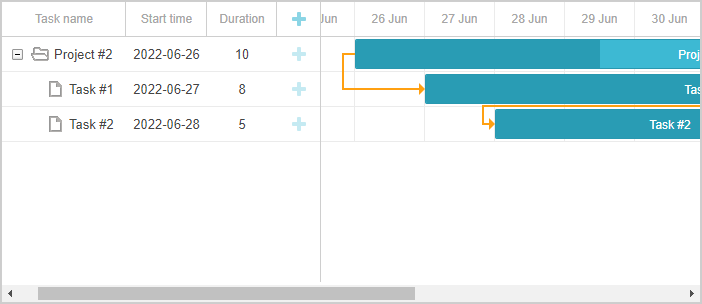
完成上述步骤后,运行应用程序将在页面上显示一个完整可用的甘特图:
错误处理
异常过滤器" 提供了一种在 CRUD 处理程序中捕获异常并发送响应的方法,客户端 gantt 可以解析这些响应。
要在 gantt API 中启用错误处理,请按如下操作:
在 App_Start 文件夹下添加新类 GanttAPIExceptionFilterAttribute:
App_Start/GanttAPIExceptionFilterAttribute.cs
using System.Net;
using System.Net.Http;
using System.Web.Http.Filters;

namespace DHX.Gantt.Web
{
    public class GanttAPIExceptionFilterAttribute : ExceptionFilterAttribute
    {
        public override void OnException(HttpActionExecutedContext context)
        {

            context.Response = context.Request.CreateResponse(
                HttpStatusCode.InternalServerError, new
                    {
                        action = "error",
                        message = context.Exception.Message
                    }
            );
        }
    }
}
然后,将此过滤器应用于 WebAPI 控制器:
- 在 Data 控制器中: Controllers/DataController.cs
namespace DHX.Gantt.Web.Controllers
{
    [GanttAPIExceptionFilter]/*!*/
    public class DataController : ApiController
- 在 Link 控制器中: Controllers/LinkController.cs
namespace DHX.Gantt.Web.Controllers
{
    [GanttAPIExceptionFilter]/*!*/
    public class LinkController : ApiController
- 以及在 Task 控制器中: Controllers/TaskController.cs
namespace DHX.Gantt.Web.Controllers
{
    [GanttAPIExceptionFilter]/*!*/
    public class TaskController : ApiController
这样配置后,Web API 处理过程中抛出的任何异常都会导致客户端收到错误状态和消息,可以根据需要进行处理或显示。
请注意,直接向客户端暴露异常消息在生产环境中可能并不合适。
存储任务顺序
客户端 gantt 支持通过拖放方式重新排序任务。使用此功能时,需要将任务顺序保存到数据库。更多细节可参考此处总述。
下一步将是将此功能集成到应用程序中。
在客户端启用任务排序
首先,用户应能够直接在界面中对任务进行排序。
打开 Index 视图,并按如下方式调整 gantt 配置:
Views/Home/Index.cshtml
gantt.config.order_branch = true;/*!*/
gantt.config.order_branch_free = true;/*!*/

// 指定日期格式
gantt.config.date_format = "%Y-%m-%d %H:%i";
// 初始化 gantt
gantt.init("gantt_here");
将任务顺序添加到模型中
接下来,让我们更新后端以支持这些更改。
任务顺序将存储在名为 SortOrder 的属性中,因此需要相应地更新 Task 类:
Models/Task.cs
using System;
using System.ComponentModel.DataAnnotations;

namespace DHX.Gantt.Web.Models
{
    public class Task
    {
        public int Id { get; set; }
        [MaxLength(255)]
        public string Text { get; set; }
        public DateTime StartDate { get; set; }
        public int Duration { get; set; }
        public decimal Progress { get; set; }
        public int? ParentId { get; set; }
        public string Type { get; set; }
        public int SortOrder { get; set; }/*!*/
    }
}
TaskController 也需要进行一些更新:
- 发送给客户端的任务应按 SortOrder 值排序:
Controllers/TaskController.cs
namespace DHX.Gantt.Web.Controllers
{
    [GanttAPIExceptionFilter]
    public class TaskController : ApiController
    {
        private GanttContext db = new GanttContext();

        // GET api/Task
        public IEnumerable<TaskDto> Get()
        {
            return db.Tasks
                .OrderBy(t => t.SortOrder) /*!*/
                .ToList()
                .Select(t => (TaskDto)t);
        }
- 创建新任务时,分配一个默认的 SortOrder 值:
Controllers/TaskController.cs
namespace DHX.Gantt.Web.Controllers
{
    [System.Web.Http.HttpPost]
    public IHttpActionResult CreateTask(TaskDto taskDto)
    {
        var newTask = (Task)taskDto;

        newTask.SortOrder = db.Tasks.Max(t => t.SortOrder) + 1;/*!*/

        db.Tasks.Add(newTask);
        db.SaveChanges();

        return Ok(new
        {
            tid = newTask.Id,
            action = "inserted"
        });
    }
- 当客户端任务顺序发生变化时,需要更新 SortOrder。
当任务被重新排序时,gantt 会触发一个包含新位置的 PUT 请求,其中新位置包含在 'target' 属性中以及其他任务详情。
为此,需要在任务 DTO 类中添加一个新属性:
Models/TaskDto.cs
namespace DHX.Gantt.Web.Models
{
  public class TaskDto
  {
    public int id { get; set; }
    public string text { get; set; }
    public string start_date { get; set; }
    public int duration { get; set; }
    public decimal progress { get; set; }
    public int? parent { get; set; }
    public string type { get; set; }
    public bool open{ get { return true; } set { } }
    public string target { get; set; }/*!*/

    ...
  }
}
现在,在 PUT (EditTask) 操作中实现重新排序逻辑:
Controllers/TaskController.cs
    // PUT api/Task/5
    [System.Web.Http.HttpPut]
    public IHttpActionResult EditTask(int id, TaskDto taskDto)
    {
      var updatedTask = (Task)taskDto;
      updatedTask.Id = id;

      if (!string.IsNullOrEmpty(taskDto.target))
      {
        // 发生了重新排序
        this._UpdateOrders(updatedTask, taskDto.target);/*!*/
      }

      db.Entry(updatedTask).State = EntityState.Modified;
      db.SaveChanges();

      return Ok(new
      {
        action = "updated"
      });
    }

    private void _UpdateOrders(Task updatedTask, string orderTarget)/*!*/
    {
      int adjacentTaskId;
      var nextSibling = false;

      var targetId = orderTarget;

      // 相邻任务 id 通过 '{id}' 或 'next:{id}' 发送,取决于是下一个还是上一个兄弟节点
      if (targetId.StartsWith("next:"))
      {
        targetId = targetId.Replace("next:", "");
        nextSibling = true;
      }

      if (!int.TryParse(targetId, out adjacentTaskId))
      {
        return;
      }

      var adjacentTask = db.Tasks.Find(adjacentTaskId);
      var startOrder = adjacentTask.SortOrder;

      if (nextSibling)
        startOrder++;

      updatedTask.SortOrder = startOrder;

      var updateOrders = db.Tasks
       .Where(t => t.Id != updatedTask.Id)
       .Where(t => t.SortOrder >= startOrder)
       .OrderBy(t => t.SortOrder);

       var taskList = updateOrders.ToList();

       taskList.ForEach(t => t.SortOrder++);
    }
已知问题
在 IIS 上运行应用时,HTTP PUT 和 DELETE 请求可能返回 405 或 401 错误。这可能是由于 WebDAV 模块与 RESTful 处理程序冲突导致的。
常见的解决方法是在 web.config 文件中禁用 WebDAV 模块。更多细节可参见 这里。
应用安全
Gantt 本身不负责防护 SQL 注入、XSS 或 CSRF 等威胁。在实现后端时,确保应用安全是开发者的责任。更多信息可参见 相关文章。
故障排除
缺少 ASP.NET Web Application 模板
如果在 Visual Studio 2022 中找不到 "ASP.NET Web Application" 项目模板,请尝试以下操作:
-
关闭 Visual Studio 2022
-
打开开始菜单并启动 Visual Studio Installer
-
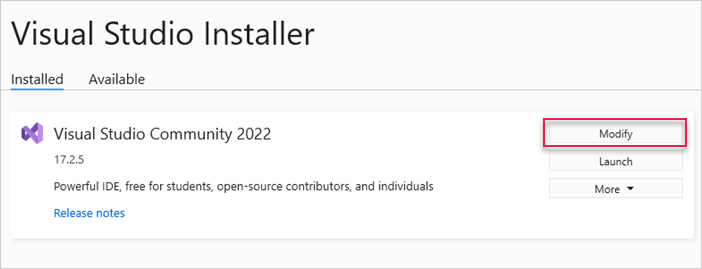
找到 Visual Studio Community 2022 并点击 Modify
- 在弹窗中,进入 Individual components,勾选 ".NET Framework Project and item templates",然后点击 Modify
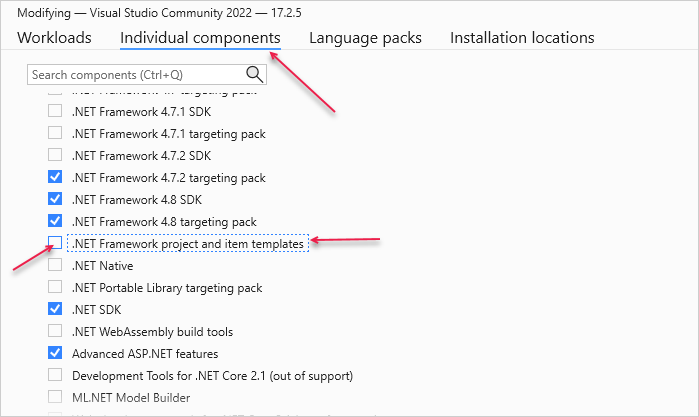
之后,重新打开 Visual Studio 2022,模板应该就可用了。
初始化数据库时发生异常
有时,DropCreateDatabaseIfModelChanges 初始化器可能会删除现有数据库,但未能创建新数据库。
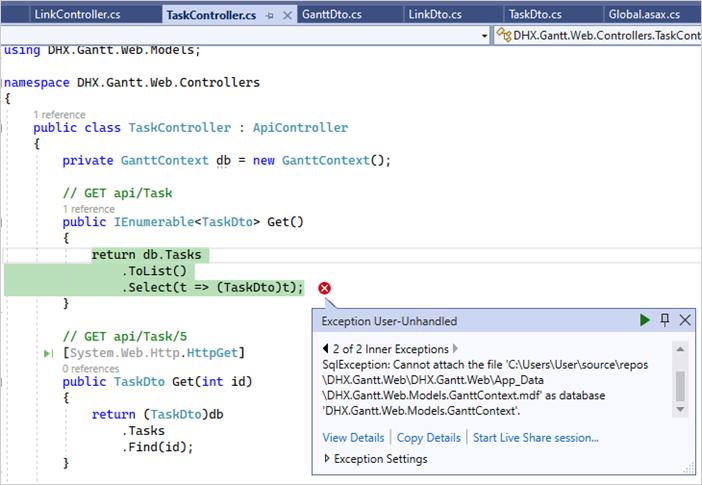
如果出现此问题,请打开 GanttInitializer.cs,将 DropCreateDatabaseIfModelChanges 替换为 DropCreateDatabaseAlways:
App_Start/GanttInitializer.cs
using System;
using System.Collections.Generic;
using System.Data.Entity;

namespace DHX.Gantt.Web.Models
{
    public class GanttInitializer : DropCreateDatabaseAlways<GanttContext> /*!*/
    {
        ...
    }
}
然后重新运行应用。
渲染任务和链接时出现问题
如果在将 Gantt 集成到 ASP.NET MVC 后任务和链接未能渲染,请参考 백엔드 통합 문제 해결 文章。该文档提供了排查潜在原因的指导。
后续步骤
此时,gantt 已经完全可用。完整代码可在 GitHub 获取,可克隆或下载用于项目开发。
此外,还可以查阅 各种 gantt 功能指南 或 与其他后端框架集成的教程。