模板
一个包含一些 HTML 内容的容器。
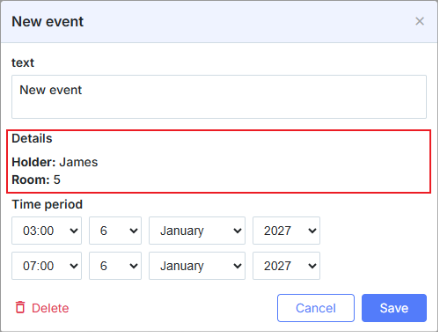
scheduler.locale.labels.section_template = 'Details';// 设置该区域的名称

scheduler.config.lightbox.sections = [
    { name:"text", height:50, map_to:"text", type:"textarea", focus:true},
    { name:"template", height: 40, type:"template", map_to:"my_template"},
    { name:"time", height:72, type:"time", map_to:"auto"}
];
scheduler.attachEvent("onEventCreated", function(id, e) {
    const ev = scheduler.getEvent(id);
    ev.my_template = "<b>Holder:</b>"+ ev.holder+"

<b>Room:</b>"+ ev.room;
});
初始化
要将 Template 控件添加到灯箱,请按照以下步骤:
- 将该段添加到 lightbox 的配置中:
scheduler.config.lightbox.sections = [
    { name:"text", ... },
       { name:"template", height: 40, type:"template", map_to:"my_template"},
    { name:"time", ...}
];
- 为该段设置标签:
scheduler.locale.labels.section_template = 'Details';
- 通过某些事件设置控件的内容,例如 onBeforeLightbox 事件:
scheduler.attachEvent("onBeforeLightbox", function(id) {
    const ev = scheduler.getEvent(id);
    ev.my_template = "<b>Holder:</b>"+ ev.holder+"

<b>Room:</b>"+ ev.room;
    return true;
});
属性
以下属性在 'template' 控件中最为重要并且常被设置(完整清单请参见 此处):
| name | (string) 该段的名称 |
| height | (number) 该段的高度 |
| map_to | (string) 将映射到该段的数据属性的名称 |
| type | (textarea, time, select, template, multiselect, radio, checkbox, combo) 该段控件的类型 |
Need help?
Got a question about the documentation? Reach out to our technical support team for help and guidance. For custom component solutions, visit the Services page.