选择
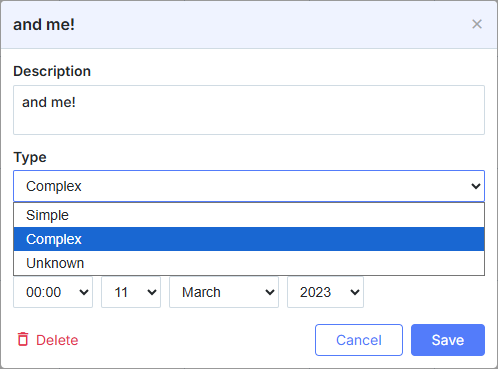
const alert_opts = [
    { key: 1, label: 'None' },
    { key: 2, label: 'On start date' },
    { key: 3, label: '1 day before' }
];

scheduler.locale.labels.section_select = 'Alert';

scheduler.config.lightbox.sections = [
    { name:"text", height:50, map_to:"text", type:"textarea", focus:true },
    { name:"select", height:40, map_to:"type", type:"select", options:alert_opts},
    { name:"time", height:72, type:"time", map_to:"auto"}
];
初始化
要将 Select 控件添加到灯箱,请按照以下步骤进行:
- 将该节添加到灯箱配置中:
scheduler.config.lightbox.sections = [
    { name:"description", ... },
    { name:"alert", height:40,map_to:"type",type:"select", options:alert_opts},
    { name:"time", ...}
];
- 为该节设置标签:
scheduler.locale.labels.section_select = "Alert";
属性
以下属性对 'select' 控件通常很重要并且经常设置(完整列表请参见 此处):
| name | (string) 该节的名称 |
| height | (number) 该节的高度 |
| map_to | (string) 将映射到该节的数据属性的名称 |
| type | (textarea,time,select,template,multiselect,radio,checkbox,combo) 该节控件的类型 |
| options | (array of objects) 定义控件的选项(对于 'select', 'multiselect', 'radio', 'combo' 控件)。数组中的每个对象指定一个选项,并具有以下属性:
|
| onchange | (function) 指定该节控件的 'onchange' 事件处理函数 在灯箱中链接下拉控件 |
用数据填充控件
通常,要为 Select 控件设置值,应使用 options 参数:
scheduler.config.lightbox.sections = [
    {      name:"alert", type:"select",
        ...
        options:[
            { key: 1, label: 'None'},
            { key: 2, label: 'On start date'},
            { key: 3, label: '1 day before'}
    ]},
    ...
];
在 options 参数中的项必须具备两个必需属性:
- key - 选项的 id
- label - 选项的标签
动态更改选项
要从服务器填充控件,请将 options 选项设置为由 serverList 方法返回的值:
scheduler.config.lightbox.sections = [
    {name:"description", ...},
    {name:"type",map_to:"type",type:"select",options:scheduler.serverList("type")},
    {name:"time", ...}
];

scheduler.load("/api/types");
注释
有关 serverList 方法的详细信息,请参阅 相关文档。
对于 load 方法的数据响应,应包含一个集合,其名称与服务器列表在 JSON 中指定的名称相同,格式如下 json-with-collections:
{
   "data":[
      {
          "id":"1",
          "start_date":"2027-03-02 15:00:00",
          "end_date":"2027-03-04 16:00:00",
          "text":"Interview",
          "type":"1"
      },
      {
          "id":"2",
          "start_date":"2027-03-02 17:00:00",
          "end_date":"2027-03-04 18:00:00",
          "text":"Performance review",
          "type":"2"
      }
   ],
   "collections": {/*!*/
      "type":[/*!*/
         {"value":"1","label":"Interview"},/*!*/
         {"value":"2","label":"Performance review"},/*!*/
         {"value":"3","label":"Request"}/*!*/
      ]/*!*/
   }/*!*/
}
在需要在调度程序初始化后加载选项时,亦可使用 parse 方法。
如果需要用新选项更新控件的指定选项,可以使用 updateCollection 方法:
scheduler.updateCollection("type", [
    {"key":"1","label":"Interview"},
    {"key":"2","label":"Performance review"},
    {"key":"3","label":"Request"}
]);
请参阅 scheduler.serverList 文章中的详情。
Need help?
Got a question about the documentation? Reach out to our technical support team for help and guidance. For custom component solutions, visit the Services page.