重复事件
重复事件是日历应用中的常见功能,允许用户创建按指定间隔重复的事件。从 v7.1 开始,Scheduler 使用基于 RFC-5545 的格式来表示重复事件。
本文将解释如何在 Scheduler 中使用重复事件,以及如何将它们存储到数据库中。
您可以在 此处 找到传统旧格式的重复事件的描述
默认情况下,Scheduler 不支持重复事件。若要提供此类支持,需要在页面上启用 recurring 扩展:
scheduler.plugins({
    recurring: true
});
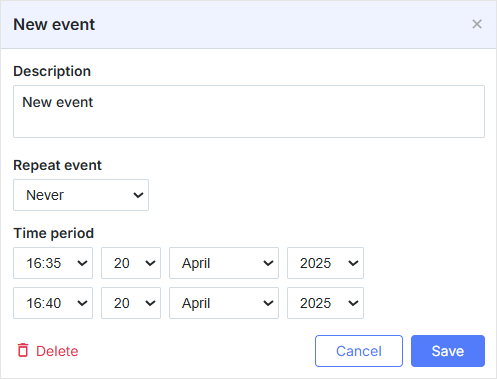
一旦启用对重复事件的支持,弹出框将变成如下所示:
配置选项
库提供了以下选项用于配置重复事件:
repeat_date- 设置在“recurring”弹出框中 “End by” 字段的日期格式
scheduler.config.repeat_date = "%m/%d/%Y";
...
scheduler.init('scheduler_here', new Date(2027, 7, 5), "month");
相关示例 Recurring events
“Recurring” 弹出框
默认情况下,一旦启用重复扩展,弹出框会多出一个部分——“Repeat event”。
“recurring” 弹出框的默认定义如下:
scheduler.config.lightbox.sections = [
    { name: "description", map_to: "text", type: "textarea", focus: true },
    { name: "recurring", type: "recurring", map_to: "rrule" },
    { name: "time", height: 72, type: "time", map_to: "auto" }
];
相关示例 Recurring events
格式描述
重复事件在数据库中以一条记录存储,包含常规事件的全部字段,以及若干附加属性:
- start_date - (datetime) 定义系列的开始日期
- end_date - (datetime) 定义系列的结束日期
- rrule - (string) 定义重复规则
- duration - (number) 重复实例的持续时间
- recurring_event_id - (string|number) 父系列的 id,仅在修改或删除的发生中填写
- original_start - (datetime) 修改过的实例的原始日期,仅在修改或删除的发生中填写
- deleted - (boolean) 指定序列中已删除的实例,仅在已删除的发生中填写
rrule 遵循 RFC-5545 中规定的 iCalendar 格式,详细描述了控制重复模式的频率、间隔和其他参数。
与 iCalendar 格式的差异
我们的格式在两个关键点上与 iCalendar 格式不同:
将 STDATE 和 DTEND 分开存储:
在 iCalendar 格式中,重复序列的开始日期和结束日期通常作为 RRULE 字符串的一部分,被包含在 STDATE 和 DTEND 属性中。我们的格式中,stdate 和 dtend 作为独立字段存储。这种分离便于按日期对重复事件进行更直观的操作和查询,而无需解析 RRULE 字符串。
下面是一个示例,表示从 2027 年 6 月 1 日起至 2027 年 12 月 1 日,每周一重复的重复事件序列:
{
    "id": 1,
    "text": "Weekly Team Meeting",
    "start_date": "2027-06-03 09:00:00",
    "duration": 3600,
    "end_date": "2027-12-02 10:00:00",
    "rrule": "FREQ=WEEKLY;INTERVAL=1;BYDAY=MO",
    "recurring_event_id": null,
    "original_start": null
}
处理异常
异常,也称为对序列的修改或删除的发生,被存储为与父系列相连的单独事件记录。异常具有三个附加属性:recurring_event_id、original_start、和 deleted。这些属性让我们能够轻松识别被修改或删除的实例及其与父系列的关系。
与传统的 iCalendar 格式不同,异常(被修改或删除的实例)不会存储在系列的 RRULE 的 EXDATE 属性中。
下面是一个包含一个修改后的发生和一个删除发生的重复系列示例:
[
    {
        "id": 1,
        "text": "Weekly Team Meeting",
        "start_date": "2027-06-03 09:00:00",
        "duration": 3600,
        "end_date": "2027-12-02 10:00:00",
        "rrule": "FREQ=WEEKLY;INTERVAL=1;BYDAY=MO",
        "recurring_event_id": null,
        "original_start": null
    },
    {
        "id": 2,
        "text": "Special Team Meeting",
        "start_date": "2027-06-10 09:00:00",
        "end_date": "2027-06-10 11:00:00",
        "rrule": null,
        "recurring_event_id": 1,
        "original_start": "2027-06-10 09:00:00"
    },
    {
        "id": 3,
        "text": "Deleted Team Meeting",
        "start_date": "2027-06-17 09:00:00",
        "end_date": "2027-06-17 10:00:00",
        "rrule": null,
        "recurring_event_id": 1,
        "original_start": "2027-06-17 09:00:00",
        "deleted": true
    }
]
计划在 2027-06-10 09:00:00 的重复事件将被 Special Team Meeting 记录替代,计划在 2027-06-17 09:00:00 的事件将被跳过。
请注意,修改或删除的发生的 rrule 将被忽略。
被删除实例的 text、start_date 和 end_date 也会被忽略,这些字段的值不会影响 Scheduler 的行为。
编辑/删除序列中的某个特定发生
可以在序列中删除或编辑某个特定的发生。
重要提示
- 对重复事件的每次更新,数据库中会创建一个单独的记录。
- 具体发生通过 recurring_event_id 属性与父事件相关联。
- 一旦你在序列中编辑了某个发生,更新的 original_start 字段将存储若该事件未被编辑时应发生的日期,而不是实际事件长度。所以若该发生在 2027 年 7 月 27 日 15:00 已发生并被移动到 2027 年 7 月 30 日 15:00,则时间戳将反映最初的日期。
服务器端逻辑
除了额外字段外,服务器端控制器还需要添加一套特定的逻辑:
- 如果插入了一个已删除的实例,服务器响应必须具有 “deleted” 状态。
- 可以通过 deleted 属性的非空值来识别一个已删除的实例。
- 如果一个序列被修改,序列的所有修改和已删除的发生都应被删除。
- 序列可以通过 rrule 属性的非空值以及 recurring_event_id 的空值来识别。
- 序列中的修改发生是所有 recurring_event_id 与序列的 id 相匹配的记录。
- 如果删除了一个具有非空 recurring_event_id 的事件,需要将其更新为删除(即删除属性设为 true),而不是直接删除。
完整代码示例请参阅 integrations/howtostart-guides.md
自定义弹出框的重复块
从版本 4.2 开始,Scheduler 允许你为弹出框中的 “recurring” 块指定自定义 HTML。
你可以进行哪些自定义?
- 修改标记
- 删除不必要的元素(例如,“ yearly” 重复类型)
- 为输入设置默认值(例如,所有序列都设为“无结束日期”)
弹出框的重复块默认模板
重复块的默认模板如下(其中 loc 对象是 Scheduler 的一个 locale 对象(区域特定标签)):
<div class="dhx_form_rrule">
    <div class="dhx_form_repeat_pattern">
        <select>
            <option value="NEVER">${loc.repeat_never}</option>
            <option value="DAILY">${loc.repeat_daily}</option>
            <option value="WEEKLY">${loc.repeat_weekly}</option>
            <option value="MONTHLY">${loc.repeat_monthly}</option>
            <option value="YEARLY">${loc.repeat_yearly}</option>
            <option value="WORKDAYS">${loc.repeat_workdays}</option>
            <option value="CUSTOM">${loc.repeat_custom}</option>
        </select>
    </div>
    <div class="dhx_form_repeat_custom dhx_hidden">
        <div class="dhx_form_repeat_custom_interval">
            <input name="repeat_interval_value" type="number" min="1"/>
            <select name="repeat_interval_unit">
                <option value="DAILY">${loc.repeat_freq_day}</option>
                <option value="WEEKLY">${loc.repeat_freq_week}</option>
                <option value="MONTHLY">${loc.repeat_freq_month}</option>
                <option value="YEARLY">${loc.repeat_freq_year}</option>
            </select>
        </div>
        <div class="dhx_form_repeat_custom_additional">
            <div class="dhx_form_repeat_custom_week dhx_hidden">
                <label><input class="dhx_repeat_checkbox" type="checkbox" name="week_day"
                    value="MO" />${loc.day_for_recurring[1]}</label>
                <label><input class="dhx_repeat_checkbox" type="checkbox" name="week_day"
                    value="TU" />${loc.day_for_recurring[2]}</label>
                <label><input class="dhx_repeat_checkbox" type="checkbox" name="week_day"
                    value="WE" />${loc.day_for_recurring[3]}</label>
                <label><input class="dhx_repeat_checkbox" type="checkbox" name="week_day"
                    value="TH" />${loc.day_for_recurring[4]}</label>
                <label><input class="dhx_repeat_checkbox" type="checkbox" name="week_day"
                    value="FR" />${loc.day_for_recurring[5]}</label>
                <label><input class="dhx_repeat_checkbox" type="checkbox" name="week_day"
                    value="SA" />${loc.day_for_recurring[6]}</label>
                <label><input class="dhx_repeat_checkbox" type="checkbox" name="week_day"
                    value="SU" />${loc.day_for_recurring[0]}</label>
            </div>
            <div class="dhx_form_repeat_custom_month dhx_hidden">
                <select name="dhx_custom_month_option">
                    <option value="month_date"></option>
                    <option value="month_nth_weekday"></option>
                </select>
            </div>
            <div class="dhx_form_repeat_custom_year dhx_hidden">
                <select name="dhx_custom_year_option">
                    <option value="month_date"></option>
                    <option value="month_nth_weekday"></option>
                </select>
            </div>
        </div>
    </div>
    <div class="dhx_form_repeat_ends">
        <div>${loc.repeat_ends}</div>
        <div class="dhx_form_repeat_ends_options">
            <select name="dhx_custom_repeat_ends">
                <option value="NEVER">${loc.repeat_never}</option>
                <option value="AFTER">${loc.repeat_radio_end2}</option>
                <option value="ON">${loc.repeat_on_date}</option>
            </select>
            <div class="dhx_form_repeat_ends_extra">
                <div class="dhx_form_repeat_ends_after dhx_hidden">
                    <label><input name="dhx_form_repeat_ends_after" type="number"
                        min="1"/>${loc.repeat_text_occurrences_count}</label>
                </div>
                <div class="dhx_form_repeat_ends_on dhx_hidden">
                    <input type="date" name="dhx_form_repeat_ends_ondate"/>
                </div>
            </div>
        </div>
    </div>
</div>
主要的重复选择控件
基本上,弹出框的重复块包含主重复选择控件,默认有 5 种重复类型,选项如下: “Every day”、“Every week”、“Every month”、“Every year”、“Every weekday”。此外,还包含用于创建所需类型的 “Custom” 选项以及用于禁用重复的 “Never” 选项:
<div class="dhx_form_repeat_pattern">
    <select>
        <option value="NEVER">Never</option>
        <option value="DAILY">Every day</option>
        <option value="WEEKLY">Every week</option>
        <option value="MONTHLY">Every month</option>
        <option value="YEARLY">Every year</option>
        <option value="WORKDAYS">Every weekday</option>
        <option value="CUSTOM">Custom</option>
    </select>
</div>
对于“Custom”重复类型,有特殊的重复单位:“Day”、“Week”、“Month”、“Year”、以及重复间隔输入框。单位中的 “Week”、“Month” 和 “Year” 的选项也有自己的区块,包含具体的重复选项(默认在选择所需类型之前,这些区块是隐藏的):
<div class="dhx_form_repeat_custom">
    <div class="dhx_form_repeat_custom_interval">
        <input name="repeat_interval_value" type="number" min="1"/>
        <select name="repeat_interval_unit">
            <option value="DAILY">${loc.repeat_freq_day}</option>
            <option value="WEEKLY">${loc.repeat_freq_week}</option>
            <option value="MONTHLY">${loc.repeat_freq_month}</option>
            <option value="YEARLY">${loc.repeat_freq_year}</option>
        </select>
    </div>

    <div class="dhx_form_repeat_custom_additional">
        <div class="dhx_form_repeat_custom_week dhx_hidden">
            <label><input class="dhx_repeat_checkbox" type="checkbox" name="week_day"
                value="MO" />${loc.day_for_recurring[1]}</label>
            <label><input class="dhx_repeat_checkbox" type="checkbox" name="week_day"
                value="TU" />${loc.day_for_recurring[2]}</label>
            <label><input class="dhx_repeat_checkbox" type="checkbox" name="week_day"
                value="WE" />${loc.day_for_recurring[3]}</label>
            <label><input class="dhx_repeat_checkbox" type="checkbox" name="week_day"
                value="TH" />${loc.day_for_recurring[4]}</label>
            <label><input class="dhx_repeat_checkbox" type="checkbox" name="week_day"
                value="FR" />${loc.day_for_recurring[5]}</label>
            <label><input class="dhx_repeat_checkbox" type="checkbox" name="week_day"
                value="SA" />${loc.day_for_recurring[6]}</label>
            <label><input class="dhx_repeat_checkbox" type="checkbox" name="week_day"
                value="SU" />${loc.day_for_recurring[0]}</label>
        </div>

        <div class="dhx_form_repeat_custom_month dhx_hidden">
            <select name="dhx_custom_month_option">
                <option value="month_date"></option>
                <option value="month_nth_weekday"></option>
            </select>
        </div>

        <div class="dhx_form_repeat_custom_year dhx_hidden">
            <select name="dhx_custom_year_option">
                <option value="month_date"></option>
                <option value="month_nth_weekday"></option>
            </select>
        </div>
    </div>
</div>
指定重复结束的区块
重复结束由以下值的选择控件定义:“NEVER”、“ON”、“AFTER”。若选择了“AFTER”选项,将出现一个额外的输入,用于指定重复事件的数量;若选择“ON”选项,将出现一个额外的日期输入:
<div class="dhx_form_repeat_ends">
    <div>${loc.repeat_ends}</div>
        <div class="dhx_form_repeat_ends_options">
            <select name="dhx_custom_repeat_ends">
                <option value="NEVER">${loc.repeat_never}</option>
                <option value="AFTER">${loc.repeat_radio_end2}</option>
                <option value="ON">${loc.repeat_on_date}</option>
            </select>
            <div class="dhx_form_repeat_ends_extra">
                <div class="dhx_form_repeat_ends_after dhx_hidden">
                    <label><input name="dhx_form_repeat_ends_after" type="number"
                        min="1"/>${loc.repeat_text_occurrences_count}</label>
                </div>
                <div class="dhx_form_repeat_ends_on dhx_hidden">
                    <input type="date" name="dhx_form_repeat_ends_ondate"/>
                </div>
            </div>
        </div>
    </div>
</div>
自定义重复块的示例
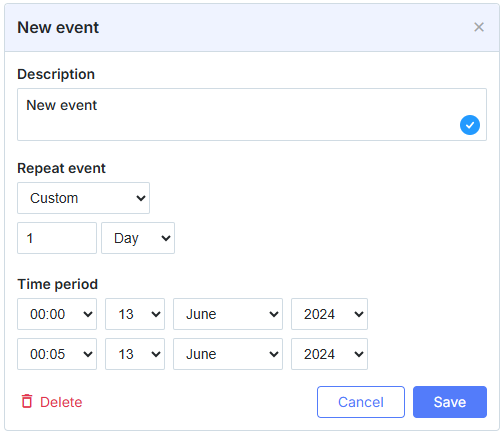
让我们来创建一个自定义重复块的示例。设想你想移除“monthly”和“yearly”重复类型,并为所有事件提供“无结束日期”的选项(即移除用于指定重复结束的区块)。
- 定义自定义表单的标记并将其放在页面的某处 (你可以从复制默认模板开始):
<!-- 注意:你需要为自定义重复表单指定 id  -->
<div class="dhx_form_rrule" id="my_recurring_form" style="display:none;">
    <div class="dhx_form_repeat_pattern">
        <select>
            <option value="NEVER">Never</option>
            <option value="DAILY">Every day</option>
            <option value="WEEKLY">Every week</option>
            <option value="WORKDAYS">Every weekday</option>
            <option value="CUSTOM">Custom</option>
        </select>
    </div>
    <div class="dhx_form_repeat_custom">
        <div class="dhx_form_repeat_custom_interval">
            <input name="repeat_interval_value" type="number" min="1"/>
            <select name="repeat_interval_unit">
                <option value="DAILY">Day</option>
                <option value="WEEKLY">Week</option>
            </select>
        </div>

        <div class="dhx_form_repeat_custom_additional">
            <div class="dhx_form_repeat_custom_week dhx_hidden">
                <label><input class="dhx_repeat_checkbox" type="checkbox"
                    name="week_day" value="MO" />Monday</label>
                <label><input class="dhx_repeat_checkbox" type="checkbox"
                    name="week_day" value="TU" />Tuesday</label>
                <label><input class="dhx_repeat_checkbox" type="checkbox"
                    name="week_day" value="WE" />Wednesday</label>
                <label><input class="dhx_repeat_checkbox" type="checkbox"
                    name="week_day" value="TH" />Thursday</label>
                <label><input class="dhx_repeat_checkbox" type="checkbox"
                    name="week_day" value="FR" />Friday</label>
                <label><input class="dhx_repeat_checkbox" type="checkbox"
                    name="week_day" value="SA" />Saturday</label>
                <label><input class="dhx_repeat_checkbox" type="checkbox"
                    name="week_day" value="SU" />Sunday</label>
            </div>
        </div>
    </div>
</div>
- 将“recurring”区段的 form 参数设置为你自定义表单的 id:
scheduler.config.lightbox.sections = [
    { name: "description", type: "textarea", map_to: "text", focus: true },
    { name: "recurring", type: "recurring", map_to: "rrule", form: "my_recurring_form" },
    { name: "time", type: "time", map_to: "auto", height: 72 }
];
含自定义重复块的弹出框如下图所示:
下方片段演示了如何实现上述具有自定义重复块的弹出框:
相关示例 Lightbox with a custom recurring block
更改重复块的注意事项
在开始为弹出框的重复块应用自定义配置之前,请注意以下事项:
- name 属性对所有输入都是硬编码的:具有不同名称的输入将被忽略。
- value 属性对所有输入都是固定的,除了那些需要直接输入的。
- 当你指定一个新表单时,Scheduler 不会直接使用它,而是将你的 HTML 结构复制到弹出框的模板中。这意味着通过代码附加到表单 DOM 元素的所有事件处理程序或自定义属性不会应用到弹出框中的表单上。如果你想附加事件处理程序,你需要将其作为内联 HTML 属性指定,或在弹出框显示时通过
addEventListener()为表单附加处理程序。
请注意,Scheduler 不会使用你原始的 HTML 表单,而是会在弹出框模板中创建它的副本。
例如:
- 以下行将被复制到弹出框中:
<input onclick="handler()"/>
- 下面这一行不会被复制到弹出框中:
node.addEventListener("click", () => {
    ...
});
自定义确认模态框
当用户编辑或拖动重复事件时,Scheduler 会显示一个内置模态框,询问是仅修改此发生、修改此及后续事件,还是修改整个序列。你可以通过覆盖 scheduler.ext.recurring.confirm 来用你自己的界面替换它。
scheduler.ext.recurring.confirm = (context) => {
    // context 包含:
    // - origin: "lightbox" | "dnd"
    // - occurrence: 发生事件对象
    // - series: 父级系列事件对象
    // - labels: { title, ok, cancel, occurrence, following, series }
    // - options: ["occurrence", "following", "series"]
    //
    // 返回其中之一:"occurrence"、"following"、"series" 或 null 以取消。
    // 也可以返回一个 Promise 以实现异步界面。

    return new Promise((resolve) => {
        myCustomDialog.show({
            title: context.labels.title,
            options: context.options,
            onSelect: (choice) => { resolve(choice); },
            onCancel: () => { resolve(null); }
        });
    });
};
context 对象具有以下属性:
| 属性 | 类型 | 描述 |
|---|---|---|
origin | "lightbox" | "dnd" | 动作是否来自弹出框还是拖放操作 |
occurrence | object | 正在编辑的具体发生对象 |
series | object | 父级重复事件 |
labels | object | 本地化字符串:title、ok、cancel、occurrence、following、series |
options | string[] | 可用选项,例如 ["occurrence", "following", "series"] |
该函数必须返回 "occurrence"、"following"、"series",或 null 以取消。也可以直接返回值,或作为 Promise 返回。
如需在 React 实现,请参阅 React Scheduler 文档。
旧版重复事件格式
直到 v7.1,Scheduler 使用自定义的重复事件格式,格式详情请参考 此处。