Select
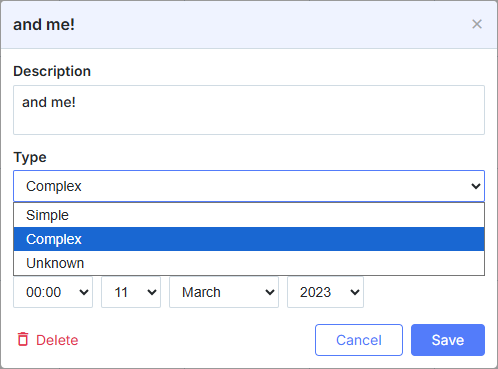
const alert_opts = [
    { key: 1, label: 'None' },
    { key: 2, label: 'On start date' },
    { key: 3, label: '1 day before' }
];

scheduler.locale.labels.section_select = 'Alert';

scheduler.config.lightbox.sections = [
    { name:"text", height:50, map_to:"text", type:"textarea", focus:true },
    { name:"select", height:40, map_to:"type", type:"select", options:alert_opts},
    { name:"time", height:72, type:"time", map_to:"auto"}
];
초기화
Select 컨트롤을 라이트박스에 추가하려면 아래 절차를 따르세요:
- 라이트박스 구성에 섹션을 추가:
scheduler.config.lightbox.sections = [
    { name:"description", ... },
    { name:"alert", height:40,map_to:"type",type:"select", options:alert_opts},
    { name:"time", ...}
];
- 섹션의 레이블 설정:
scheduler.locale.labels.section_select = "Alert";
속성
다음 속성들은 주로 'select' 컨트롤에 대해 중요하고 일반적으로 설정됩니다(전체 목록은 여기를 참조):
| name | (문자열) 섹션의 이름 |
| height | (숫자) 섹션의 높이 |
| map_to | (문자열) 섹션에 매핑될 데이터 속성의 이름 |
| type | (textarea,time,select,template,multiselect,radio,checkbox,combo) 섹션 컨트롤의 유형 |
| options | (객체 배열) 컨트롤의 선택 옵션을 정의합니다 (select, multiselect, radio, combo 컨트롤에 해당). 배열의 각 객체는 하나의 옵션을 지정하며 다음 속성을 갖습니다:
|
| onchange | (함수) 섹션 컨트롤의 'onchange' 이벤트 핸들러 함수를 지정합니다 Linking select controls in the lightbox |
데이터로 컨트롤 채우기
일반적으로 Select 컨트롤의 값을 설정하려면 options 매개변수를 사용해야 합니다:
scheduler.config.lightbox.sections = [
    {      name:"alert", type:"select",
        ...
        options:[
            { key: 1, label: 'None'},
            { key: 2, label: 'On start date'},
            { key: 3, label: '1 day before'}
    ]},
    ...
];
options 매개변수의 항목은 2개의 필수 속성을 가져야 합니다:
- key - 옵션의 아이디
- label - 옵션의 레이블
동적으로 옵션 변경
서버에서 컨트롤의 옵션을 채우려면 options 옵션을 serverList 메서드가 반환하는 값으로 설정하세요:
scheduler.config.lightbox.sections = [
    {name:"description", ...},
    {name:"type",map_to:"type",type:"select",options:scheduler.serverList("type")},
    {name:"time", ...}
];

scheduler.load("/api/types");
노트
The details on the serverList method are given in the related article.
load 메서드의 데이터 응답은 JSON 형식으로 서버 목록 이름이 지정된 컬렉션을 포함해야 합니다 다음 형식의 예시를 참조:
{
   "data":[
      {
          "id":"1",
          "start_date":"2027-03-02 15:00:00",
          "end_date":"2027-03-04 16:00:00",
          "text":"Interview",
          "type":"1"
      },
      {
          "id":"2",
          "start_date":"2027-03-02 17:00:00",
          "end_date":"2027-03-04 18:00:00",
          "text":"Performance review",
          "type":"2"
      }
   ],
   "collections": {/*!*/
      "type":[/*!*/
         {"value":"1","label":"Interview"},/*!*/
         {"value":"2","label":"Performance review"},/*!*/
         {"value":"3","label":"Request"}/*!*/
      ]/*!*/
   }/*!*/
}
The parse 메서드는 초기화 이후 옵션을 불러와야 하는 경우에도 사용할 수 있습니다.
지정된 옵션을 새 값으로 업데이트해야 하는 경우에는 updateCollection 메서드를 사용할 수 있습니다:
scheduler.updateCollection("type", [
    {"key":"1","label":"Interview"},
    {"key":"2","label":"Performance review"},
    {"key":"3","label":"Request"}
]);
자세한 내용은 scheduler.serverList 문서를 참고하십시오.
Need help?
Got a question about the documentation? Reach out to our technical support team for help and guidance. For custom component solutions, visit the Services page.