Combo(组合框)
一个通过 DHTMLX Combo 组件 提供的组合框。
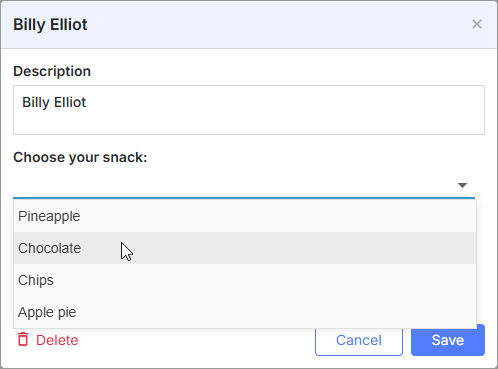
const holders = [
    { key: 1, label: 'James' },
    { key: 2, label: 'Alex' },
    { key: 3, label: 'Antony' },
    { key: 4, label: 'Andrew' }
];

scheduler.locale.labels.section_holder = "Holder";

scheduler.config.lightbox.sections = [
    { name:"description", height:50, map_to:"text", type:"textarea", focus:true },
    { name:"holders", options:holders, map_to:"holders", type:"combo",
    image_path:"../common/dhtmlxCombo/imgs/", height:30, filtering:true},
    { name:"time", height:72, type:"time", map_to:"auto"}
];
初始化
要将 Combo 控件添加到 lightbox,请按照下列步骤操作:
- 包含 dhtmlxCombo 文件:
<script src="../codebase/dhtmlxscheduler.js" ...></script>
<link rel="stylesheet" href="../codebase/dhtmlxscheduler.css" ...>

<link rel="stylesheet" href="common/dhtmlxCombo/dhtmlxcombo.css" ..>
<script src="common/dhtmlxCombo/dhtmlxcombo.js" ...></script>
- 在页面上激活 editors 扩展:
scheduler.plugins({
    editors: true
});
- 将该段添加到 lightbox 配置中:
scheduler.config.lightbox.sections = [
    { name:"description", ... },
    { name:"holders", options:holders, map_to:"holders", type:"combo",
    image_path:"../common/dhtmlxCombo/imgs/", height:30, filtering:true},
    { name:"time", ...}
];
- 为该段设置标签:
scheduler.locale.labels.section_holders = "Holder";
属性
以下属性对“combo”控件来说最为重要且常用(完整列表请参见 此处):
| name | (string) 该段的名称 |
| height | (number) 该段的高度 |
| map_to | (string) 将映射到该段的数据属性名称 |
| type | (textarea,time,select,template,multiselect,radio,checkbox,combo) 该段控件的类型 |
| options | (array of objects) 定义控件的选项(对 'select', 'multiselect', 'radio', 'combo' 控件有效)。数组中的每个对象定义一个选项,并包含以下属性:
|
| image_path | (string) dhtmlxCombo 图像的路径 |
| filtering | (boolean, string) 启用自动筛选功能(输入时将过滤选项)。可选值如下:
|
| script_path | (string) 指向服务器端脚本的路径,该脚本将从服务器提供加载控件选项。可选 |
| cache | (boolean) 启用/禁用脚本响应的缓存(推荐开启该属性)。可选 |
使用数据填充控件
一般而言,要为 Combo 控件设置值,应使用 options 参数:
scheduler.config.lightbox.sections =
    {
        name:"holders", type:"combo",
        ...
        options:[
            { key: 1, label: 'James' },
            { key: 2, label: 'Alex' },
            { key: 3, label: 'Antony' },
            { key: 4, label: 'Andrew' }
    ]},
    ...
];
在 options 参数中的项必须具备两个必需属性:
- key - 选项的 id
- label - 选项的标签
从服务器填充控件数据
要从服务器填充 Combo 控件,请使用 script_path 属性,指定将处理服务器请求的服务器端脚本的路径。
scheduler.config.lightbox.sections = [
    { name: "country", type: "combo", script_path: "data/combo_select", ... },
        ...
];
script_path 属性指定从中加载选项的 URL,即若指定了 script_path,Combo 将通过 AJAX 从该 URL 加载数据。
Combo 选择器基于 dhtmlxCombo,因此服务器应返回与之兼容的数据。有关向组合框添加数据的方式,请参阅文章 Loading Options。
该 URL 的请求分为两种情况:
- 打开 lightbox 时,Combo 有选定值 — 控件向服务器发送请求并加载所选选项的标签。
请求将包含一个 id 查询参数:
GET /url?id="1"
响应应返回仅包含指定 id 的项的数组,格式如下:
[
   { "value": 1, "text": "Marketing"}
]
- 用户在下拉框输入文本时 — 控件加载筛选后的值。
客户端将发送带有输入文本的 mask 参数的请求:
GET /url?mask="al"
服务器的响应应返回所有与 mask 值匹配的项:
[
   { "value": 1, "text": "Albania"},
   { "value": 3, "text": "Algeria"},
]
示例后端处理程序(Node.js/Express):
app.get("/api/countries", async (req, res) => {
  const { id, mask } = req.query;
  // 通过 id 或 mask 查询数据源
  const items = await countriesService.find({ id, mask });
  res.json(items); // [{ value: 1, text: "Albania" }, ...]
});
自动筛选模式
自动筛选模式是在用户输入时自动过滤选项的模式。要启用该模式,请将 filtering 属性设置为 true:
scheduler.config.lightbox.sections = [
    { name:"holders", type:"combo", filtering:true, ... },
    ...
];
注释
请注意,无论数据来自何处(客户端还是服务器端),均可使用自动筛选模式。
更多相关信息请参阅 dhtmlxCombo 文档 dhtmlxCombo. Filtering 。
Need help?
Got a question about the documentation? Reach out to our technical support team for help and guidance. For custom component solutions, visit the Services page.