Template
Контейнер с некоторым HTML‑контентом внутри.
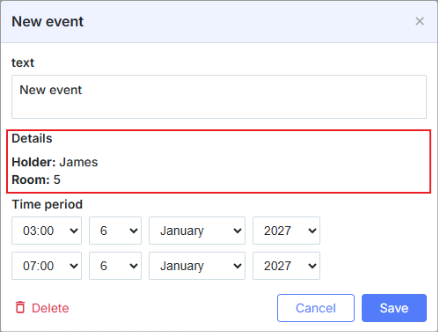
scheduler.locale.labels.section_template = 'Details';// задаёт название секции

scheduler.config.lightbox.sections = [
    { name:"text", height:50, map_to:"text", type:"textarea", focus:true},
    { name:"template", height: 40, type:"template", map_to:"my_template"},
    { name:"time", height:72, type:"time", map_to:"auto"}
];
scheduler.attachEvent("onEventCreated", function(id, e) {
    const ev = scheduler.getEvent(id);
    ev.my_template = "<b>Holder:</b>"+ ev.holder+"

<b>Room:</b>"+ ev.room;
});
Инициализация
Чтобы добавить управление Template в lightbox, выполните следующие шаги:
- Добавьте секцию в конфигурацию lightbox:
scheduler.config.lightbox.sections = [
    { name:"text", ... },
       { name:"template", height: 40, type:"template", map_to:"my_template"},
    { name:"time", ...}
];
- Установите метку для секции:
scheduler.locale.labels.section_template = 'Details';
- Установите содержимое управления с помощью какого-либо события, например события onBeforeLightbox:
scheduler.attachEvent("onBeforeLightbox", function(id) {
    const ev = scheduler.getEvent(id);
    ev.my_template = "<b>Holder:</b>"+ ev.holder+"

<b>Room:</b>"+ ev.room;
    return true;
});
Свойства
Следующие свойства в основном важны и обычно устанавливаются для управления 'template' (см. полный список здесь здесь):
| имя | (string) имя секции |
| высота | (number) высота секции |
| map_to | (string) имя свойства данных, которое будет сопоставлено с секцией |
| type | (textarea,time,select,template,multiselect,radio,checkbox,combo) тип элемента управления секции |
Need help?
Got a question about the documentation? Reach out to our technical support team for help and guidance. For custom component solutions, visit the Services page.